

1. บทนำ
นโยบายไฟร์วอลล์เครือข่าย
ไฟร์วอลล์เป็นองค์ประกอบพื้นฐานสำหรับสภาพแวดล้อมระบบคลาวด์ที่ปลอดภัย ก่อนหน้านี้เราได้เปิดตัวนโยบายไฟร์วอลล์ที่ระดับองค์กรและโฟลเดอร์ โดยที่ไฟร์วอลล์ VPC ไม่มีการเปลี่ยนแปลง ในเวอร์ชันนี้ เราจะขยายโครงสร้างนโยบายไฟร์วอลล์ลงไปถึงระดับ VPC และทำการปรับปรุงหลายอย่างในการรองรับนโยบายไฟร์วอลล์ปัจจุบัน เพื่อให้การรองรับไฟร์วอลล์แบบรวมในลำดับชั้นทรัพยากรของ Google Cloud และประสบการณ์ของผู้ใช้ที่สอดคล้องกันในการจัดการการควบคุมนโยบายไฟร์วอลล์ด้วยวิธีที่ปลอดภัย ยืดหยุ่น และรองรับการปรับขนาดได้
นโยบายไฟร์วอลล์เครือข่ายทำหน้าที่เป็นคอนเทนเนอร์สำหรับกฎไฟร์วอลล์ กฎที่กำหนดไว้ในนโยบายไฟร์วอลล์เครือข่ายจะไม่มีผลที่ใดจนกว่าจะมีการเชื่อมโยงนโยบายกับเครือข่าย VPC เครือข่าย VPC แต่ละเครือข่ายสามารถมีนโยบายไฟร์วอลล์เครือข่ายที่เชื่อมโยงได้ 1 รายการ นโยบายไฟร์วอลล์เครือข่ายรองรับแท็กที่ควบคุมโดย IAM (หรือเพียงแค่แท็ก) ในกฎไฟร์วอลล์ ซึ่งจะแทนที่แท็กเครือข่ายปัจจุบันและใช้เพื่อระบุตัวตนให้กับภาระงานได้
การแชร์นโยบายไฟร์วอลล์เครือข่ายในเครือข่ายต่างๆ และการผสานรวมกับแท็กที่ควบคุมโดย IAM จะช่วยลดความซับซ้อนในการกำหนดค่าและการจัดการไฟร์วอลล์ได้อย่างมาก
เมื่อเปิดตัวนโยบายไฟร์วอลล์เครือข่าย นโยบายไฟร์วอลล์ของ Google Cloud จึงประกอบด้วยคอมโพเนนต์ต่อไปนี้
- นโยบายไฟร์วอลล์แบบลำดับชั้น
- กฎไฟร์วอลล์ VPC
- นโยบายไฟร์วอลล์เครือข่าย ( ส่วนกลางและระดับภูมิภาค)
ระบบรองรับนโยบายไฟร์วอลล์แบบลำดับชั้นที่โหนดองค์กรและโฟลเดอร์ภายในลำดับชั้นทรัพยากร ในขณะที่กฎไฟร์วอลล์ VPC และนโยบายไฟร์วอลล์เครือข่ายจะใช้ในระดับ VPC ความแตกต่างที่สำคัญระหว่างกฎไฟร์วอลล์ VPC กับนโยบายไฟร์วอลล์เครือข่ายคือ กฎไฟร์วอลล์ VPC ใช้ได้กับเครือข่าย VPC เดียวเท่านั้น ในขณะที่นโยบายไฟร์วอลล์เครือข่ายสามารถแนบกับ VPC เดียวหรือกลุ่ม VPC ได้ นอกเหนือจากประโยชน์อื่นๆ เช่น การอัปเดตเป็นกลุ่ม
สุดท้ายนี้ เรายังมีกฎไฟร์วอลล์โดยนัยที่มาพร้อมกับเครือข่าย VPC ทุกเครือข่ายด้วย
- กฎขาออกที่มีการดำเนินการเป็นอนุญาต ปลายทางเป็น 0.0.0.0/0
- กฎขาเข้าที่มีการดำเนินการเป็นปฏิเสธและแหล่งที่มาเป็น 0.0.0.0/0
โดยค่าเริ่มต้น ลำดับการบังคับใช้จะแสดงในแผนภาพต่อไปนี้
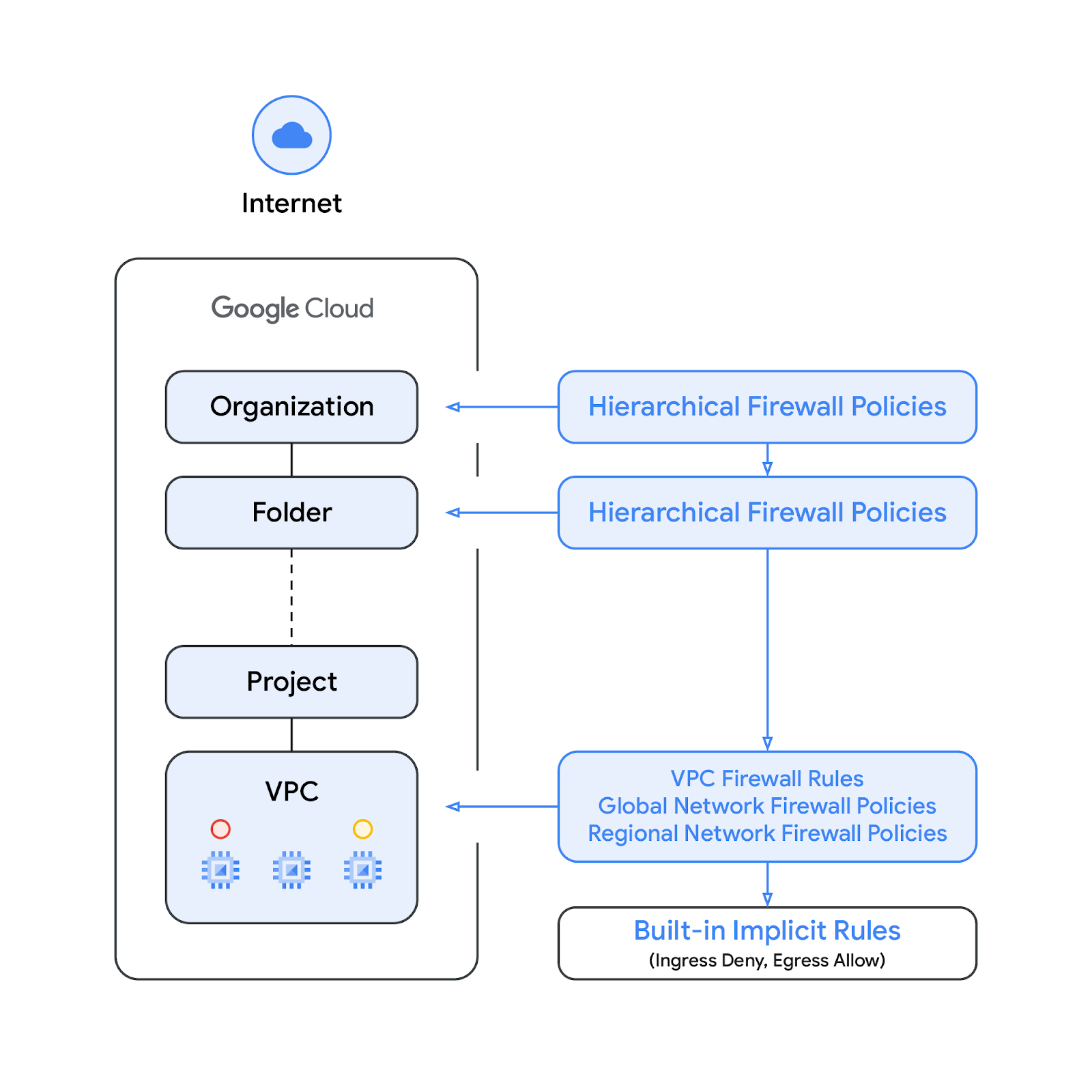
โปรดทราบว่าสามารถสลับลำดับการบังคับใช้ระหว่างกฎไฟร์วอลล์ VPC กับนโยบายไฟร์วอลล์เครือข่ายส่วนกลางได้ ลูกค้าสามารถระบุลำดับการบังคับใช้ได้ทุกเมื่อด้วยคำสั่ง gcloud
แท็ก
แท็กใหม่ที่ผสานรวมในกฎนโยบายไฟร์วอลล์เครือข่ายคือทรัพยากรคู่คีย์-ค่าที่กำหนดไว้ที่ระดับองค์กรของลำดับชั้นทรัพยากร Google Cloud แท็กดังกล่าวมีการควบคุมการเข้าถึง IAM ตามชื่อที่ระบุว่าใครทำอะไรในแท็กได้บ้าง เช่น สิทธิ์ IAM ช่วยให้ระบุได้ว่าผู้รับสิทธิ์รายใดสามารถกำหนดค่าให้กับแท็ก และผู้รับสิทธิ์รายใดสามารถแนบแท็กกับทรัพยากรได้ เมื่อใช้แท็กกับทรัพยากรแล้ว กฎไฟร์วอลล์เครือข่ายจะใช้แท็กดังกล่าวเพื่ออนุญาตและปฏิเสธการรับส่งข้อมูลได้
แท็กเป็นไปตามโมเดลทรัพยากรการรับช่วงของ Google Cloud ซึ่งหมายความว่าระบบจะส่งแท็กและค่าของแท็กลงในลําดับชั้นจากระดับบน ด้วยเหตุนี้ ระบบจึงอาจสร้างแท็กในที่เดียว แล้วโฟลเดอร์และโปรเจ็กต์อื่นๆ จะใช้แท็กนั้นได้ทั่วทั้งลำดับชั้นของทรัพยากร ดูรายละเอียดเพิ่มเติมเกี่ยวกับแท็กและการจำกัดการเข้าถึงได้ที่หน้านี้
อย่าสับสนระหว่างแท็กกับแท็กเครือข่าย โดยแท็กเครือข่ายเป็นสตริงที่เพิ่มลงในอินสแตนซ์ Compute Engine ได้ ซึ่งเชื่อมโยงกับอินสแตนซ์และจะหายไปเมื่อเลิกใช้งานอินสแตนซ์ กฎไฟร์วอลล์ VPC อาจมีแท็กเครือข่าย แต่เนื่องจากไม่ได้ถือว่าเป็นทรัพยากรระบบคลาวด์ จึงไม่อยู่ภายใต้การควบคุมการเข้าถึง IAM
โปรดทราบว่าเอกสารนี้ใช้แท็กและแท็กที่ควบคุมโดย IAM สลับกัน
สิ่งที่คุณจะสร้าง
Codelab นี้มี 2 ส่วน โดยส่วนแรกจะสาธิตนโยบายไฟร์วอลล์เครือข่ายและแท็กโดยใช้เครือข่าย VPC เดียว ส่วนที่ 2 จะแสดงวิธีใช้แท็กในเครือข่าย VPC ที่เพียร์กันตามแผนภาพด้านล่าง ดังนั้น Codelab นี้จึงต้องใช้โปรเจ็กต์เดียวและมีความสามารถในการสร้างเครือข่าย VPC หลายรายการ

สิ่งที่คุณจะได้เรียนรู้
- วิธีสร้างนโยบายไฟร์วอลล์เครือข่าย
- วิธีสร้างและใช้แท็กกับนโยบายไฟร์วอลล์เครือข่าย
- วิธีใช้แท็กผ่านการเพียร์เครือข่าย VPC
สิ่งที่คุณต้องมี
- โปรเจ็กต์ Google Cloud
- ความรู้เกี่ยวกับการติดตั้งใช้งานอินสแตนซ์และการกำหนดค่าคอมโพเนนต์เครือข่าย
- ความรู้เกี่ยวกับการกำหนดค่าไฟร์วอลล์ VPC
2. ก่อนเริ่มต้น
สร้าง/อัปเดตตัวแปร
Codelab นี้ใช้ $variables เพื่อช่วยในการติดตั้งใช้งานการกำหนดค่า gcloud ใน Cloud Shell
ใน Cloud Shell ให้ทำดังนี้
gcloud config set project [project-id]
export project_id=`gcloud config list --format="value(core.project)"`
export org_id=[org]
export region=us-central1
export zone=us-central1-a
export prefix=fwpolicy
3. สร้างเครือข่าย VPC และซับเน็ต
เครือข่าย VPC
สร้าง fwpolicy-vpc1:
gcloud compute networks create $prefix-vpc1 --subnet-mode=custom
ซับเน็ต
สร้างซับเน็ตที่เกี่ยวข้องในภูมิภาคที่เลือก
gcloud compute networks subnets create $prefix-vpc1-subnet \
   --range=10.0.0.0/24 --network=$prefix-vpc1 --region=$region
Cloud NAT
สร้าง Cloud Router และเกตเวย์ Cloud NAT สำหรับ fwpolicy-pc1:
gcloud compute routers create $prefix-vpc1-cr \
  --region=$region --network=$prefix-vpc1

gcloud compute routers nats create $prefix-vpc1-cloudnat \
   --router=$prefix-vpc1-cr --router-region=$region \
   --auto-allocate-nat-external-ips \
   --nat-all-subnet-ip-ranges
4. สร้างอินสแตนซ์
สร้างกฎไฟร์วอลล์ที่อนุญาตการรับส่งข้อมูล SSH ขาเข้าจากช่วง IAP ในกรณีที่ยังไม่ได้กำหนดเป็นส่วนหนึ่งของการตั้งค่า IAP
gcloud compute firewall-rules create allow-ssh-ingress-from-iap-vpc1 \
  --direction=INGRESS \
  --action=allow \
  --network=$prefix-vpc1 \
  --rules=tcp:22 \
  --source-ranges=35.235.240.0/20
สร้างอินสแตนซ์ไคลเอ็นต์และเว็บเซิร์ฟเวอร์ fwpolicy-vpc1 โดยทำดังนี้
gcloud compute instances create $prefix-vpc1-www \
   --subnet=$prefix-vpc1-subnet --no-address --zone $zone \
   --metadata startup-script='#! /bin/bash
apt-get update
apt-get install apache2 -y
a2ensite default-ssl
a2enmod ssl
# Read VM network configuration:
md_vm="http://169.254.169.254/computeMetadata/v1/instance/"
vm_hostname="$(curl $md_vm/name -H "Metadata-Flavor:Google" )"
filter="{print \$NF}"
vm_network="$(curl $md_vm/network-interfaces/0/network \
-H "Metadata-Flavor:Google" | awk -F/ "${filter}")"
vm_zone="$(curl $md_vm/zone \
-H "Metadata-Flavor:Google" | awk -F/ "${filter}")"
# Apache configuration:
echo "Page on $vm_hostname in network $vm_network zone $vm_zone" | \
tee /var/www/html/index.html
systemctl restart apache2'

gcloud compute instances create $prefix-vpc1-client \
    --subnet=$prefix-vpc1-subnet --no-address --zone $zone
เนื่องจากไม่มีการกำหนดกฎไฟร์วอลล์ VPC (นอกเหนือจากกฎอนุญาต SSH ที่ควรสร้างขึ้นเมื่อกำหนดค่า IAP ตามที่ระบุไว้ตอนต้นของส่วนนี้) และโดยค่าเริ่มต้น ระบบจะปฏิเสธการรับส่งข้อมูลขาเข้าทั้งหมด อินสแตนซ์ไคลเอ็นต์จึงจะเข้าถึงเว็บเซิร์ฟเวอร์ที่เกี่ยวข้องไม่ได้ หากต้องการยืนยันว่าคำขอจะหมดเวลา ให้เปิดหน้าต่างใหม่และเริ่มเซสชัน SSH ไปยังอินสแตนซ์ fwpolicy-vpc1-client แล้วลองใช้คำสั่ง curl กับเว็บเซิร์ฟเวอร์
user@fwpolicy-vpc1-client$ curl fwpolicy-vpc1-www --connect-timeout 2
ผลลัพธ์ที่คาดไว้
curl: (28) Connection timed out after 2001 milliseconds
ไม่บังคับ: ตรวจสอบว่าไม่มีกฎไฟร์วอลล์ VPC ที่กำหนดไว้สำหรับ fwpolicy-vpc1 ผ่าน Cloud Shell โดยทำดังนี้
gcloud compute firewall-rules list --filter="network:$prefix-vpc1"
5. นโยบายไฟร์วอลล์เครือข่ายส่วนกลาง
สร้างนโยบายไฟร์วอลล์เครือข่ายส่วนกลาง
gcloud compute network-firewall-policies create \
   $prefix-example --description \
   "firewall-policy-description" --global
เพิ่มกฎที่อนุญาตการเข้าชมเว็บ
gcloud compute network-firewall-policies rules create 500 \
    --action allow \
    --description "allow-web" \
    --layer4-configs tcp:80,tcp:443 \
    --firewall-policy $prefix-example \
    --src-ip-ranges 10.0.0.0/16 \
    --global-firewall-policy --enable-logging
อธิบายนโยบายไฟร์วอลล์เครือข่ายและยืนยันว่ากฎaddedทำงานสำเร็จ
gcloud compute network-firewall-policies describe \
    $prefix-example --global
เอาต์พุตที่คาดไว้ (เลื่อนขึ้นไปที่จุดเริ่มต้นของเอาต์พุต โปรดทราบว่ากฎโดยนัยจะแสดงด้วย)
creationTimestamp: '2022-09-23T12:46:53.677-07:00'
description: "firewall-policy-description"
fingerprint: Np1Rup09Amc=
id: '7021772628738421698'
kind: compute#firewallPolicy
name: fwpolicy-example
ruleTupleCount: 13
rules:
- action: allow
  description: allow-web
  direction: INGRESS
  disabled: false
  enableLogging: true
  kind: compute#firewallPolicyRule
  match:
    layer4Configs:
    - ipProtocol: tcp
      ports:
      - '80'
    - ipProtocol: tcp
      ports:
      - '443'
    srcIpRanges:
    - 10.0.0.0/16
  priority: 500
  ruleTupleCount: 5
...
เชื่อมโยงนโยบายไฟร์วอลล์เครือข่ายกับ fwpolicy-vpc1
gcloud compute network-firewall-policies associations create \
     --firewall-policy $prefix-example \
     --network $prefix-vpc1 \
     --name $prefix-vpc1-association \
     --global-firewall-policy
ตรวจสอบว่าได้ใช้กับเครือข่าย fwpolicy-vpc1 เรียบร้อยแล้ว
gcloud compute networks get-effective-firewalls $prefix-vpc1
เอาต์พุตที่คาดไว้ (โปรดทราบว่าหากมีนโยบายไฟร์วอลล์แบบลำดับชั้นที่มีลำดับความสำคัญสูงกว่า กฎที่เกี่ยวข้องจะแสดงที่ด้านบน)
TYPE                     FIREWALL_POLICY_NAME     PRIORITY    ACTION     DIRECTION  IP_RANGES
network-firewall-policy  fwpolicy-example      500         ALLOW      INGRESS    10.0.0.0/16
network-firewall-policy  fwpolicy-example      2147483645  GOTO_NEXT  INGRESS    ::/0
network-firewall-policy  fwpolicy-example      2147483647  GOTO_NEXT  INGRESS    0.0.0.0/0
network-firewall-policy  fwpolicy-example      2147483644  GOTO_NEXT  EGRESS     ::/0
network-firewall-policy  fwpolicy-example      2147483646  GOTO_NEXT  EGRESS     0.0.0.0/0
ตรวจสอบว่าได้ใช้กับเว็บเซิร์ฟเวอร์ fwpolicy-vpc1 เรียบร้อยแล้ว
gcloud compute instances network-interfaces \
   get-effective-firewalls $prefix-vpc1-www --zone $zone
เอาต์พุตที่คาดไว้จะคล้ายกับคำสั่งก่อนหน้า (ไฟร์วอลล์ที่มีผลfwpolicy-vpc1):
TYPE                     FIREWALL_POLICY_NAME     PRIORITY    ACTION     DIRECTION  IP_RANGES
network-firewall-policy  fwpolicy-example      500         ALLOW      INGRESS    10.0.0.0/16
network-firewall-policy  fwpolicy-example      2147483645  GOTO_NEXT  INGRESS    ::/0
network-firewall-policy  fwpolicy-example      2147483647  GOTO_NEXT  INGRESS    0.0.0.0/0
network-firewall-policy  fwpolicy-example      2147483644  GOTO_NEXT  EGRESS     ::/0
network-firewall-policy  fwpolicy-example      2147483646  GOTO_NEXT  EGRESS     0.0.0.0/0
กลับไปที่เซสชัน SSH ของ vpc1-client แล้วลองใช้ curl อีกครั้ง (โปรดทราบว่าคำสั่งด้านล่างนี้ถือว่าใช้ fwpolicy เป็นคำนำหน้า โปรดปรับคำสั่ง curl ตามนั้นหากใช้ชื่ออื่นแทน)
user@vpc1-client$ curl fwpolicy-vpc1-www --connect-timeout 2
Page on vpc1-www in network vpc1 zone us-central1-a
จาก Cloud Shell ให้ตรวจสอบว่าได้ใช้นโยบายไฟร์วอลล์เครือข่ายกับ fwpolicy-vpc1 แล้ว
gcloud compute network-firewall-policies describe \
   $prefix-example --global
ผลลัพธ์ที่คาดหวัง (เลื่อนขึ้นไปที่จุดเริ่มต้นของเอาต์พุต)
---
associations:
- attachmentTarget: https://www.googleapis.com/compute/v1/projects/PROJECT_ID/global/networks/fwpolicy-vpc1
  name: fwpolicy-vpc1-association
...
6. แท็กที่ควบคุมโดย IAM
แท็กคือคู่คีย์-ค่าที่ต่อเชื่อมกับองค์กร โฟลเดอร์ หรือโปรเจ็กต์ได้ ดูรายละเอียดเพิ่มเติมได้ที่การสร้างและการจัดการแท็กและสิทธิ์ที่จำเป็น
บทบาท tagAdmin ช่วยให้คุณสร้างแท็กใหม่ อัปเดต และลบแท็กที่มีอยู่ได้ ผู้ดูแลระบบองค์กรสามารถให้บทบาทนี้ได้ จาก Cloud Shell ให้อัปเดตนโยบาย IAM เพื่อเพิ่มบทบาท tagAdmin ให้กับผู้ใช้ ใช้หน้าแหล่งอ้างอิงของสิทธิ์เพื่อดูว่าสิทธิ์ใดบ้างที่รวมอยู่ในแต่ละบทบาทที่กำหนดไว้ล่วงหน้า
gcloud organizations add-iam-policy-binding $org_id \
  --member user:[user@example.com] --role roles/resourcemanager.tagAdmin
เรียกใช้คำสั่งด้านล่างเพื่อยืนยันว่าผู้ใช้ใดมีบทบาท resourcemanager.tagAdmin
gcloud organizations get-iam-policy $org_id --flatten=bindings \
  --filter=bindings.role:roles/resourcemanager.tagAdmin
สร้างคีย์แท็กใหม่
gcloud resource-manager tags keys create tags-vpc1 \
   --parent organizations/$org_id \
   --purpose GCE_FIREWALL \
   --purpose-data network=$project_id/$prefix-vpc1
ผลลัพธ์ที่คาดไว้
Waiting for TagKey [tags-vpc1] to be created...done.
createTime: '2022-09-23T20:49:01.162228Z'
etag: PwvmFuHO4wK1y6c5Ut2n5w==
name: tagKeys/622132302133
namespacedName: ORGANIZATION_ID/tags-vpc1
parent: organizations/ORGANIZATION_ID
purpose: GCE_FIREWALL
purposeData:
  network: https://www.googleapis.com/compute/v1/projects/PROJECT_ID/global/networks/6749205358365096383
shortName: tags-vpc1
updateTime: '2022-09-23T20:49:03.873776Z'
สร้างค่าแท็กใหม่
gcloud resource-manager tags values create web-servers \
   --parent=$org_id/tags-vpc1

gcloud resource-manager tags values create web-clients \
   --parent=$org_id/tags-vpc1
ตรวจสอบว่าสร้างค่าแท็กสําเร็จแล้ว
gcloud resource-manager tags values list \
   --parent=$org_id/tags-vpc1
ผลลัพธ์ที่คาดไว้
NAME                    SHORT_NAME   DESCRIPTION
tagValues/349564376683  web-servers
tagValues/780363571446  web-clients
จาก Cloud Shell ให้ใช้คำสั่ง describe กับกฎนโยบายไฟร์วอลล์เครือข่ายที่มีอยู่เพื่อยืนยันว่าไม่ได้ใช้แท็ก
gcloud compute network-firewall-policies rules describe 500 \
    --firewall-policy $prefix-example \
    --global-firewall-policy
ผลลัพธ์ที่คาดไว้
---
action: allow
description: allow-web
direction: INGRESS
disabled: false
enableLogging: true
kind: compute#firewallPolicyRule
match:
  layer4Configs:
  - ipProtocol: tcp
    ports:
    - '80'
  - ipProtocol: tcp
    ports:
    - '443'
  srcIpRanges:
  - 10.0.0.0/16
priority: 500
ruleTupleCount: 5
จาก Cloud Shell ให้อัปเดตกฎเพื่ออนุญาตเฉพาะการรับส่งข้อมูลจากคีย์แท็ก vpc1-tags/web-clients และติดตั้งกฎในอินสแตนซ์ที่มีคีย์แท็ก vpc1-tags/web-servers
gcloud compute network-firewall-policies rules update 500 \
    --firewall-policy $prefix-example \
    --src-secure-tags $org_id/tags-vpc1/web-clients \
    --target-secure-tags $org_id/tags-vpc1/web-servers \
    --global-firewall-policy
จาก Cloud Shell ให้อธิบายกฎนโยบายไฟร์วอลล์เครือข่ายที่มีอยู่เพื่อยืนยันว่าได้ใช้แท็กเรียบร้อยแล้วและรายงานเป็น EFFECTIVE
gcloud compute network-firewall-policies rules describe 500 \
    --firewall-policy $prefix-example \
    --global-firewall-policy
ผลลัพธ์ที่คาดไว้
---
action: allow
description: allow-web
direction: INGRESS
disabled: false
enableLogging: false
kind: compute#firewallPolicyRule
match:
  layer4Configs:
  - ipProtocol: tcp
    ports:
    - '80'
  - ipProtocol: tcp
    ports:
    - '443'
  srcIpRanges:
  - 10.0.0.0/16
  srcSecureTags:
  - name: tagValues/479619031616
    state: EFFECTIVE
priority: 500
ruleTupleCount: 7
targetSecureTags:
- name: tagValues/230424970229
  state: EFFECTIVE
จาก Cloud Shell ให้ตรวจสอบว่าได้ใช้กฎกับ vpc1 แล้ว
gcloud compute networks get-effective-firewalls $prefix-vpc1
ผลลัพธ์ที่คาดไว้
network-firewall-policy  fwpolicy-example      500         ALLOW      INGRESS    10.0.0.0/16
network-firewall-policy  fwpolicy-example      2147483645  GOTO_NEXT  INGRESS    ::/0
network-firewall-policy  fwpolicy-example      2147483647  GOTO_NEXT  INGRESS    0.0.0.0/0
network-firewall-policy  fwpolicy-example      2147483644  GOTO_NEXT  EGRESS     ::/0
network-firewall-policy  fwpolicy-example      2147483646  GOTO_NEXT  EGRESS     0.0.0.0/0
ตรวจสอบว่าแม้ว่านโยบายไฟร์วอลล์ของเครือข่ายจะยังเชื่อมโยงกับเครือข่าย VPC แต่ระบบจะไม่ใช้กฎที่อนุญาตการรับส่งข้อมูลบนเว็บกับเว็บเซิร์ฟเวอร์อีกต่อไป เนื่องจากไม่ได้เพิ่มแท็กลงในอินสแตนซ์
gcloud compute instances network-interfaces \
   get-effective-firewalls $prefix-vpc1-www --zone $zone
เอาต์พุตที่คาดไว้ (โปรดทราบว่ากฎไฟร์วอลล์ที่มีลำดับความสำคัญ 500 จะไม่แสดง)
network-firewall-policy  fwpolicy-example      2147483645  GOTO_NEXT  INGRESS    ::/0
network-firewall-policy  fwpolicy-example      2147483647  GOTO_NEXT  INGRESS    0.0.0.0/0
network-firewall-policy  fwpolicy-example      2147483644  GOTO_NEXT  EGRESS     ::/0
network-firewall-policy  fwpolicy-example      2147483646  GOTO_NEXT  EGRESS     0.0.0.0/0
ให้บทบาทผู้ใช้แท็กแก่แท็กและผู้ใช้ที่เฉพาะเจาะจง ใช้หน้าแหล่งอ้างอิงของสิทธิ์เพื่อดูว่าสิทธิ์ใดบ้างที่รวมอยู่ในแต่ละบทบาทที่กำหนดไว้ล่วงหน้า
gcloud resource-manager tags keys add-iam-policy-binding \
  $org_id/tags-vpc1 \
  --member user:[email] --role roles/resourcemanager.tagUser

gcloud projects add-iam-policy-binding $project_id \
  --member user:[email] --role roles/resourcemanager.tagUser
ตรวจสอบว่าเพิ่มบทบาทสำเร็จแล้ว
gcloud resource-manager tags keys get-iam-policy $org_id/tags-vpc1

gcloud projects get-iam-policy $project_id --flatten=bindings \
   --filter=bindings.role:roles/resourcemanager.tagUser
ผลลัพธ์ที่คาดไว้
bindings:
- members:
  - user:[user]
  role: roles/resourcemanager.tagUser
...
ใช้แท็กกับอินสแตนซ์ fwpolicy-vpc1-www โดยทำดังนี้
gcloud resource-manager tags bindings create \
  --location $zone \
  --tag-value $org_id/tags-vpc1/web-servers \
  --parent \
//compute.googleapis.com/projects/$project_id/zones/$zone/instances/$prefix-vpc1-www
ผลลัพธ์ที่คาดไว้
Waiting for TagBinding for parent [//compute.googleapis.com/projects/PROJECT_ID/zones/us-central1-a/instances/38369703403698502] and tag value [tagValues/34
9564376683] to be created with [operations/rctb.us-central1-a.6144808968019372877]...done.
done: true
metadata:
  '@type': type.googleapis.com/google.cloud.resourcemanager.v3.CreateTagBindingMetadata
name: operations/rctb.us-central1-a.6144808968019372877
response:
  '@type': type.googleapis.com/google.cloud.resourcemanager.v3.TagBinding
  name: tagBindings/%2F%2Fcompute.googleapis.com%2Fprojects%2FPROJECT_NUMBER%2Fzones%2Fus-central1-a%2Finstances%2F38369703403698502/tagValues/349564376683
  parent: //compute.googleapis.com/projects/PROJECT_NUMBER/zones/us-central1-a/instances/38369703403698502
  tagValue: tagValues/349564376683
ยืนยันการเชื่อมโยง
gcloud resource-manager tags bindings list --location $zone --effective --parent //compute.googleapis.com/projects/$project_id/zones/$zone/instances/$prefix-vpc1-www
ผลลัพธ์ที่คาดไว้
namespacedTagKey: ORGANIZATION_ID/tags-vpc1
namespacedTagValue: ORGANIZATION_ID/tags-vpc1/web-servers
tagKey: tagKeys/622132302133
tagValue: tagValues/349564376683
ตรวจสอบกฎไฟร์วอลล์ที่มีผลอีกครั้ง
gcloud compute instances network-interfaces \
   get-effective-firewalls $prefix-vpc1-www --zone $zone
ผลลัพธ์ที่คาดไว้
network-firewall-policy  fwpolicy-example      490         ALLOW      INGRESS    10.0.0.0/16
network-firewall-policy  fwpolicy-example      2147483645  GOTO_NEXT  INGRESS    ::/0
network-firewall-policy  fwpolicy-example      2147483647  GOTO_NEXT  INGRESS    0.0.0.0/0
network-firewall-policy  fwpolicy-example      2147483644  GOTO_NEXT  EGRESS     ::/0
network-firewall-policy  fwpolicy-example      2147483646  GOTO_NEXT  EGRESS     0.0.0.0/0
กลับไปที่แท็บเซสชัน SSH ของ fwpolicy-vpc1-client แล้วลองใช้ curl ดังนี้
user@fwpolicy-vpc1-client$ curl fwpolicy-vpc1-www --connect-timeout 2
คุณเชื่อมต่อได้ไหม
หากต้องการยืนยัน ให้แก้ไขกฎเพื่อนำเกณฑ์ CIDR ของแหล่งที่มาออกผ่าน Cloud Shell
gcloud compute network-firewall-policies rules update 500 \
    --firewall-policy $prefix-example \
    --src-ip-ranges "" \
    --global-firewall-policy

gcloud compute network-firewall-policies rules describe 500 \
    --firewall-policy $prefix-example \
    --global-firewall-policy

action: allow
description: allow-web
direction: INGRESS
disabled: false
enableLogging: false
kind: compute#firewallPolicyRule
match:
  layer4Configs:
  - ipProtocol: tcp
    ports:
    - '80'
  - ipProtocol: tcp
    ports:
    - '443'
  srcSecureTags:
  - name: tagValues/479619031616
    state: EFFECTIVE
priority: 490
ruleTupleCount: 7
targetSecureTags:
- name: tagValues/230424970229
  state: EFFECTIVE
กลับไปที่แท็บเซสชัน SSH fwpolicy-vpc1-client แล้วลองอีกครั้ง
user@fwpolicy-vpc1-client$ curl fwpolicy-vpc1-www --connect-timeout 2
การเชื่อมต่อควรหมดเวลาในครั้งนี้ เนื่องจากไม่ได้เพิ่มแท็กไปยัง fwpolicy-vpc1-client จาก Cloud Shell ให้เพิ่มแล้วลองอีกครั้ง
gcloud resource-manager tags bindings create \
  --location $zone \
  --tag-value $org_id/tags-vpc1/web-clients \
  --parent \
//compute.googleapis.com/projects/$project_id/zones/$zone/instances/$prefix-vpc1-client
กลับไปที่แท็บเซสชัน SSH fwpolicy-vpc1-client แล้วลองอีกครั้ง ซึ่งตอนนี้ควรจะสำเร็จแล้ว
user@fwpolicy-vpc1-client$ curl fwpolicy-vpc1-www --connect-timeout 2
7. แท็กที่ควบคุมโดย IAM ผ่านการเพียร์เครือข่าย VPC
จาก Cloud Shell ให้สร้าง VPC, ซับเน็ต และไคลเอ็นต์ใหม่ แล้วตั้งค่าการเชื่อมต่อแบบเพียร์ของเครือข่าย VPC ระหว่างเครือข่าย
gcloud compute networks create $prefix-vpc2 --subnet-mode=custom

gcloud compute networks subnets create $prefix-vpc2-subnet \
   --range=10.0.1.0/24 --network=$prefix-vpc2 --region=$region

gcloud compute instances create $prefix-vpc2-client \
   --subnet=$prefix-vpc2-subnet --no-address --zone $zone

gcloud compute networks peerings create vpc1-to-vpc2 \
   --network=$prefix-vpc1 \
   --peer-project $project_id \
   --peer-network $prefix-vpc2

gcloud compute networks peerings create vpc2-to-vpc1 \
    --network=$prefix-vpc2 \
    --peer-project $project_id \
    --peer-network $prefix-vpc1
สร้างกฎไฟร์วอลล์ที่อนุญาตการรับส่งข้อมูล SSH ขาเข้าจากช่วง IAP ในกรณีที่ยังไม่ได้กำหนดเป็นส่วนหนึ่งของการตั้งค่า IAP
gcloud compute firewall-rules create allow-ssh-ingress-from-iap-vpc2 \
  --direction=INGRESS \
  --action=allow \
  --network=$prefix-vpc2 \
  --rules=tcp:22 \
  --source-ranges=35.235.240.0/20
แม้ว่าแท็กจะเป็นออบเจ็กต์ระดับองค์กร แต่คีย์แท็กจะเชื่อมโยงกับ VPC ที่เฉพาะเจาะจง จึงใช้กับอินสแตนซ์ในเครือข่ายอื่นไม่ได้ ดังนั้น คุณจึงต้องสร้างคีย์และค่าแท็กใหม่ที่ใช้ได้กับ vpc2 โดยทำดังนี้
gcloud resource-manager tags keys create tags-vpc2 \
   --parent organizations/$org_id \
   --purpose GCE_FIREWALL \
   --purpose-data network=$project_id/$prefix-vpc2

gcloud resource-manager tags values create web-clients \
   --parent=$org_id/tags-vpc2
ใช้แท็กใหม่กับอินสแตนซ์ fwpolicy-vpc2-client โดยทำดังนี้
gcloud resource-manager tags bindings create \
  --location $zone \
  --tag-value $org_id/tags-vpc2/web-clients \
  --parent \
//compute.googleapis.com/projects/$project_id/zones/$zone/instances/$prefix-vpc2-client
คุณจะแสดงรายการการเชื่อมโยงของ fwpolicy-vpc2-client ก็ได้โดยทำดังนี้
gcloud resource-manager tags bindings list --location $zone --effective --parent //compute.googleapis.com/projects/$project_id/zones/$zone/instances/$prefix-vpc2-client
ผลลัพธ์ที่คาดไว้
namespacedTagKey: ORGANIZATION_ID/tags-vpc2
namespacedTagValue: ORGANIZATION_ID/tags-vpc2/web-clients
tagKey: tagKeys/916316350251
tagValue: tagValues/633150043992
จาก Cloud Shell ให้ระบุกฎนโยบายไฟร์วอลล์เครือข่ายที่มีอยู่เพื่อยืนยันว่าไม่ได้ใช้แท็กใหม่
gcloud compute network-firewall-policies rules describe 500 \
    --firewall-policy $prefix-example \
    --global-firewall-policy
ผลลัพธ์ที่คาดไว้
---
action: allow
description: allow-web
direction: INGRESS
disabled: false
enableLogging: true
kind: compute#firewallPolicyRule
match:
  layer4Configs:
  - ipProtocol: tcp
    ports:
    - '80'
  - ipProtocol: tcp
    ports:
    - '443'
  srcSecureTags:
  - name: tagValues/479619031616
    state: EFFECTIVE
priority: 500
ruleTupleCount: 6
targetSecureTags:
- name: tagValues/230424970229
  state: EFFECTIVE
อัปเดตกฎไฟร์วอลล์ที่มีอยู่เพื่ออนุญาตแท็กจากเครือข่าย VPC ที่เพียร์:
gcloud compute network-firewall-policies rules update 500 \
    --firewall-policy $prefix-example \
    --src-secure-tags $org_id/tags-vpc1/web-clients,$org_id/tags-vpc2/web-clients \
    --global-firewall-policy
อธิบายกฎไฟร์วอลล์เพื่อให้แน่ใจว่าได้ใช้กฎเรียบร้อยแล้วและรายงานเป็นมีผล
gcloud compute network-firewall-policies rules describe 500 \
    --firewall-policy $prefix-example \
    --global-firewall-policy
ผลลัพธ์ที่คาดไว้
---
action: allow
description: allow-web
direction: INGRESS
disabled: false
enableLogging: false
kind: compute#firewallPolicyRule
match:
  layer4Configs:
  - ipProtocol: tcp
    ports:
    - '80'
  - ipProtocol: tcp
    ports:
    - '443'
  srcSecureTags:
  - name: tagValues/479619031616
    state: EFFECTIVE
  - name: tagValues/633150043992
    state: EFFECTIVE
priority: 500
ruleTupleCount: 7
targetSecureTags:
- name: tagValues/230424970229
  state: EFFECTIVE
ค้นหา IP ของ fwpolicy-vpc1-www ผ่านคำสั่ง gcloud ด้านล่าง
gcloud compute instances list --filter=vpc1-www
เชื่อมต่อกับ fwpolicy-vpc2-client ผ่าน SSH แล้วลองใช้คำสั่ง curl กับ IP ของ fwpolicy-vpc1
user@fwpolicy-vpc2-client$ curl [fwpolicy-vpc1-www_IP] --connect-timeout 2
คุณควรเชื่อมต่อกับเซิร์ฟเวอร์ fwpolicy-vpc1-www ได้ ไปยังส่วนถัดไปเพื่อดูขั้นตอนการล้างข้อมูล
8. ขั้นตอนการล้างข้อมูล
จาก Cloud Shell ให้นำอินสแตนซ์, Cloud NAT และ Cloud Router ออกโดยทำดังนี้
gcloud -q compute instances delete $prefix-vpc2-client --zone=$zone

gcloud -q compute instances delete $prefix-vpc1-client --zone=$zone

gcloud -q compute instances delete $prefix-vpc1-www --zone=$zone

gcloud -q compute routers nats delete $prefix-vpc1-cloudnat \
--router=$prefix-vpc1-cr --router-region=$region

gcloud -q compute routers delete $prefix-vpc1-cr --region=$region
นำนโยบายไฟร์วอลล์เครือข่ายส่วนกลางและแท็กออก
gcloud -q resource-manager tags values delete \
   $org_id/tags-vpc2/web-clients

gcloud -q resource-manager tags keys delete $org_id/tags-vpc2

gcloud -q resource-manager tags values delete \
   $org_id/tags-vpc1/web-servers

gcloud -q resource-manager tags values delete \
   $org_id/tags-vpc1/web-clients

gcloud -q resource-manager tags keys delete $org_id/tags-vpc1

gcloud -q compute network-firewall-policies associations delete \
     --firewall-policy $prefix-example \
     --name $prefix-vpc1-association \
     --global-firewall-policy

gcloud -q compute network-firewall-policies delete \
   $prefix-example --global

gcloud -q compute firewall-rules delete allow-ssh-ingress-from-iap-vpc1

gcloud -q compute firewall-rules delete allow-ssh-ingress-from-iap-vpc2
ทำตามขั้นตอนด้านล่างหากมีการเปลี่ยนแปลงบทบาท tagAdmin และ tagUsers
gcloud organizations remove-iam-policy-binding $org_id \
  --member user:[email] --role roles/resourcemanager.tagAdmin

gcloud organizations remove-iam-policy-binding $org_id \
  --member user:[email] --role roles/resourcemanager.tagUser
สุดท้าย ให้นำการเพียร์เครือข่าย VPC, ซับเน็ต และเครือข่าย VPC ออกโดยทำดังนี้
gcloud -q compute networks peerings delete vpc1-to-vpc2 \
    --network $prefix-vpc1

gcloud -q compute networks peerings delete vpc2-to-vpc1 \
    --network $prefix-vpc2

gcloud -q compute networks subnets delete $prefix-vpc1-subnet \
    --region $region

gcloud -q compute networks subnets delete $prefix-vpc2-subnet \
    --region $region

gcloud -q compute networks delete $prefix-vpc1

gcloud -q compute networks delete $prefix-vpc2
9. ยินดีด้วย
ขอแสดงความยินดี คุณกำหนดค่าและตรวจสอบนโยบายไฟร์วอลล์เครือข่ายส่วนกลางที่มีการกำหนดค่าแท็กเรียบร้อยแล้ว