
1. Overview
In this lab, you will explore the following tasks:
- 1️⃣ Detect visual objects within images with Gemini
- 2️⃣ Extract and restore visual objects with Nano Banana
- 3️⃣ Edit and transform the restored objects with Nano Banana
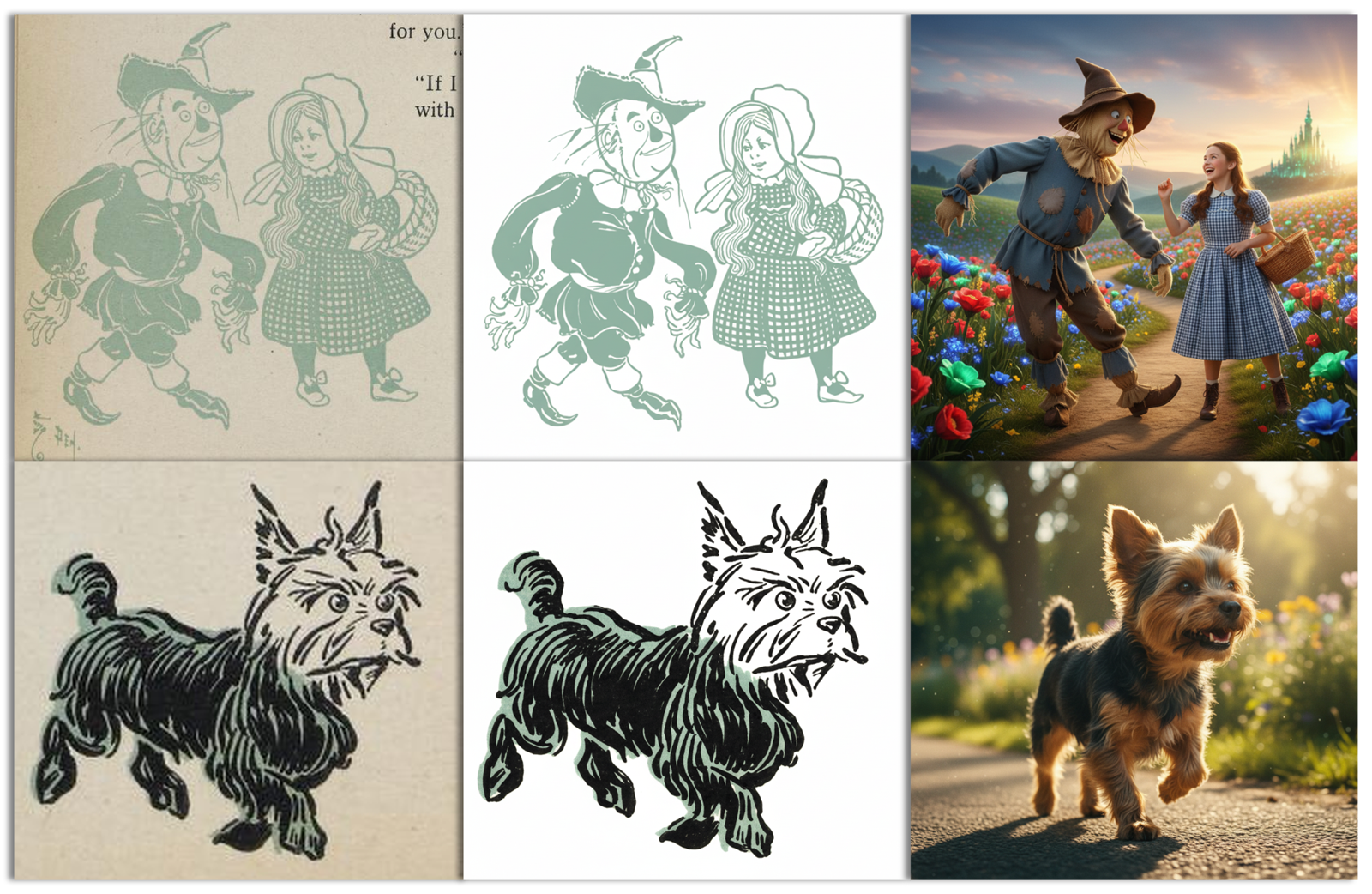
Here are a few examples of what you'll achieve:

What you'll learn
- How to perform open-vocabulary object detection using Gemini's spatial understanding
- How to extract bounding boxes, captions, and dynamic labels using natural language prompts
- How to restore, clean up, and straighten warped or vintage visual objects
- How to write imperative and descriptive prompts for image editing
- How to creatively colorize and transform visuals into entirely new styles
- How to "cinematize" visuals into photorealistic live-action movie stills
What you'll need
- Familiarity running Python in a notebook (in Colab or any other Jupyter environment)
- A Google Cloud project (Vertex AI) or a Gemini API key (Google AI Studio) with billing enabled
ℹ️ The total cost to run the lab from start to end is less than 2 USD (45 generated 1K images of 1,290 tokens each).




Let's get started...
2. Before you begin
To use the Gemini API, you have two main options:
- Via Vertex AI with a Google Cloud project
- Via Google AI Studio with a Gemini API key
🛠️ Option 1 - Gemini API via Vertex AI
Requirements:
- A Google Cloud project
- The Vertex AI API must be enabled for this project
🛠️ Option 2 - Gemini API via Google AI Studio
Requirement:
- A Gemini API key
Learn more about getting a Gemini API key from Google AI Studio.
3. Run the notebook
Choose your preferred tool to open the notebook:
🧰 Tool A - Open the notebook in Colab
🧰 Tool B - Open the notebook in Colab Enterprise or Vertex AI Workbench
💡 This might be preferred if you already have a Google Cloud project configured with a Colab Enterprise or Vertex AI Workbench instance.
🧰 Tool C - Get the notebook from GitHub and run it in your own environment
⚠️ You will need to get the notebook from GitHub (or clone the repository) and run it in your own Jupyter environment.
🗺️ Notebook table of contents
For easier navigation, make sure to expand and use the table of contents. Example:

🏁 Run the notebook
You are ready. You can now follow and run the notebook. Have fun!...
4. Congratulations!
Congratulations for completing the codelab!
Learn more
- Complete the Generating Consistent Imagery with Gemini Nano Banana codelab.
- Check out the Nano Banana recipes notebook for more practical examples.
- Explore additional use cases in the Vertex AI Prompt Gallery.
- Stay updated by following the Vertex AI Release Notes.