
1. Giới thiệu
Trong lớp học lập trình này, bạn sẽ tìm hiểu cách khai thác sức mạnh của Apache Spark để chuyển đổi dữ liệu trong giao diện quen thuộc của BigQuery Studio. Bạn sẽ đọc dữ liệu từ BigQuery, thực hiện việc làm sạch và chuyển đổi dữ liệu bằng PySpark, đồng thời ghi kết quả trở lại một bảng mới trong BigQuery, tất cả đều từ một sổ ghi chú.
Trong lớp học lập trình này, bạn sẽ áp dụng phương pháp từng bước như sau:
- Chuẩn bị dự án Google Cloud và Bật tất cả API bắt buộc trên dự án đó
- Tạo bộ chứa GCS cho thư mục tạm thời
- Nhập các thư viện bắt buộc để chạy Apache Spark
- Khởi chạy phiên Spark bằng trình kết nối BigQuery
- Đọc dữ liệu mẫu của Google Analytics từ Tập dữ liệu công khai của BigQuery
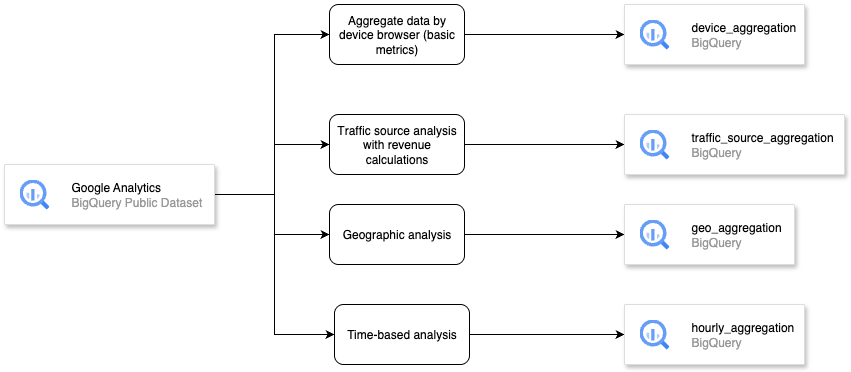
- Chuyển đổi dữ liệu bằng cách tổng hợp dữ liệu theo trình duyệt thiết bị (các chỉ số cơ bản)
- Chuyển đổi dữ liệu bằng cách phân tích nguồn lưu lượng truy cập với các phép tính doanh thu
- Chuyển đổi dữ liệu bằng cách phân tích địa lý
- Ghi dữ liệu sau khi chuyển đổi vào bảng BigQuery
Tổng quan về kiến trúc
Điều kiện tiên quyết
- Một dự án trên Google Cloud Platform (GCP) đã bật tính năng thanh toán.
- BigQuery API và BigQuery Connection API đã được bật trong dự án GCP.
- Có kiến thức cơ bản về SQL và Python.
Kiến thức bạn sẽ học được
- Cách trích xuất dữ liệu bằng Apache Spark trong Sổ ghi chú BigQuery Studio
- Cách chuyển đổi hoặc tổng hợp dữ liệu bằng Apache Spark trong Sổ ghi chú BigQuery Studio
- Cách ghi dữ liệu sau khi chuyển đổi hoặc tổng hợp dữ liệu bằng Apache Spark trong Sổ ghi chú BigQuery Studio
Bạn cần có
- Trình duyệt web Chrome
- Tài khoản Gmail
- Một dự án trên đám mây đã bật tính năng thanh toán
2. Yêu cầu và quy trình thiết lập cơ bản
Thiết lập môi trường tự học
- Đăng nhập vào Google Cloud Console rồi tạo một dự án mới hoặc sử dụng lại một dự án hiện có. Nếu chưa có tài khoản Gmail hoặc Google Workspace, bạn phải tạo một tài khoản.



- Tên dự án là tên hiển thị cho những người tham gia dự án này. Đây là một chuỗi ký tự mà các API của Google không sử dụng. Bạn luôn có thể cập nhật tên này.
- Mã dự án là duy nhất trên tất cả các dự án Google Cloud và không thể thay đổi (không thể thay đổi sau khi đã đặt). Cloud Console tự động tạo một chuỗi duy nhất; thường thì bạn không cần quan tâm đến chuỗi này. Trong hầu hết các lớp học lập trình, bạn sẽ cần tham chiếu đến Mã dự án (thường được xác định là
PROJECT_ID). Nếu không thích mã đã tạo, bạn có thể tạo một mã ngẫu nhiên khác. Ngoài ra, bạn có thể thử mã của riêng mình và xem mã đó có dùng được hay không. Bạn không thể thay đổi mã này sau bước này và mã này sẽ tồn tại trong suốt thời gian của dự án. - Để bạn tham khảo, có một giá trị thứ ba là Số dự án mà một số API sử dụng. Tìm hiểu thêm về cả ba giá trị này trong tài liệu.
- Tiếp theo, bạn cần bật tính năng thanh toán trong Cloud Console để sử dụng các API/tài nguyên trên đám mây. Việc tham gia lớp học lập trình này sẽ không tốn nhiều chi phí, thậm chí là không tốn chi phí. Để tắt các tài nguyên nhằm tránh phát sinh chi phí thanh toán ngoài hướng dẫn này, bạn có thể xoá các tài nguyên đã tạo hoặc xoá dự án. Người dùng mới của Google Cloud đủ điều kiện tham gia chương trình Dùng thử miễn phí trị giá 300 USD.
3. Trước khi bắt đầu
Bật API
Trước khi sử dụng Sổ ghi chú BigQuery Studio, chúng ta phải bật các API sau:
- Compute Engine API
- Dataform API
- Vertex AI API
Để bật theo cách thủ công, hãy chuyển đến BigQuery. Trong thanh thẻ của ngăn chỉnh sửa, hãy nhấp vào trình đơn thả xuống mũi tên bên cạnh dấu +, giữ con trỏ trên Notebook, rồi chọn BigQuery template hoặc Empty Notebook hoặc Spark template

Trong cửa sổ Enable Core feature API (Bật API tính năng cốt lõi), hãy nhấp vào Enable (Bật) trong BigQuery Unified API (API hợp nhất của BigQuery)

Sau khi hoàn tất, hãy bật rồi nhấp vào Close (Đóng). Vui lòng tham khảo bài viết Bật BigQuery Studio để quản lý tài sản để biết thêm thông tin chi tiết
4. Đọc tập dữ liệu công khai
Trước tiên, chúng ta sẽ tạo một bộ chứa GCS để sử dụng tạm thời nhằm có thể chạy Spark trong Sổ ghi chú BigQuery Studio.
- Trong Google Cloud Console, hãy chuyển đến BigQuery
- Trong thanh thẻ của ngăn chỉnh sửa, hãy nhấp vào trình đơn thả xuống mũi tên bên cạnh dấu +, giữ con trỏ trên Notebook, rồi chọn Empty Notebook.

- Nhấp vào ô mã rồi nhập tập lệnh CLI bên dưới để tạo bộ chứa GCS, sau đó nhấp vào nút Run cell (Chạy ô) hoặc nhấn Shift + Enter
!gsutil mb -p <your_project_id> -c STANDARD -l US gs://ioxid2025-<your_project_id>
Cập nhật các giá trị cho <your_project_id> theo những gì bạn đã chọn khi tạo Dự án Google Cloud. Cập nhật các giá trị cho <your_project_id> bằng mã dự án của bạn để tạo tên bộ chứa GCS duy nhất. Sau đó, hãy nhấp vào nút Run cell (Chạy ô) hoặc nhấn Shift + Enter để chạy ô mã
Sau đó, chúng ta sẽ khởi chạy một phiên Spark. Trong lớp học lập trình này, chúng ta sẽ sử dụng thư viện SparkSession mặc dù có thể sử dụng DataprocSession để khai thác các khả năng của Dataproc nhằm chạy Spark trong Sổ ghi chú BigQuery Studio
- Nhấp vào ô mã rồi nhập tập lệnh CLI bên dưới để khởi chạy phiên Spark. Nhấp vào nút Run cell (Chạy ô) hoặc nhấn Shift + Enter.
# Import required libraries
from pyspark.sql import SparkSession
from pyspark.sql.functions import col, sum, count, countDistinct, when, expr, date_format
from pyspark.sql.types import DecimalType

# Initialize Spark session with BigQuery connector
from pyspark.sql import SparkSession
from pyspark.sql.functions import col, sum, count, countDistinct, when, expr, date_format
from pyspark.sql.types import DecimalType

# Initialize Spark session with BigQuery connector
spark = SparkSession.builder \
 .appName("Google Analytics ETL with Apache Spark") \
 .config("spark.jars.packages", "com.google.cloud.spark:spark-bigquery-with-dependencies_2.12:0.32.0") \
 .getOrCreate()

spark
Kết quả đầu ra dự kiến :
SparkSession - in-memory
SparkContext
Spark UI
Version
v3.5.4
Master
local[*]
AppName
Google Analytics ETL with Apache Spark
- Nhấp vào ô mã rồi nhập tập lệnh CLI bên dưới để đặt dự án GCP và bộ chứa tạm thời GCS.
# Set GCP project and temporary bucket
project_id = "your-gcp-project-id"  # Replace with your GCP project ID
bucket = "your-gcs-bucket"  # Replace with your GCS bucket for temporary files spark.conf.set("temporaryGcsBucket", bucket)
Cơ sở dữ liệu mẫu của Google Analytics
Cơ sở dữ liệu mẫu của Google Analytics được cung cấp trên BigQuery thông qua chương trình tập dữ liệu công khai của Google Cloud. Tập dữ liệu này cung cấp 12 tháng (tháng 8 năm 2016 đến tháng 8 năm 2017) dữ liệu Google Analytics 360 ở dạng xáo trộn từ Google Merchandise Store , một cửa hàng thương mại điện tử thực sự bán hàng hoá mang thương hiệu Google, trong BigQuery. Đây là một cách tuyệt vời để phân tích dữ liệu doanh nghiệp và tìm hiểu các lợi ích của việc sử dụng BigQuery để phân tích dữ liệu Analytics 360 Tìm hiểu thêm về dữ liệu
Dữ liệu này bao gồm Dữ liệu điển hình mà một trang web thương mại điện tử sẽ thấy và bao gồm các thông tin sau:
- Dữ liệu nguồn lưu lượng truy cập: thông tin về nguồn gốc của khách truy cập trang web, bao gồm dữ liệu về lưu lượng truy cập tự nhiên, lưu lượng truy cập tìm kiếm có trả tiền và lưu lượng truy cập hiển thị
- Dữ liệu nội dung: thông tin về hành vi của người dùng trên trang web, chẳng hạn như URL của các trang mà khách truy cập xem, cách họ tương tác với nội dung, v.v.
- Dữ liệu giao dịch: thông tin về các giao dịch trên trang web Google Merchandise Store.
Chạy mã bên dưới để hiển thị 5 dữ liệu hàng đầu mẫu trong Apache Spark
# EXTRACT: Read data from BigQuery
print("Extracting data from BigQuery...")
ga_df = spark.read.format("bigquery") \
   .option("table", "bigquery-public-data.google_analytics_sample.ga_sessions_20170801") \
   .load()

# Show schema sample data
print("Sample data:")
ga_df.show(5, truncate=False)
Kết quả đầu ra dự kiến :
Extracting data from BigQuery...
Sample data:
+---------+-----------+----------+--------------+--------+---------------------------------------------------------------+---------------------------------------------------------------------------------------------------------------------------------------------------------------------------------------+----------------------------------------------------------------------------------------------------------------------------------------------------------------------------------------------------------------------------------------------------------------------------------------------------------------------------------------------------------------------------------------------------------------------------+-------------------------------------------------------------------------------------------------------------------------------------------------------------------------------------------------------------------------------------------------------------------------------+--------------------+-------------------------------------------------------------------------------------------------------------------------------------------------------------------------------------------------------------------------------------------------------------------------------------------------------------------------------------------------------------------------------------------------------------------------------------------------------------------------------------------------------------------------------------------------------------------------------------------------------------------------------------------------------------------------------------------------------------------------------------------------------------------------------------------------------------------------------------------------------------------------------------------------------------------------------------+-------------------+------+--------+---------------+--------------------+
|visitorId|visitNumber|visitId   |visitStartTime|date    |totals                                                         |trafficSource                                                                                                                                                                          |device                                                                                                                                                                                                                                                                                                                                                                                                                      |geoNetwork                                                                                                                                                                                                                                                                     |customDimensions    |hits                                                                                                                                                                                                                                                                                                                                                                                                                                                                                                                                                                                                                                                                                                                                                                                                                                                                                                                                 |fullVisitorId      |userId|clientId|channelGrouping|socialEngagementType|
+---------+-----------+----------+--------------+--------+---------------------------------------------------------------+---------------------------------------------------------------------------------------------------------------------------------------------------------------------------------------+----------------------------------------------------------------------------------------------------------------------------------------------------------------------------------------------------------------------------------------------------------------------------------------------------------------------------------------------------------------------------------------------------------------------------+-------------------------------------------------------------------------------------------------------------------------------------------------------------------------------------------------------------------------------------------------------------------------------+--------------------+-------------------------------------------------------------------------------------------------------------------------------------------------------------------------------------------------------------------------------------------------------------------------------------------------------------------------------------------------------------------------------------------------------------------------------------------------------------------------------------------------------------------------------------------------------------------------------------------------------------------------------------------------------------------------------------------------------------------------------------------------------------------------------------------------------------------------------------------------------------------------------------------------------------------------------------+-------------------+------+--------+---------------+--------------------+
|NULL     |1          |1501591568|1501591568    |20170801|{1, 1, 1, NULL, 1, NULL, NULL, 1, NULL, NULL, NULL, NULL, 1}   |{NULL, (not set), (direct), (none), NULL, NULL, {NULL, NULL, NULL, NULL, NULL, NULL, not available in demo dataset, NULL, NULL, NULL, NULL, NULL}, NULL, NULL}                         |{Chrome, not available in demo dataset, not available in demo dataset, Windows, not available in demo dataset, false, not available in demo dataset, not available in demo dataset, not available in demo dataset, not available in demo dataset, not available in demo dataset, not available in demo dataset, NULL, not available in demo dataset, not available in demo dataset, not available in demo dataset, desktop} |{Europe, Southern Europe, Greece, not available in demo dataset, not available in demo dataset, not available in demo dataset, not available in demo dataset, tellas.gr, not available in demo dataset, not available in demo dataset, not available in demo dataset}          |[]                  |[{1, 0, 5, 46, NULL, true, true, true, https://www.google.gr/, {/google+redesign/bags/google+zipper+front+sports+bag.axd, shop.googlemerchandisestore.com, Page Unavailable, NULL, NULL, /google+redesign/, /bags/, /google+zipper+front+sports+bag.axd, }, NULL, NULL, NULL, {NULL, NULL, NULL, NULL, NULL, NULL, NULL, NULL, shop.googlemerchandisestore.com/google+redesign/bags/google+zipper+front+sports+bag.axd, shop.googlemerchandisestore.com/google+redesign/bags/google+zipper+front+sports+bag.axd, shop.googlemerchandisestore.com/google+redesign/bags/google+zipper+front+sports+bag.axd, 0}, {NULL, true, NULL, NULL}, NULL, [], [], NULL, NULL, {0, 1, NULL}, [], NULL, [], [], [], PAGE, {NULL, NULL, NULL, NULL, (not set), NULL, No,  : }, NULL, NULL, {(not set), Bags, (not set), (not set), (not set), (entrance), (entrance), (entrance), (entrance), (entrance), NULL, 1, NULL, NULL, NULL}, web, []}]     |3418334011779872055|NULL  |NULL    |Organic Search |Not Socially Engaged|
|NULL     |2          |1501589647|1501589647    |20170801|{1, 1, 1, NULL, 1, NULL, NULL, NULL, NULL, NULL, NULL, NULL, 1}|{/analytics/web/, (not set), analytics.google.com, referral, NULL, NULL, {NULL, NULL, NULL, NULL, NULL, NULL, not available in demo dataset, NULL, NULL, NULL, NULL, NULL}, NULL, NULL}|{Chrome, not available in demo dataset, not available in demo dataset, Windows, not available in demo dataset, false, not available in demo dataset, not available in demo dataset, not available in demo dataset, not available in demo dataset, not available in demo dataset, not available in demo dataset, NULL, not available in demo dataset, not available in demo dataset, not available in demo dataset, desktop} |{Asia, Southern Asia, India, Maharashtra, (not set), Mumbai, not available in demo dataset, unknown.unknown, not available in demo dataset, not available in demo dataset, not available in demo dataset}                                                                      |[{4, APAC}]         |[{1, 0, 5, 14, NULL, true, true, true, https://analytics.google.com/analytics/web/, {/google+redesign/shop+by+brand/youtube, shop.googlemerchandisestore.com, Page Unavailable, NULL, NULL, /google+redesign/, /shop+by+brand/, /youtube, }, NULL, NULL, NULL, {NULL, NULL, NULL, NULL, NULL, NULL, NULL, NULL, shop.googlemerchandisestore.com/google+redesign/shop+by+brand/youtube, shop.googlemerchandisestore.com/google+redesign/shop+by+brand/youtube, shop.googlemerchandisestore.com/google+redesign/shop+by+brand/youtube, 0}, {NULL, true, NULL, NULL}, NULL, [], [], NULL, NULL, {0, 1, NULL}, [], NULL, [], [], [], PAGE, {NULL, NULL, NULL, NULL, (not set), NULL, No,  : }, NULL, NULL, {(not set), Brands, (not set), (not set), (not set), (entrance), (entrance), (entrance), (entrance), (entrance), NULL, 1, NULL, NULL, NULL}, web, []}]                                                                        |2474397855041322408|NULL  |NULL    |Referral       |Not Socially Engaged|
|NULL     |1          |1501616621|1501616621    |20170801|{1, 1, 1, NULL, 1, NULL, NULL, 1, NULL, NULL, NULL, NULL, 1}   |{/analytics/web/, (not set), analytics.google.com, referral, NULL, NULL, {NULL, NULL, NULL, NULL, NULL, NULL, not available in demo dataset, NULL, NULL, NULL, NULL, NULL}, NULL, NULL}|{Chrome, not available in demo dataset, not available in demo dataset, Windows, not available in demo dataset, false, not available in demo dataset, not available in demo dataset, not available in demo dataset, not available in demo dataset, not available in demo dataset, not available in demo dataset, NULL, not available in demo dataset, not available in demo dataset, not available in demo dataset, desktop} |{Europe, Northern Europe, United Kingdom, not available in demo dataset, not available in demo dataset, not available in demo dataset, not available in demo dataset, as9105.com, not available in demo dataset, not available in demo dataset, not available in demo dataset} |[{4, EMEA}]         |[{1, 0, 12, 43, NULL, true, true, true, https://analytics.google.com/analytics/web/?utm_source=demoaccount&utm_medium=demoaccount&utm_campaign=demoaccount, {/google+redesign/shop+by+brand/youtube, shop.googlemerchandisestore.com, Page Unavailable, NULL, NULL, /google+redesign/, /shop+by+brand/, /youtube, }, NULL, NULL, NULL, {NULL, NULL, NULL, NULL, NULL, NULL, NULL, NULL, shop.googlemerchandisestore.com/google+redesign/shop+by+brand/youtube, shop.googlemerchandisestore.com/google+redesign/shop+by+brand/youtube, shop.googlemerchandisestore.com/google+redesign/shop+by+brand/youtube, 0}, {NULL, true, NULL, NULL}, NULL, [], [], NULL, NULL, {0, 1, NULL}, [], NULL, [], [], [], PAGE, {NULL, NULL, NULL, NULL, (not set), NULL, No,  : }, NULL, NULL, {(not set), Brands, (not set), (not set), (not set), (entrance), (entrance), (entrance), (entrance), (entrance), NULL, 1, NULL, NULL, NULL}, web, []}]|5870462820713110108|NULL  |NULL    |Referral       |Not Socially Engaged|
|NULL     |1          |1501601200|1501601200    |20170801|{1, 1, 1, NULL, 1, NULL, NULL, 1, NULL, NULL, NULL, NULL, 1}   |{/analytics/web/, (not set), analytics.google.com, referral, NULL, NULL, {NULL, NULL, NULL, NULL, NULL, NULL, not available in demo dataset, NULL, NULL, NULL, NULL, NULL}, NULL, NULL}|{Firefox, not available in demo dataset, not available in demo dataset, Windows, not available in demo dataset, false, not available in demo dataset, not available in demo dataset, not available in demo dataset, not available in demo dataset, not available in demo dataset, not available in demo dataset, NULL, not available in demo dataset, not available in demo dataset, not available in demo dataset, desktop}|{Americas, Northern America, United States, Texas, Dallas-Ft. Worth TX, Dallas, not available in demo dataset, h5colo.com, not available in demo dataset, not available in demo dataset, not available in demo dataset}                                                        |[{4, North America}]|[{1, 0, 8, 26, NULL, true, true, true, https://analytics.google.com/analytics/web/, {/google+redesign/shop+by+brand/youtube, shop.googlemerchandisestore.com, Page Unavailable, NULL, NULL, /google+redesign/, /shop+by+brand/, /youtube, }, NULL, NULL, NULL, {NULL, NULL, NULL, NULL, NULL, NULL, NULL, NULL, shop.googlemerchandisestore.com/google+redesign/shop+by+brand/youtube, shop.googlemerchandisestore.com/google+redesign/shop+by+brand/youtube, shop.googlemerchandisestore.com/google+redesign/shop+by+brand/youtube, 0}, {NULL, true, NULL, NULL}, NULL, [], [], NULL, NULL, {0, 1, NULL}, [], NULL, [], [], [], PAGE, {NULL, NULL, NULL, NULL, (not set), NULL, No,  : }, NULL, NULL, {(not set), Brands, (not set), (not set), (not set), (entrance), (entrance), (entrance), (entrance), (entrance), NULL, 1, NULL, NULL, NULL}, web, []}]                                                                        |9397809171349480379|NULL  |NULL    |Referral       |Not Socially Engaged|
|NULL     |1          |1501615525|1501615525    |20170801|{1, 1, 1, NULL, 1, NULL, NULL, 1, NULL, NULL, NULL, NULL, 1}   |{/analytics/web/, (not set), adwords.google.com, referral, NULL, NULL, {NULL, NULL, NULL, NULL, NULL, NULL, not available in demo dataset, NULL, NULL, NULL, NULL, NULL}, NULL, NULL}  |{Chrome, not available in demo dataset, not available in demo dataset, Windows, not available in demo dataset, false, not available in demo dataset, not available in demo dataset, not available in demo dataset, not available in demo dataset, not available in demo dataset, not available in demo dataset, NULL, not available in demo dataset, not available in demo dataset, not available in demo dataset, desktop} |{Americas, Northern America, United States, not available in demo dataset, not available in demo dataset, not available in demo dataset, not available in demo dataset, (not set), not available in demo dataset, not available in demo dataset, not available in demo dataset}|[{4, North America}]|[{1, 0, 12, 25, NULL, true, true, true, https://adwords.google.com/analytics/web/?__o=cues&authuser=0, {/google+redesign/shop+by+brand/youtube, shop.googlemerchandisestore.com, Page Unavailable, NULL, NULL, /google+redesign/, /shop+by+brand/, /youtube, }, NULL, NULL, NULL, {NULL, NULL, NULL, NULL, NULL, NULL, NULL, NULL, shop.googlemerchandisestore.com/google+redesign/shop+by+brand/youtube, shop.googlemerchandisestore.com/google+redesign/shop+by+brand/youtube, shop.googlemerchandisestore.com/google+redesign/shop+by+brand/youtube, 0}, {NULL, true, NULL, NULL}, NULL, [], [], NULL, NULL, {0, 1, NULL}, [], NULL, [], [], [], PAGE, {NULL, NULL, NULL, NULL, (not set), NULL, No,  : }, NULL, NULL, {(not set), Brands, (not set), (not set), (not set), (entrance), (entrance), (entrance), (entrance), (entrance), NULL, 1, NULL, NULL, NULL}, web, []}]                                                     |6089902943184578335|NULL  |NULL    |Referral       |Not Socially Engaged|
+---------+-----------+----------+--------------+--------+---------------------------------------------------------------+---------------------------------------------------------------------------------------------------------------------------------------------------------------------------------------+----------------------------------------------------------------------------------------------------------------------------------------------------------------------------------------------------------------------------------------------------------------------------------------------------------------------------------------------------------------------------------------------------------------------------+-------------------------------------------------------------------------------------------------------------------------------------------------------------------------------------------------------------------------------------------------------------------------------+--------------------+-------------------------------------------------------------------------------------------------------------------------------------------------------------------------------------------------------------------------------------------------------------------------------------------------------------------------------------------------------------------------------------------------------------------------------------------------------------------------------------------------------------------------------------------------------------------------------------------------------------------------------------------------------------------------------------------------------------------------------------------------------------------------------------------------------------------------------------------------------------------------------------------------------------------------------------+-------------------+------+--------+---------------+--------------------+
only showing top 5 rows
5. Tổng hợp dữ liệu theo trình duyệt thiết bị (các chỉ số cơ bản)
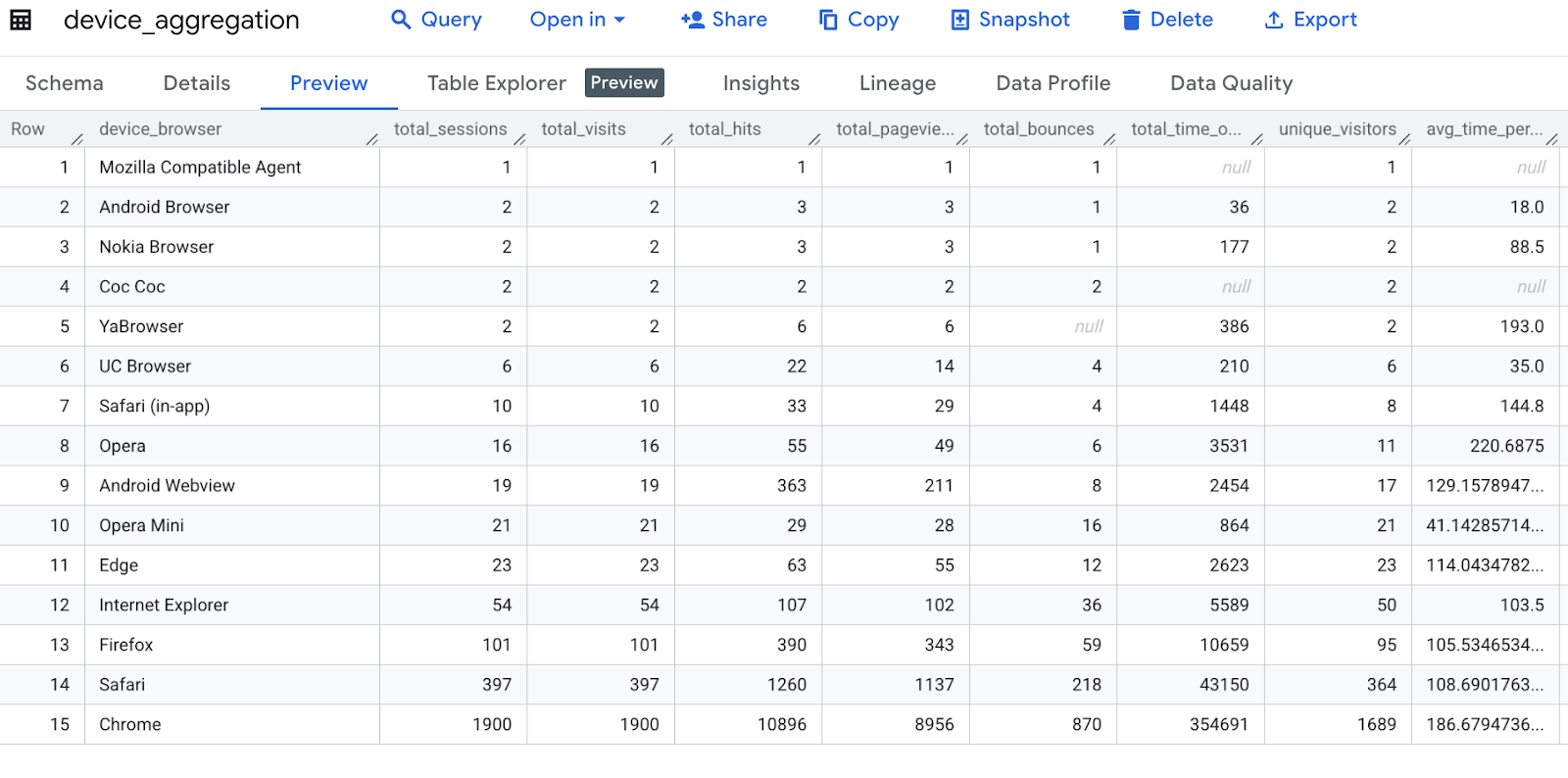
Mã này tổng hợp dữ liệu Google Analytics theo trình duyệt thiết bị, tính toán nhiều chỉ số như tổng số phiên, lượt truy cập, lượt truy cập, lượt xem trang, lượt thoát, thời gian trên trang web, khách truy cập riêng biệt và thời gian trung bình cho mỗi lượt truy cập, sau đó đổi tên một cột và sắp xếp kết quả.
print("Transformation 1: Aggregating by device browser...")
device_agg = ga_df.groupBy("device.browser") \
   .agg(
       count("*").alias("total_sessions"),
       sum("totals.visits").alias("total_visits"),
       sum("totals.hits").alias("total_hits"),
       sum("totals.pageviews").alias("total_pageviews"),
       sum("totals.bounces").alias("total_bounces"),
       sum("totals.timeOnSite").alias("total_time_on_site"),
       countDistinct("fullVisitorId").alias("unique_visitors"),
       (sum("totals.timeOnSite")/sum("totals.visits")).alias("avg_time_per_visit")
   ) \
   .withColumnRenamed("browser", "device_browser") \
   .orderBy("total_sessions", ascending=False)

# Show sample transformed data
print("\nDevice Aggregation Sample:")
device_agg.show(5)
Kết quả đầu ra dự kiến :
Transformation 1: Aggregating by device browser...

Device Aggregation Sample:
+-----------------+--------------+------------+----------+---------------+-------------+------------------+---------------+------------------+
|   device_browser|total_sessions|total_visits|total_hits|total_pageviews|total_bounces|total_time_on_site|unique_visitors|avg_time_per_visit|
+-----------------+--------------+------------+----------+---------------+-------------+------------------+---------------+------------------+
|           Chrome|          1900|        1900|     10896|           8956|          870|            354691|           1689|186.67947368421054|
|           Safari|           397|         397|      1260|           1137|          218|             43150|            364|108.69017632241814|
|          Firefox|           101|         101|       390|            343|           59|             10659|             95|105.53465346534654|
|Internet Explorer|            54|          54|       107|            102|           36|              5589|             50|             103.5|
|             Edge|            23|          23|        63|             55|           12|              2623|             23|114.04347826086956|
+-----------------+--------------+------------+----------+---------------+-------------+------------------+---------------+------------------+
only showing top 5 rows
6. Phân tích nguồn lưu lượng truy cập bằng các phép tính doanh thu
Mã này phân tích dữ liệu Google Analytics theo nguồn lưu lượng truy cập và phương tiện, tính toán các chỉ số như số phiên, số giao dịch, tổng doanh thu, doanh thu trên mỗi phiên và số khách truy cập riêng biệt, sau đó đổi tên các cột và sắp xếp kết quả theo tổng doanh thu.
print("Transformation 2: Analyzing traffic sources...")
traffic_source_agg = ga_df.groupBy("trafficSource.source", "trafficSource.medium") \
   .agg(
       count("*").alias("session_count"),
       sum(when(col("totals.transactions").isNotNull(), 1).otherwise(0)).alias("transactions"),
       sum("totals.totalTransactionRevenue").cast(DecimalType(20,2)).alias("total_revenue"),
       (sum("totals.totalTransactionRevenue")/count("*")).cast(DecimalType(10,2)).alias("revenue_per_session"),
       countDistinct("fullVisitorId").alias("unique_visitors")
   ) \
   .withColumnRenamed("source", "traffic_source") \
   .withColumnRenamed("medium", "traffic_medium") \
   .orderBy("total_revenue", ascending=False)

print("\nTraffic Source Aggregation Sample:")
traffic_source_agg.show(5)
Kết quả đầu ra dự kiến :
Transformation 2: Analyzing traffic sources...

Traffic Source Aggregation Sample:
+--------------------+--------------+-------------+------------+-------------+-------------------+---------------+
|      traffic_source|traffic_medium|session_count|transactions|total_revenue|revenue_per_session|unique_visitors|
+--------------------+--------------+-------------+------------+-------------+-------------------+---------------+
|            (direct)|        (none)|         2166|          42|8872040000.00|         4096048.01|           1943|
|     mail.google.com|      referral|            2|           1|  17960000.00|         8980000.00|              2|
|       google.com.tw|      referral|            1|           0|         NULL|               NULL|              1|
|analytics.google.com|      referral|           57|           0|         NULL|               NULL|             53|
|           quora.com|      referral|            6|           0|         NULL|               NULL|              5|
+--------------------+--------------+-------------+------------+-------------+-------------------+---------------+
only showing top 5 rows
7. Phân tích địa lý
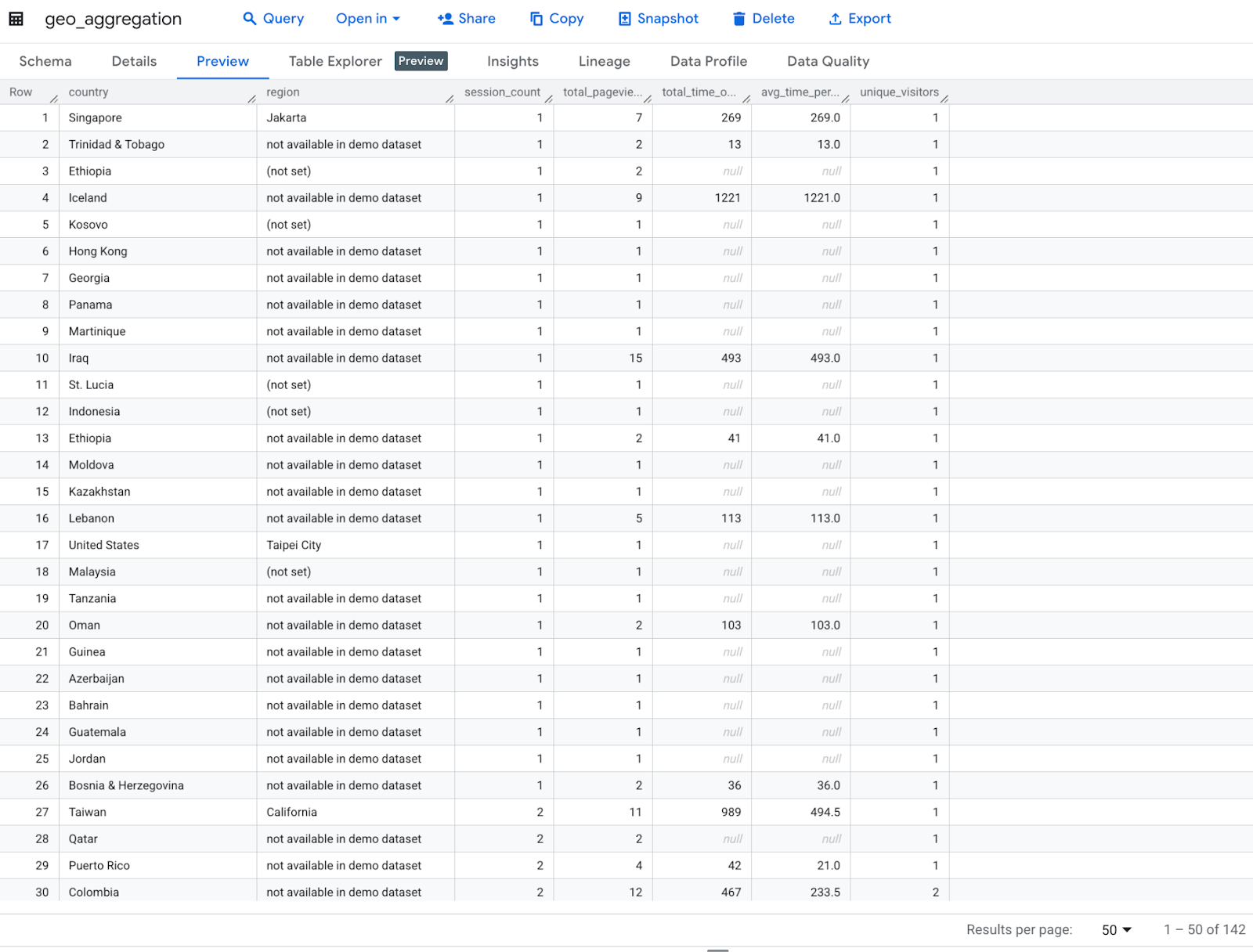
Mã này thực hiện phân tích địa lý trên dữ liệu Google Analytics theo quốc gia và khu vực, tính toán số phiên, tổng số lượt xem trang, tổng thời gian trên trang web, thời gian trung bình cho mỗi phiên và số khách truy cập riêng biệt, sau đó đổi tên các cột và sắp xếp theo số phiên.
print("Transformation 3: Geographic analysis...")
geo_agg = ga_df.groupBy("geoNetwork.country", "geoNetwork.region") \
   .agg(
       count("*").alias("session_count"),
       sum("totals.pageviews").alias("total_pageviews"),
       sum("totals.timeOnSite").alias("total_time_on_site"),
       (sum("totals.timeOnSite")/count("*")).alias("avg_time_per_session"),
       countDistinct("fullVisitorId").alias("unique_visitors")
   ) \
   .withColumnRenamed("country", "country") \
   .withColumnRenamed("region", "region") \
   .orderBy("session_count", ascending=False)

print("\nGeographic Aggregation Sample:")
geo_agg.show(5)
Kết quả đầu ra dự kiến :
Transformation 3: Geographic analysis...

Geographic Aggregation Sample:
+--------------+--------------------+-------------+---------------+------------------+--------------------+---------------+
|       country|              region|session_count|total_pageviews|total_time_on_site|avg_time_per_session|unique_visitors|
+--------------+--------------------+-------------+---------------+------------------+--------------------+---------------+
| United States|not available in ...|          564|           2326|             97829|  173.45567375886526|            494|
| United States|          California|          420|           3102|            116563|   277.5309523809524|            347|
| United States|            New York|          109|            845|             39976|   366.7522935779817|             84|
|United Kingdom|not available in ...|           82|            161|              7791|   95.01219512195122|             79|
|         India|not available in ...|           62|            139|              2869|  46.274193548387096|             61|
+--------------+--------------------+-------------+---------------+------------------+--------------------+---------------+
only showing top 5 rows
8. Phân tích dựa trên thời gian
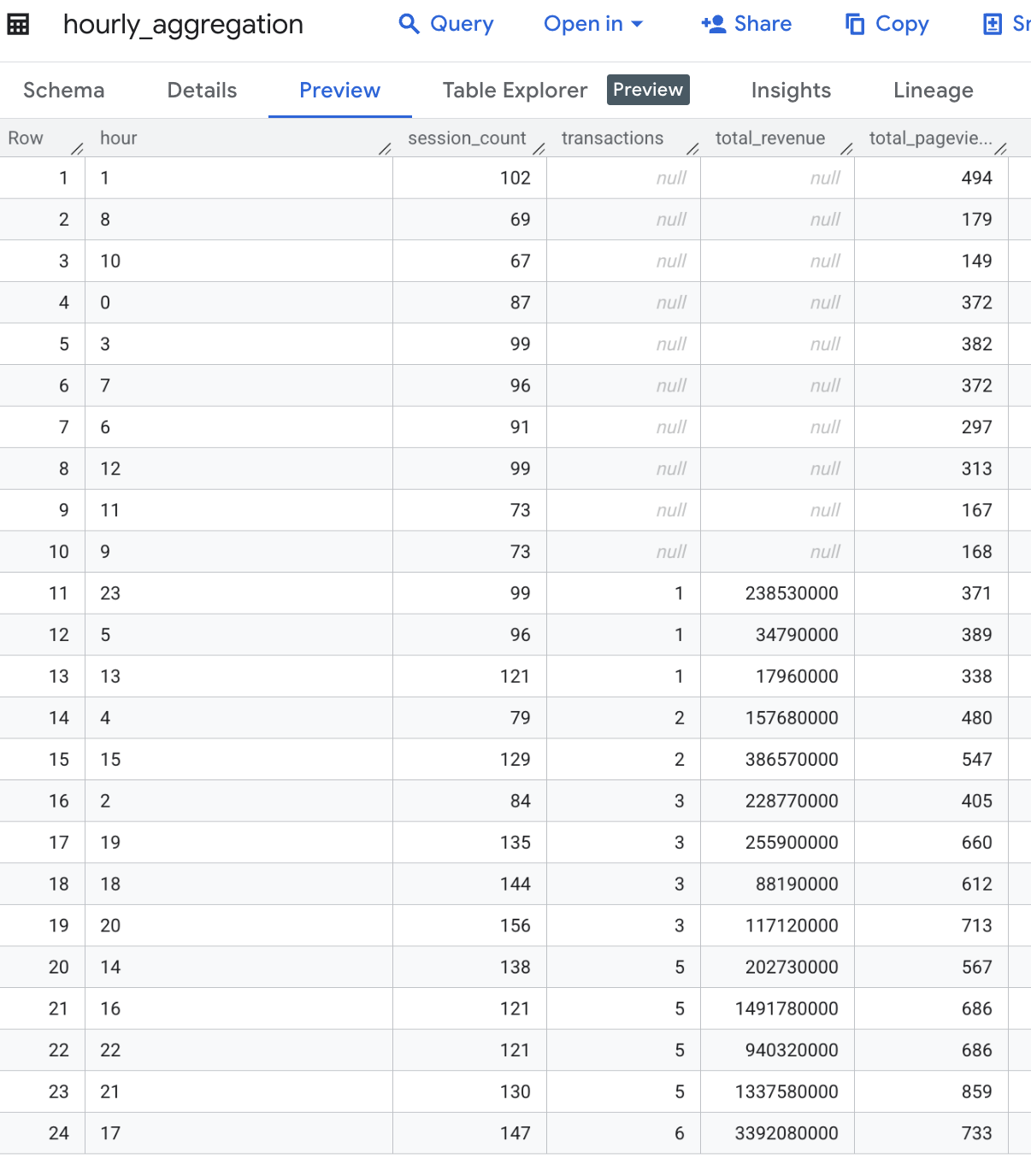
Mã này thực hiện phân tích dựa trên thời gian bằng cách trích xuất giờ từ cột visitStartTime, sau đó nhóm dữ liệu theo giờ để tính toán số phiên, số giao dịch, tổng doanh thu và tổng số lượt xem trang cho mỗi giờ, cuối cùng là sắp xếp kết quả theo giờ.
print("Transformation 4: Time-based analysis...")
hourly_agg = ga_df.withColumn("hour", date_format(col("visitStartTime").cast("timestamp"), "H")) \
   .groupBy("hour") \
   .agg(
       count("*").alias("session_count"),
       sum("totals.transactions").alias("transactions"),
       sum("totals.totalTransactionRevenue").cast(DecimalType(20,2)).alias("total_revenue"),
       sum("totals.pageviews").alias("total_pageviews")
   ) \
   .orderBy("hour")

print("\nHourly Aggregation Sample:")
hourly_agg.show(5)
Kết quả đầu ra dự kiến :
Transformation 4: Time-based analysis...

Hourly Aggregation Sample:
+----+-------------+------------+-------------+---------------+
|hour|session_count|transactions|total_revenue|total_pageviews|
+----+-------------+------------+-------------+---------------+
|   0|           87|        NULL|         NULL|            372|
|   1|          102|        NULL|         NULL|            494|
|  10|           67|        NULL|         NULL|            149|
|  11|           73|        NULL|         NULL|            167|
|  12|           99|        NULL|         NULL|            313|
+----+-------------+------------+-------------+---------------+
only showing top 5 rows
9. Ghi kết quả vào bảng BigQuery
Mã này xuất 4 khung dữ liệu tổng hợp (device_agg, traffic_source_agg, geo_agg và hourly_agg) vào các bảng riêng biệt trong Google BigQuery, ghi đè các bảng hiện có nếu có, bằng phương thức ghi trực tiếp.
# Write to BigQuery tables
print("\nLoading data to BigQuery...")

# Set output tables
device_output_table = f"{project_id}.analytics_sample.device_aggregation"
traffic_output_table = f"{project_id}.analytics_sample.traffic_source_aggregation"
geo_output_table = f"{project_id}.analytics_sample.geo_aggregation"
hourly_output_table = f"{project_id}.analytics_sample.hourly_aggregation"

dataset_id = "demo"  # Replace with your BigQuery dataset ID

# Set BigQuery output table
device_output_table = f"{project_id}.{dataset_id}.device_aggregation"
traffic_output_table = f"{project_id}.{dataset_id}.traffic_source_aggregation"
geo_output_table = f"{project_id}.{dataset_id}.geo_aggregation"
hourly_output_table = f"{project_id}.{dataset_id}.hourly_aggregation"

# Write each DataFrame to BigQuery
device_agg.write \
   .format("bigquery") \
   .option("table", device_output_table) \
   .option("writeMethod", "direct") \
   .mode("overwrite") \
   .save()

traffic_source_agg.write \
   .format("bigquery") \
   .option("table", traffic_output_table) \
   .option("writeMethod", "direct") \
   .mode("overwrite") \
   .save()

geo_agg.write \
   .format("bigquery") \
   .option("table", geo_output_table) \
   .option("writeMethod", "direct") \
   .mode("overwrite") \
   .save()

hourly_agg.write \
   .format("bigquery") \
   .option("table", hourly_output_table) \
   .option("writeMethod", "direct") \
   .mode("overwrite") \
   .save()
Kiểm tra bảng kết quả đầu ra trong BigQuery để đảm bảo dữ liệu được lưu thành công sau khi thực hiện một số phép chuyển đổi

Bảng device_aggregation
Bảng geo_aggregation
Bảng hourly_aggregation
traffic_source_aggregation

10. Điều phối mã sổ ghi chú BigQuery Studio (Không bắt buộc)
Bạn có thể điều phối mã sổ ghi chú BigQuery Studio theo những cách sau:
- Lên lịch mã sổ ghi chú từ bảng điều khiển Cloud ( áp dụng giá sổ ghi chú).
- Chạy mã sổ ghi chú dưới dạng khối lượng công việc hàng loạt Dataproc Serverless ( áp dụng giá Dataproc Serverless).
Trong lớp học lập trình này, chúng ta sẽ sử dụng tính năng Lên lịch mã sổ ghi chú từ bảng điều khiển Google Cloud.
- Trên thanh công cụ Notebook (Sổ ghi chú), hãy nhấp vào Schedule (Lên lịch).
- Trong ngăn Schedule Notebook (Lên lịch sổ ghi chú), ở trường Schedule name (Tên lịch biểu), hãy nhập tên cho lịch biểu.
- Trong phần Authentication (Xác thực), hãy uỷ quyền cho sổ ghi chú bằng thông tin đăng nhập của người dùng Tài khoản Google hoặc tài khoản dịch vụ.
- Để sử dụng thông tin đăng nhập của người dùng Tài khoản Google ( Bản dùng thử), hãy chọn Thực thi bằng thông tin đăng nhập của người dùng.
- Để sử dụng tài khoản dịch vụ, hãy chọn Execute with selected service account (Thực thi bằng tài khoản dịch vụ đã chọn), sau đó chọn một tài khoản dịch vụ.
- Trong phần Notebook options (Tuỳ chọn sổ tay), ở trường Runtime template (Mẫu thời gian chạy), hãy chọn mẫu thời gian chạy sổ tay Colab hoặc thông số kỹ thuật thời gian chạy mặc định. Để biết thông tin chi tiết về cách tạo mẫu thời gian chạy sổ tay Colab, hãy xem bài viết Tạo mẫu thời gian chạy.
- Trong trường Cloud Storage bucket (Bộ chứa Cloud Storage), hãy nhấp vào Browse (Duyệt tìm) rồi chọn hoặc tạo một bộ chứa Cloud Storage. Tài khoản dịch vụ đã chọn phải được cấp vai trò Quản trị viên bộ nhớ (
roles/storage.admin) IAM trên bộ chứa đã chọn. Để biết thêm thông tin, hãy xem bài viết Bật tính năng lên lịch sổ ghi chú. - Trong phần Schedule frequency (Tần suất lên lịch), hãy thực hiện các thao tác sau:
- Trong trình đơn Repeats (Lặp lại), hãy chọn tần suất chạy sổ ghi chú theo lịch.
- Trong trường At time (Vào lúc), hãy nhập thời gian chạy sổ ghi chú theo lịch.
- Trong trình đơn Timezone (Múi giờ), hãy chọn múi giờ cho lịch biểu.
- Nhấp vào Create schedule (Tạo lịch biểu). Nếu chọn Execute with my user credentials (Thực thi bằng thông tin đăng nhập của người dùng) cho phương thức xác thực, bạn phải uỷ quyền cho Tài khoản Google ( Bản dùng thử).

11. Dọn dẹp
Để tránh phát sinh chi phí cho tài khoản Google Cloud đối với các tài nguyên được sử dụng trong lớp học lập trình này, hãy làm theo các bước sau:
- Trong bảng điều khiển Cloud, hãy chuyển đến trang Quản lý tài nguyên.
- Trong danh sách dự án, hãy chọn dự án mà bạn muốn xoá, rồi nhấp vào Xoá.
- Trong hộp thoại, hãy nhập mã dự án, rồi nhấp vào Tắt để xoá dự án.
12. Xin chúc mừng
Bạn đã hoàn tất việc chuyển đổi và phân tích dữ liệu bằng cách khai thác Apache Spark không máy chủ trong Sổ ghi chú BigQuery Studio. Trong quá trình này, bạn đã khám phá Tập dữ liệu công khai của Google Cloud, thực hiện ETL không máy chủ bằng Apache Spark trong Sổ ghi chú BigQuery Studio và Điều phối Sổ ghi chú BigQuery Studio. Thật tuyệt vời!
Các bước tiếp theo :
- Điều phối sổ ghi chú bằng tài khoản dịch vụ cho mục đích tự động hoá.
- Thêm tập lệnh để theo dõi thời lượng khi chạy công việc ETL.
- Triển khai sổ ghi chú .
- Sử dụng DataprocSparkSession để khai thác các khả năng thực sự của Apache Spark phân tán bằng Dataproc Serverless trong Sổ ghi chú BigQuery Studio.
- Tạo thủ tục được lưu trữ cho Apache Spark trong BigQuery Studio. Bằng cách này, bạn có thể áp dụng các nguyên tắc OOP để cấu trúc mã PySpark nhằm sắp xếp, sử dụng lại và duy trì tốt hơn.
Tài liệu tham khảo :