

1. บทนำ
ใน Codelab นี้ คุณจะได้สร้างโซลูชันการดึงข้อมูลมาเสริม (Retrieval-Augmented Generation หรือ RAG) ของกราฟ (GraphRAG) เพื่อตรวจหาการป้องกันการฟอกเงิน (Anti-Money Laundering หรือ AML) และการฉ้อโกงทางการเงิน คุณจะใช้ Vertex AI, การค้นหาแบบเวกเตอร์ และความสามารถของกราฟแบบเนทีฟของ BigQuery ซึ่งประสานงานผ่าน LangChain เมื่อจบลำดับการทดลองนี้ คุณจะเห็นว่าโมเดลภาษาขนาดใหญ่ (LLM) สามารถระบุการกำหนดเส้นทางการโอนเงินที่ผิดกฎหมายได้อย่างไรโดยการสังเคราะห์บันทึกการตรวจสอบเชิงความหมายและเครือข่ายธุรกรรมที่ซับซ้อน
โฟลว์สถาปัตยกรรม GraphRAG
+------------------+     1. Vector Search      +---------------------+
| User Prompt /    | ------------------------> | BigQuery ML         |
| Investigation    |                           | (AccountAudits)     |
+------------------+                           +---------------------+
         |                                                |
         |                                                | 2. Seed Entity ID
         v                                                v
+------------------+     3. GQL Traversal      +---------------------+
| LangChain        | <------------------------ | BigQuery Property   |
| Graph Retriever  |                           | Graph (FinGraph)    |
+------------------+                           +---------------------+
         |
         | 4. Synthesized Context
         v
+------------------+
| Gemini 2.5 Flash | ---> Detailed Fraud Report
+------------------+
สิ่งที่คุณต้องทำ
- ระยะที่ 1: การตั้งค่าชุดข้อมูลและกราฟพร็อพเพอร์ตี้: สร้างตารางทางการเงินเชิงสัมพันธ์และสร้าง
PROPERTY GRAPHBigQuery ดั้งเดิม - ระยะที่ 2: การสร้างการฝังเวกเตอร์เชิงความหมาย: สร้างการฝังข้อความใน SQL โดยตรงสำหรับบันทึกการตรวจสอบโดยใช้
AI.GENERATE_EMBEDDING(text-embedding-005) - ระยะที่ 3: ตัวดึงข้อมูล GraphRAG ของ LangChain แบบกำหนดเอง: สร้างตัวดึงข้อมูล Python แบบกำหนดเองที่รวมความคล้ายคลึงของเวกเตอร์ (
COSINE_DISTANCE) และการข้ามเส้นทาง ISO GQL - ระยะที่ 4: การให้เหตุผลเรื่องการฉ้อโกงของ LLM และการแสดงภาพเส้นทางการติดตาม: เรียกใช้ห่วงโซ่การให้เหตุผลของ Gemini เพื่อเปิดเผยวงจรการฟอกเงินที่ผิดกฎหมายและแสดงภาพเส้นทางการติดตามใน BigQuery Studio
สิ่งที่คุณต้องมี
- เว็บเบราว์เซอร์ เช่น Chrome
- โปรเจ็กต์ Google Cloud ที่เปิดใช้การเรียกเก็บเงิน
Codelab นี้ออกแบบมาสำหรับนักพัฒนาซอฟต์แวร์ วิศวกรข้อมูล และผู้เชี่ยวชาญด้าน AI ทุกระดับ รวมถึงผู้เริ่มต้น
ระยะเวลาโดยประมาณ: 35 นาที
ค่าใช้จ่ายโดยประมาณ: น้อยกว่า $2.00 USD (ใช้ Vertex AI และการประมวลผลคำค้นหา BigQuery แบบจ่ายเมื่อใช้)
2. ก่อนเริ่มต้น
สร้างโปรเจ็กต์ Google Cloud
- ในคอนโซล Google Cloud ให้เลือกหรือสร้างโปรเจ็กต์ Google Cloud
- ตรวจสอบว่าได้เปิดใช้การเรียกเก็บเงินสำหรับโปรเจ็กต์ที่อยู่ในระบบคลาวด์แล้ว
เริ่มต้น Cloud Shell
- คลิกเปิดใช้งาน Cloud Shell ที่ด้านบนของคอนโซล Google Cloud
- ยืนยันการตรวจสอบสิทธิ์
gcloud auth list
- กำหนดค่าตัวแปรสภาพแวดล้อมใน Cloud Shell โดยทำดังนี้
export GCP_PROJECT=$(gcloud config get-value project)
export REGION="us-central1"
export BQ_DATASET="fingraph_rag"
gcloud config set project $GCP_PROJECT
เปิดใช้ API
เรียกใช้คำสั่งนี้เพื่อเปิดใช้ API ที่จำเป็นทั้งหมด
gcloud services enable \
 bigquery.googleapis.com \
 aiplatform.googleapis.com \
 bigqueryreservation.googleapis.com
สร้างการจองและการกำหนด BigQuery
หากต้องการเรียกใช้การค้นหา GQL คุณต้องมีการจองที่ใช้รุ่น Enterprise หรือ Enterprise Plus สร้างการจองรุ่น Enterprise ที่มีการปรับขนาดอัตโนมัติใน Cloud Shell โดยทำดังนี้
# 1. Create a BigQuery Enterprise reservation with 0 baseline slots and 100 max autoscaling slots
bq mk --reservation \
  --project_id=${GCP_PROJECT} \
  --location=US \
  --edition=ENTERPRISE \
  --slots=0 \
  --autoscale_max_slots=100 \
  --ignore_idle_slots=true \
  graphrag-bigquery-reservation

# 2. Assign your Cloud project to the newly created reservation for query execution
bq mk --reservation_assignment \
  --project_id=${GCP_PROJECT} \
  --location=US \
  --reservation_id=graphrag-bigquery-reservation \
  --job_type=QUERY \
  --assignee_type=PROJECT \
  --assignee_id=${GCP_PROJECT}
3. การตั้งค่าและการเริ่มต้น
ในขั้นตอนนี้ เราจะตั้งค่าสภาพแวดล้อม Python ติดตั้งไลบรารีที่จำเป็น และเริ่มต้นไคลเอ็นต์ BigQuery และ Vertex AI คุณเรียกใช้คำสั่งเหล่านี้ได้ใน Cloud Shell หรือสภาพแวดล้อมสมุดบันทึก Jupyter
- สร้างและเปิดใช้งานสภาพแวดล้อมเสมือนของ Python โดยใช้คำสั่งต่อไปนี้
python3 -m venv venv
source venv/bin/activate
- ติดตั้งแพ็กเกจ Python ที่จำเป็น
pip install langchain-google-vertexai langchain-core google-cloud-bigquery vertexai
- สร้างไฟล์ Python
graphrag_aml.pyและเพิ่มโค้ดการเริ่มต้น แทนที่
import vertexai
from google.cloud import bigquery

# Configuration
GCP_PROJECT_ID = "<YOUR_PROJECT_ID>"
REGION = "us-central1"
BQ_DATASET_ID = "fingraph_rag"
MODEL_NAME = "gemini-2.5-flash"

# Initialize clients
bq_client = bigquery.Client(project=GCP_PROJECT_ID)
vertexai.init(project=GCP_PROJECT_ID, location=REGION)
4. สร้างตารางและสคีมา
จากนั้นเราจะกำหนดสคีมาสำหรับกราฟทางการเงินโดยการสร้างชุดข้อมูลและตารางมาตรฐานของ BigQuery
- สร้างชุดข้อมูล BigQuery โดยทำดังนี้
bq mk --location=US --dataset fingraph_rag
- สร้างตาราง คุณเรียกใช้คำสั่งนี้ได้ใน UI ของ BigQuery Studio หรือผ่าน Cloud Shell ต่อไปนี้คือ SQL
CREATE TABLE IF NOT EXISTS `fingraph_rag.Account` (id INT64, create_time TIMESTAMP, is_blocked BOOL, type STRING);
CREATE TABLE IF NOT EXISTS `fingraph_rag.Loan` (id INT64, loan_amount FLOAT64, balance FLOAT64, create_time TIMESTAMP, interest_rate FLOAT64);
CREATE TABLE IF NOT EXISTS `fingraph_rag.Person` (id INT64, name STRING);
CREATE TABLE IF NOT EXISTS `fingraph_rag.AccountRepayLoan` (id INT64, loan_id INT64, amount FLOAT64, create_time TIMESTAMP);
CREATE TABLE IF NOT EXISTS `fingraph_rag.AccountTransferAccount` (id INT64, to_id INT64, amount FLOAT64, create_time TIMESTAMP);
CREATE TABLE IF NOT EXISTS `fingraph_rag.PersonOwnAccount` (id INT64, account_id INT64, create_time TIMESTAMP);
CREATE TABLE IF NOT EXISTS `fingraph_rag.AccountAudits` (id INT64, audit_timestamp TIMESTAMP, audit_details STRING, embedding ARRAY<FLOAT64>);
5. แทรกชุดข้อมูล
ตอนนี้เราจะแทรกเอนทิตีและความสัมพันธ์ของเอนทิตีเพื่อสร้างเส้นทางการเงิน ชุดข้อมูลนี้แสดงกิจกรรมที่น่าสงสัยระหว่าง Doe (เจ้าของบริษัทเชลล์ที่น่าสงสัย), Jacoby (ตัวกลาง), Menville (เป้าหมายที่ KYC ไม่ผ่าน) และ Smith (ผู้ที่ไม่ได้เกี่ยวข้อง)
เรียกใช้ SQL ต่อไปนี้เพื่อป้อนข้อมูลในตาราง
INSERT INTO `fingraph_rag.Account` VALUES
  (10,'2020-01-10 06:22:20.222',false,'brokerage account'),
  (20,'2020-01-27 17:55:09.206',false,'checking account'),
  (30,'2020-02-15 09:12:33.111',false,'savings account'),
  (40,'2019-11-05 14:33:10.000',false,'business account');

INSERT INTO `fingraph_rag.Loan` VALUES
  (100,2022278.5,123359.0,'2020-03-18 16:42:57.719',0.064),
  (200,50000.0,45000.0,'2020-03-23 19:03:05.567',0.097),
  (300, 15000.0, 10000.0, '2020-05-10 10:00:00.000', 0.05);

INSERT INTO `fingraph_rag.Person` VALUES
  (1,'Jacoby'), (2,'Menville'), (3,'Smith'), (4,'Doe');

INSERT INTO `fingraph_rag.AccountTransferAccount` VALUES
  (40,10,25000.0,'2020-08-01 10:00:00.000'),
  (10,20,24000.0,'2020-08-29 15:28:58.647'),
  (30,20,150.0,'2020-09-01 12:00:00.000');

INSERT INTO `fingraph_rag.AccountRepayLoan` VALUES
  (10,100,56809.8,'2020-12-12 07:25:02.597'),
  (20,200,20000.0,'2021-01-18 01:40:25.317');

INSERT INTO `fingraph_rag.PersonOwnAccount` VALUES
  (1,10,'2020-01-10 06:22:20.222'), (2,20,'2020-01-27 17:55:09.206'),
  (3,30,'2020-02-15 09:12:33.111'), (4,40,'2019-11-05 14:33:10.000');

INSERT INTO `fingraph_rag.AccountAudits` (id, audit_timestamp, audit_details) VALUES
  (10, '2020-05-14 06:57:02', 'Account 10 (Jacoby) flagged by AML system for suspicious high-volume transfers from offshore business accounts.'),
  (20, '2021-03-09 02:51:45', 'Account 20 (Menville) failed KYC verification. Linked source of funds is unverified and customer is unresponsive.'),
  (40, '2020-07-20 09:00:00', 'Account 40 (Doe) under investigation as a suspected shell company involved in illicit activities.');
ยืนยันระเบียนที่นำเข้า
เรียกใช้การค้นหานี้เพื่อยืนยันจำนวนระเบียนในตารางทางการเงิน
SELECT 'Account' AS entity_table, COUNT(*) AS row_count FROM `fingraph_rag.Account`
UNION ALL SELECT 'Loan', COUNT(*) FROM `fingraph_rag.Loan`
UNION ALL SELECT 'Person', COUNT(*) FROM `fingraph_rag.Person`
UNION ALL SELECT 'AccountAudits', COUNT(*) FROM `fingraph_rag.AccountAudits`;
คุณควรเห็นเอาต์พุตการค้นหาที่ยืนยันการแทรกแถวในลักษณะนี้

6. สร้างกราฟพร็อพเพอร์ตี้ BigQuery
เมื่อมีข้อมูลเชิงสัมพันธ์แล้ว เราจะกําหนด FinGraph โดยใช้ DDL กราฟดั้งเดิมของ BigQuery ซึ่งจะสร้างเลเยอร์เชิงความหมายเหนือตารางเชิงสัมพันธ์ที่มีอยู่โดยไม่ต้องคัดลอกหรือทำซ้ำข้อมูล
ข้อมูลเบื้องต้นเกี่ยวกับไวยากรณ์ ISO GQL
กราฟพร็อพเพอร์ตี้ BigQuery ใช้รูปแบบ Graph Query Language (GQL) มาตรฐาน ISO ดังนี้
(node:Label)กำหนดโหนดเอนทิตี (เช่นAccount,Person,Loan)-[edge:LABEL]->กำหนดความสัมพันธ์แบบมีทิศทาง (เช่นTransfers,Repays,Owns)
เรียกใช้คำสั่ง SQL ต่อไปนี้เพื่อสร้างกราฟพร็อพเพอร์ตี้
CREATE OR REPLACE PROPERTY GRAPH `fingraph_rag.FinGraph`
 NODE TABLES (
   `fingraph_rag.Account` KEY (id) LABEL Account PROPERTIES (id, type, is_blocked),
   `fingraph_rag.Loan` KEY (id) LABEL Loan PROPERTIES (id, loan_amount, balance),
   `fingraph_rag.Person` KEY (id) LABEL Person PROPERTIES (id, name)
 )
 EDGE TABLES(
   `fingraph_rag.AccountRepayLoan`
     KEY (id, loan_id, create_time)
     SOURCE KEY (id) REFERENCES `fingraph_rag.Account` (id)
     DESTINATION KEY (loan_id) REFERENCES `fingraph_rag.Loan` (id)
     LABEL Repays PROPERTIES (amount, create_time),
   `fingraph_rag.AccountTransferAccount`
     KEY (id, to_id, create_time)
     SOURCE KEY (id) REFERENCES `fingraph_rag.Account` (id)
     DESTINATION KEY (to_id) REFERENCES `fingraph_rag.Account` (id)
     LABEL Transfers PROPERTIES (amount, create_time),
   `fingraph_rag.PersonOwnAccount`
     KEY (id, account_id)
     SOURCE KEY (id) REFERENCES `fingraph_rag.Person` (id)
     DESTINATION KEY (account_id) REFERENCES `fingraph_rag.Account` (id)
     LABEL Owns PROPERTIES (create_time)
 );
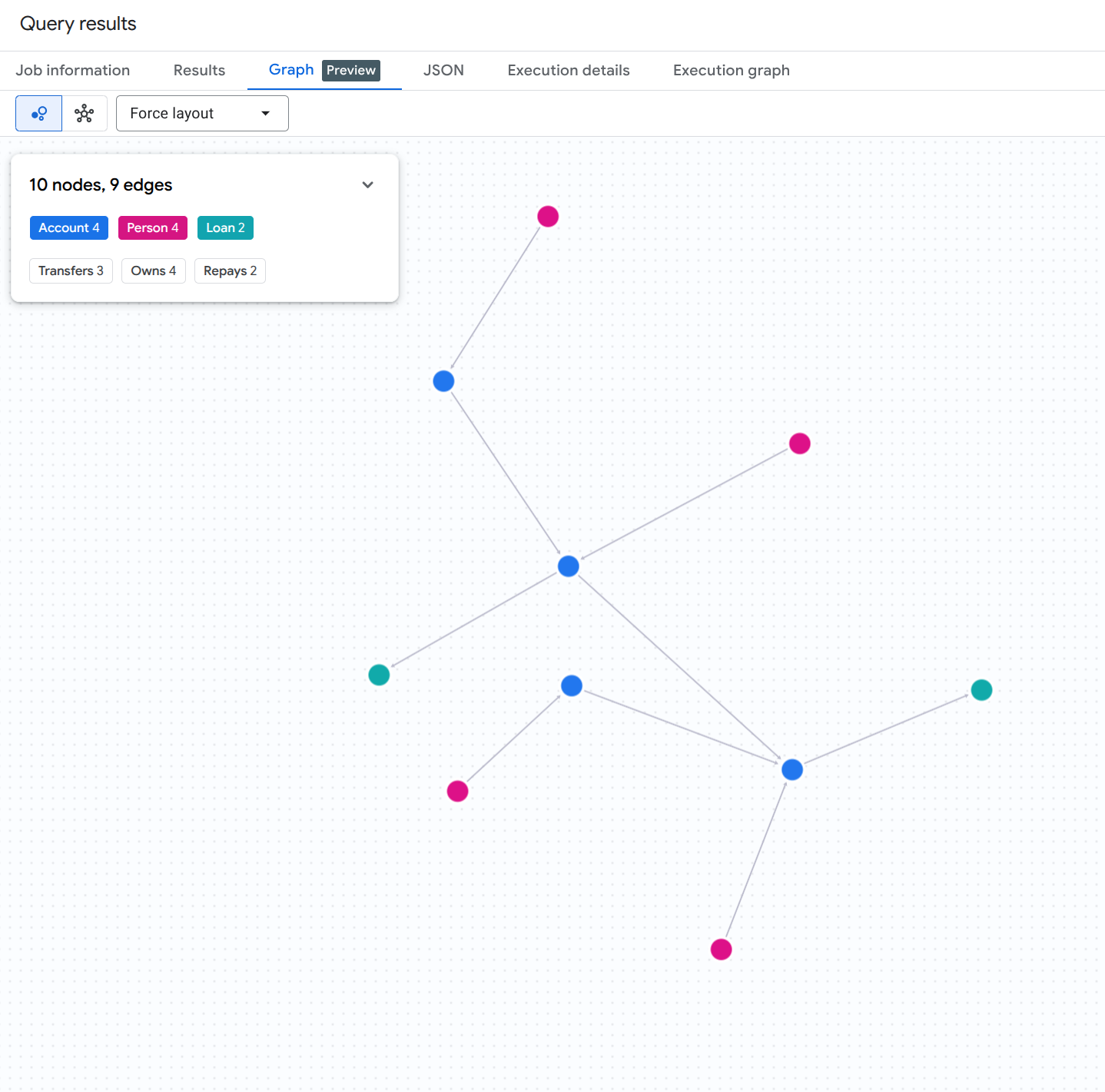
หากต้องการแสดงภาพกราฟทั้งหมดของบัญชี บุคคล และเงินกู้ ให้เรียกใช้การค้นหา SQL ต่อไปนี้ใน BigQuery Studio
GRAPH `fingraph_rag.FinGraph`
MATCH (src)-[e]->(dst)
RETURN TO_JSON([
  TO_JSON(src),
  TO_JSON(e),
  TO_JSON(dst)
  ]) AS result;
คุณควรเห็นผลการแสดงภาพกราฟที่คล้ายกับภาพนี้
7. สร้างการฝังสำหรับบันทึกการตรวจสอบ
เราสร้างการฝังข้อความสำหรับบันทึกการตรวจสอบที่ไม่มีโครงสร้างโดยตรงภายใน BigQuery โดยใช้AI.GENERATE_EMBEDDINGฟังก์ชันที่ให้ค่าเป็นตาราง (TVF) เพื่อเปิดใช้ส่วนการค้นหาเวกเตอร์ของไปป์ไลน์ RAG
สร้างการเชื่อมต่อระยะไกลของ BigQuery และให้สิทธิ์ IAM
BigQuery ML ต้องใช้CLOUD_RESOURCEการเชื่อมต่อเพื่อสื่อสารกับปลายทางการฝังของ Vertex AI อย่างปลอดภัย เรียกใช้คำสั่ง Bash ต่อไปนี้ใน Cloud Shell เพื่อสร้างการเชื่อมต่อ ค้นหาบัญชีบริการที่สร้างขึ้นโดยอัตโนมัติ และให้บทบาทผู้ใช้ Vertex AI (roles/aiplatform.user)
# 1. Set environment variables
export PROJECT_ID=$(gcloud config get-value project)
export LOCATION="us"
export CONNECTION_ID="vertex_ai_conn"

# 2. Create the BigQuery Cloud Resource Connection
bq mk --connection \
    --location=${LOCATION} \
    --project_id=${PROJECT_ID} \
    --connection_type=CLOUD_RESOURCE \
    ${CONNECTION_ID}

# 3. Retrieve the auto-generated Service Account ID associated with the connection
SA_ID=$(bq show --format=json --location=${LOCATION} --connection ${CONNECTION_ID} | jq -r '.cloudResource.serviceAccountId')
echo "Connection Service Account: ${SA_ID}"

# 4. Grant Vertex AI User (roles/aiplatform.user) permission to the Service Account
gcloud projects add-iam-policy-binding ${PROJECT_ID} \
    --member="serviceAccount:${SA_ID}" \
    --role="roles/aiplatform.user" \
    --condition=None
สร้างโมเดลการฝังระยะไกล
จากนั้นกําหนดโมเดลระยะไกลของ BigQuery ML ที่ลิงก์กับโมเดล text-embedding-005 ของ Vertex AI ผ่านการเชื่อมต่อที่ได้รับอนุญาตใหม่
CREATE OR REPLACE MODEL `fingraph_rag.embedding_model`
  REMOTE WITH CONNECTION `us.vertex_ai_conn`
  OPTIONS(ENDPOINT = 'text-embedding-005');
สร้างการฝัง
ตอนนี้ให้สร้างการฝังสำหรับตาราง AccountAudits โดยเรียกใช้ AI.GENERATE_EMBEDDING ในคําสั่ง FROM ของคําสั่ง UPDATE
UPDATE `fingraph_rag.AccountAudits` target
SET embedding = source.embedding
FROM AI.GENERATE_EMBEDDING(
  MODEL `fingraph_rag.embedding_model`,
  (SELECT id, audit_details AS content FROM `fingraph_rag.AccountAudits` WHERE ARRAY_LENGTH(embedding) = 0)
) source
WHERE target.id = source.id;
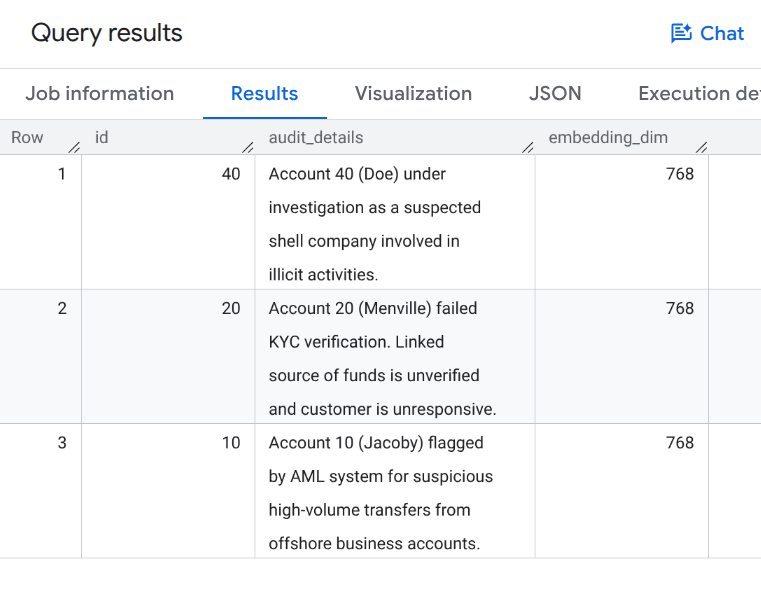
ยืนยันมิติข้อมูลเวกเตอร์ที่สร้างขึ้น
เรียกใช้การค้นหาต่อไปนี้เพื่อยืนยันว่ามีการสร้างเวกเตอร์ฝัง
SELECT id, audit_details, ARRAY_LENGTH(embedding) AS embedding_dim
FROM `fingraph_rag.AccountAudits`;
คุณควรเห็นเอาต์พุตการค้นหาที่แสดงการฝังเวกเตอร์แบบ 768 มิติที่มีลักษณะคล้ายกับตัวอย่างต่อไปนี้
8. กำหนดค่า GraphRAG Retriever
ตอนนี้เราจะสร้างตัวดึงข้อมูล LangChain ที่กำหนดเองในสภาพแวดล้อม Python ตัวดึงข้อมูลนี้รวมการค้นหาเวกเตอร์เชิงความหมาย (เพื่อค้นหาจุดเริ่มต้นที่เกี่ยวข้อง) เข้ากับคำค้นหา MATCH กราฟดั้งเดิม (เพื่อสำรวจความสัมพันธ์)
เพิ่มโค้ดต่อไปนี้ลงในสคริปต์ Python graphrag_aml.py
from langchain_core.documents import Document
from langchain_core.retrievers import BaseRetriever
from typing import List

class FinGraphRetriever(BaseRetriever):
    project: str
    dataset: str

    def _get_relevant_documents(self, query: str) -> List[Document]:
        # 1. Vector Search
        vector_query = f"""
            SELECT id, audit_details
            FROM `{self.dataset}.AccountAudits`
            ORDER BY COSINE_DISTANCE(
                embedding,
                (
                    SELECT embedding
                    FROM AI.GENERATE_EMBEDDING(
                        MODEL `{self.dataset}.embedding_model`,
                        (SELECT @query AS content)
                    )
                )
            )
            LIMIT 1
        """
        res = bq_client.query(vector_query, job_config=bigquery.QueryJobConfig(
            query_parameters=[bigquery.ScalarQueryParameter("query", "STRING", query)]
        )).result()

        start_id = None
        audit_text = ""
        for row in res:
            start_id = row.id
            audit_text = row.audit_details

        if not start_id: return []

        # 2. Native Graph Traversal
        graph_query = f"""
            GRAPH `{self.dataset}.FinGraph`
            MATCH
              (sender_person:Person)-[:Owns]->(sender_acc:Account)
              -[tx:Transfers]->
              (a:Account)
              -[repays:Repays]->(l:Loan),
              (owner:Person)-[:Owns]->(a)
            WHERE a.id = @id
            RETURN
              owner.name as owner_name,
              a.type as account_type,
              sender_person.name as sender_name,
              tx.amount as transfer_amount,
              repays.amount as repayment_amount,
              l.id as loan_id
        """
        graph_res = bq_client.query(graph_query, job_config=bigquery.QueryJobConfig(
            query_parameters=[bigquery.ScalarQueryParameter("id", "INT64", start_id)]
        )).result()

        context_docs = [Document(page_content=f"Primary Audit Log (Target Account): {audit_text}")]
        sender_names = []
        for row in graph_res:
            sender_names.append(row['sender_name'])
            doc_str = (f"Account Owner: {row['owner_name']} (Account Type: {row['account_type']}). "
                       f"Received transfer of ${row['transfer_amount']} from {row['sender_name']}. "
                       f"Made loan repayment of ${row['repayment_amount']} to Loan {row['loan_id']}.")
            context_docs.append(Document(page_content=doc_str))

        if sender_names:
            names_list = "','".join(sender_names)
            sender_audit_query = f"""
                SELECT p.name, au.audit_details
                FROM `{self.dataset}.AccountAudits` au
                JOIN `{self.dataset}.Account` a ON au.id = a.id
                JOIN `{self.dataset}.PersonOwnAccount` poa ON a.id = poa.account_id
                JOIN `{self.dataset}.Person` p ON poa.id = p.id
                WHERE p.name IN ('{names_list}')
            """
            sender_audits = bq_client.query(sender_audit_query).result()
            for row in sender_audits:
                context_docs.append(Document(page_content=f"Audit Log for Sender {row['name']}: {row['audit_details']}"))

        return context_docs
9. ดำเนินการตรวจสอบการประพฤติมิชอบ
สุดท้าย เราจะเรียกใช้ไปป์ไลน์ GraphRAG เพื่อสร้างรายงานการประพฤติมิชอบแบบละเอียด LLM จะใช้บริบทที่ดึงข้อมูลโดยเครื่องมือดึงข้อมูลกราฟที่กำหนดเองของเราเพื่อตอบพรอมต์
เพิ่มโค้ดต่อไปนี้ลงในสคริปต์ graphrag_aml.py แล้วดำเนินการโดยใช้ python graphrag_aml.py
from langchain_google_vertexai import ChatVertexAI
from langchain_core.prompts import ChatPromptTemplate
from langchain_core.output_parsers import StrOutputParser

# Initialize the LLM and the Retriever
llm = ChatVertexAI(model_name=MODEL_NAME)
retriever = FinGraphRetriever(project=GCP_PROJECT_ID, dataset=BQ_DATASET_ID)

# Define the Prompt
prompt = ChatPromptTemplate.from_template("""
You are a Lead Fraud Analyst. Use the following audit logs and graph transaction history to answer the question.
Your goal is to connect the dots between the entities and explain the flow of funds.
If you see transfers from flagged users or shell companies, highlight the money laundering risk.

Context: {context}

Question: {question}

Detailed Fraud Report:
""")

# Create the LangChain
chain = (
    {"context": retriever , "question": lambda x: x}
    | prompt
    | llm
    | StrOutputParser()
)

# Execute the chain
question = "Why is Menville's loan repayment at risk? Flag any suspicious activity if you notice."
print(chain.invoke(question))
graphrag_aml.py สคริปต์ที่สมบูรณ์
สําหรับการอ้างอิง graphrag_aml.py สคริปต์ที่สมบูรณ์ควรมีลักษณะดังนี้
import vertexai
from google.cloud import bigquery
from langchain_core.documents import Document
from langchain_core.retrievers import BaseRetriever
from typing import List
from langchain_google_vertexai import ChatVertexAI
from langchain_core.prompts import ChatPromptTemplate
from langchain_core.output_parsers import StrOutputParser

# Configuration
GCP_PROJECT_ID = "<YOUR_PROJECT_ID>"
REGION = "us-central1"
BQ_DATASET_ID = "fingraph_rag"
MODEL_NAME = "gemini-2.5-flash"

# Initialize clients
bq_client = bigquery.Client(project=GCP_PROJECT_ID)
vertexai.init(project=GCP_PROJECT_ID, location=REGION)

class FinGraphRetriever(BaseRetriever):
    project: str
    dataset: str

    def _get_relevant_documents(self, query: str) -> List[Document]:
        # 1. Vector Search using Cosine Distance
        vector_query = f"""
            SELECT id, audit_details
            FROM `{self.dataset}.AccountAudits`
            ORDER BY COSINE_DISTANCE(
                embedding,
                (
                    SELECT embedding
                    FROM AI.GENERATE_EMBEDDING(
                        MODEL `{self.dataset}.embedding_model`,
                        (SELECT @query AS content)
                    )
                )
            )
            LIMIT 1
        """
        res = bq_client.query(vector_query, job_config=bigquery.QueryJobConfig(
            query_parameters=[bigquery.ScalarQueryParameter("query", "STRING", query)]
        )).result()

        start_id = None
        audit_text = ""
        for row in res:
            start_id = row.id
            audit_text = row.audit_details

        if not start_id: return []

        # 2. Native Graph Traversal (GQL MATCH)
        graph_query = f"""
            GRAPH `{self.dataset}.FinGraph`
            MATCH
              (sender_person:Person)-[:Owns]->(sender_acc:Account)
              -[tx:Transfers]->
              (a:Account)
              -[repays:Repays]->(l:Loan),
              (owner:Person)-[:Owns]->(a)
            WHERE a.id = @id
            RETURN
              owner.name as owner_name,
              a.type as account_type,
              sender_person.name as sender_name,
              tx.amount as transfer_amount,
              repays.amount as repayment_amount,
              l.id as loan_id
        """
        graph_res = bq_client.query(graph_query, job_config=bigquery.QueryJobConfig(
            query_parameters=[bigquery.ScalarQueryParameter("id", "INT64", start_id)]
        )).result()

        context_docs = [Document(page_content=f"Primary Audit Log (Target Account): {audit_text}")]
        sender_names = []
        for row in graph_res:
            sender_names.append(row['sender_name'])
            doc_str = (f"Account Owner: {row['owner_name']} (Account Type: {row['account_type']}). "
                       f"Received transfer of ${row['transfer_amount']} from {row['sender_name']}. "
                       f"Made loan repayment of ${row['repayment_amount']} to Loan {row['loan_id']}.")
            context_docs.append(Document(page_content=doc_str))

        if sender_names:
            names_list = "','".join(sender_names)
            sender_audit_query = f"""
                SELECT p.name, au.audit_details
                FROM `{self.dataset}.AccountAudits` au
                JOIN `{self.dataset}.Account` a ON au.id = a.id
                JOIN `{self.dataset}.PersonOwnAccount` poa ON a.id = poa.account_id
                JOIN `{self.dataset}.Person` p ON poa.id = p.id
                WHERE p.name IN ('{names_list}')
            """
            sender_audits = bq_client.query(sender_audit_query).result()
            for row in sender_audits:
                context_docs.append(Document(page_content=f"Audit Log for Sender {row['name']}: {row['audit_details']}"))

        return context_docs

# Initialize LLM & Retriever
llm = ChatVertexAI(model_name=MODEL_NAME)
retriever = FinGraphRetriever(project=GCP_PROJECT_ID, dataset=BQ_DATASET_ID)

prompt = ChatPromptTemplate.from_template("""
You are a Lead Fraud Analyst. Use the following audit logs and graph transaction history to answer the question.
Your goal is to connect the dots between the entities and explain the flow of funds.
If you see transfers from flagged users or shell companies, highlight the money laundering risk.

Context: {context}

Question: {question}

Detailed Fraud Report:
""")

chain = (
    {"context": retriever, "question": lambda x: x}
    | prompt
    | llm
    | StrOutputParser()
)

question = "Why is Menville's loan repayment at risk? Flag any suspicious activity if you notice."
print(chain.invoke(question))
คุณควรเห็นเอาต์พุตที่คล้ายกับรายงานการวิเคราะห์ LLM ตัวอย่างนี้

10. สร้างภาพเส้นทางการฟอกเงิน
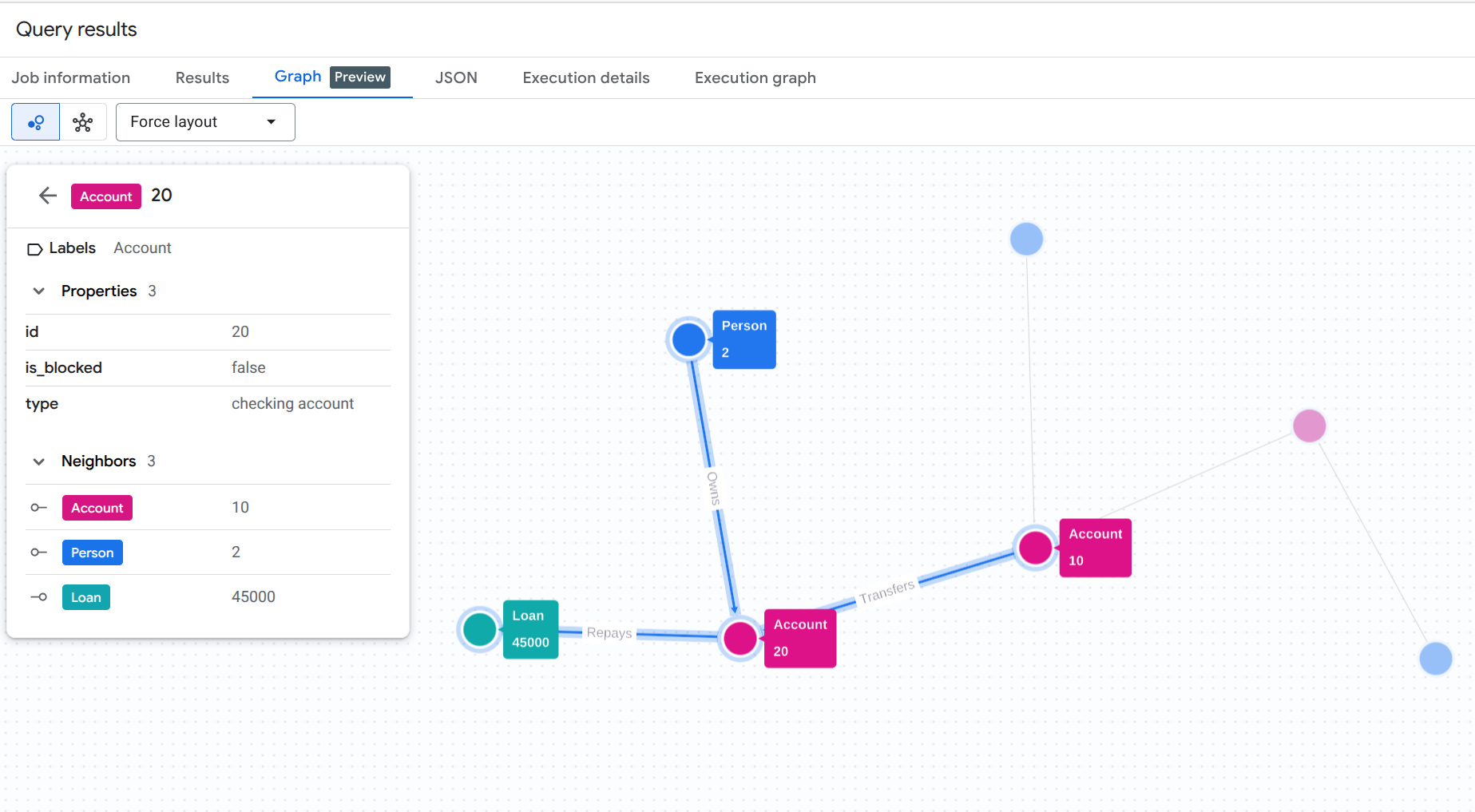
หากต้องการทำความเข้าใจเส้นทางการฟอกเงินที่เราเพิ่งค้นพบโดยอัตโนมัติ คุณสามารถเรียกใช้คำค้นหาการแสดงภาพกราฟในคอนโซล BigQuery Studio ได้
เรียกใช้การค้นหานี้ใน BigQuery Studio (ตรวจสอบว่าคุณได้เปิดใช้ฟีเจอร์การแสดงภาพกราฟหรือคลิกแท็บกราฟแล้ว หากมี)
GRAPH `fingraph_rag.FinGraph`
 MATCH
   (p_shell:Person)-[o1:Owns]->(acc_shell:Account)-[t1:Transfers]->(acc_fraud:Account)-[t2:Transfers]->(acc_target:Account)-[r:Repays]->(l:Loan),
   (p_fraud:Person)-[o2:Owns]->(acc_fraud),
   (p_target:Person)-[o3:Owns]->(acc_target)
 WHERE p_target.name = 'Menville' AND p_fraud.name = 'Jacoby' AND p_shell.name = 'Doe'
 RETURN TO_JSON([
  TO_JSON(p_shell), TO_JSON(o1), TO_JSON(acc_shell),
  TO_JSON(t1), TO_JSON(acc_fraud), TO_JSON(p_fraud), TO_JSON(o2),
  TO_JSON(t2), TO_JSON(acc_target), TO_JSON(p_target), TO_JSON(o3),
  TO_JSON(r), TO_JSON(l)
]) AS result;
การค้นหา GQL นี้จะติดตามเส้นทางทั้งหมดจากเจ้าของบริษัทเชลล์ที่น่าสงสัย (Doe) ผ่านตัวกลาง (Jacoby) ไปยังเป้าหมายสุดท้าย (Menville) และการชำระคืนเงินกู้
คุณควรเห็นผลการแสดงภาพกราฟที่คล้ายกับภาพนี้
11. ล้างข้อมูล
โปรดลบทรัพยากรที่สร้างขึ้นระหว่างการทำ Codelab นี้เพื่อหลีกเลี่ยงการเรียกเก็บเงินอย่างต่อเนื่องกับบัญชี Google Cloud
ลบชุดข้อมูล BigQuery และการเชื่อมต่อทรัพยากรระบบคลาวด์
# Delete the BigQuery dataset
bq rm -r -f $PROJECT_ID:fingraph_rag

# Delete the BigQuery Cloud Resource Connection
bq rm --connection --location=us vertex_ai_conn
ยืนยันว่าทรัพยากรถูกลบแล้ว
bq ls --project_id $PROJECT_ID
bq ls --connection --location=us
12. ขอแสดงความยินดี
ยินดีด้วย คุณสร้างแอปพลิเคชัน RAG และวิเคราะห์ลักษณะการทำงานของแอปพลิเคชันเรียบร้อยแล้ว คุณได้แสดงวิธีใช้ความสามารถของกราฟและการค้นหาแบบเวกเตอร์ดั้งเดิมของ BigQuery เพื่อดำเนินการ GraphRAG ซึ่งตรวจจับรูปแบบการฟอกเงินโดยไม่ต้องใช้ ETL
สิ่งที่คุณได้เรียนรู้
- วิธีสร้างกราฟพร็อพเพอร์ตี้ใน BigQuery บนตารางมาตรฐาน
- วิธีสร้างและจัดเก็บการฝังเวกเตอร์โดยใช้ BigQuery ML
- วิธีรวมการสำรวจกราฟ BigQuery และการค้นหาเวกเตอร์เข้ากับ LangChain Retriever
- LLM สังเคราะห์บันทึกการตรวจสอบเชิงความหมายด้วยโทโพโลยีของกราฟเพื่อลดผลบวกลวงได้อย่างไร
ขั้นตอนถัดไป
- สํารวจภาพรวมของกราฟพร็อพเพอร์ตี้ BigQuery
- ลองใช้รูปแบบภาษาการค้นหากราฟ BigQuery (GQL) เพิ่มเติม