

1. Introduzione
In questo codelab, creerai una soluzione Graph Retrieval-Augmented Generation (GraphRAG) per rilevare il riciclaggio di denaro e le frodi finanziarie. Utilizzerai Vertex AI, Vector Search e le funzionalità grafiche native di BigQuery, coordinate tramite LangChain. Al termine di questo lab, vedrai come un modello linguistico di grandi dimensioni (LLM) può identificare l'instradamento illecito di fondi sintetizzando log di controllo semantici e reti transazionali complesse.
Flusso dell'architettura GraphRAG
+------------------+     1. Vector Search      +---------------------+
| User Prompt /    | ------------------------> | BigQuery ML         |
| Investigation    |                           | (AccountAudits)     |
+------------------+                           +---------------------+
         |                                                |
         |                                                | 2. Seed Entity ID
         v                                                v
+------------------+     3. GQL Traversal      +---------------------+
| LangChain        | <------------------------ | BigQuery Property   |
| Graph Retriever  |                           | Graph (FinGraph)    |
+------------------+                           +---------------------+
         |
         | 4. Synthesized Context
         v
+------------------+
| Gemini 2.5 Flash | ---> Detailed Fraud Report
+------------------+
In questo lab proverai a:
- Fase 1: configurazione del set di dati e del grafico delle proprietà: crea tabelle finanziarie relazionali e costruisci un
PROPERTY GRAPHBigQuery nativo. - Fase 2: generazione di incorporamenti vettoriali semantici: genera incorporamenti di testo direttamente in SQL per i log di controllo utilizzando
AI.GENERATE_EMBEDDING(text-embedding-005). - Fase 3: recupero personalizzato LangChain GraphRAG: crea un recupero Python personalizzato che combini la similarità vettoriale (
COSINE_DISTANCE) e gli attraversamenti di percorso GQL ISO. - Fase 4: visualizzazione del ragionamento e del percorso della frode LLM: esegui una catena di ragionamento di Gemini per esporre i cicli illeciti di riciclaggio di denaro e visualizzare i percorsi in BigQuery Studio.
Che cosa ti serve
- Un browser web come Chrome.
- Un progetto Google Cloud con la fatturazione abilitata.
Questo codelab è pensato per sviluppatori, data engineer e professionisti dell'AI di tutti i livelli, inclusi i principianti.
Durata stimata: 35 minuti
Costo stimato: meno di 2 € (utilizza l'elaborazione delle query Vertex AI e BigQuery con pagamento a consumo).
2. Prima di iniziare
Crea un progetto Google Cloud
- Nella console Google Cloud, seleziona o crea un progetto Google Cloud.
- Verifica che la fatturazione sia attivata per il tuo progetto Cloud.
Avvia Cloud Shell
- Fai clic su Attiva Cloud Shell nella parte superiore della console Google Cloud.
- Verifica l'autenticazione:
gcloud auth list
- Configura le variabili di ambiente in Cloud Shell:
export GCP_PROJECT=$(gcloud config get-value project)
export REGION="us-central1"
export BQ_DATASET="fingraph_rag"
gcloud config set project $GCP_PROJECT
Abilita API
Esegui questo comando per abilitare tutte le API richieste:
gcloud services enable \
 bigquery.googleapis.com \
 aiplatform.googleapis.com \
 bigqueryreservation.googleapis.com
Crea la prenotazione e l'assegnazione BigQuery
Per eseguire query GQL, devi disporre di una prenotazione che utilizzi la versione Enterprise o Enterprise Plus, creare una prenotazione Enterprise Edition con scalabilità automatica in Cloud Shell:
# 1. Create a BigQuery Enterprise reservation with 0 baseline slots and 100 max autoscaling slots
bq mk --reservation \
  --project_id=${GCP_PROJECT} \
  --location=US \
  --edition=ENTERPRISE \
  --slots=0 \
  --autoscale_max_slots=100 \
  --ignore_idle_slots=true \
  graphrag-bigquery-reservation

# 2. Assign your Cloud project to the newly created reservation for query execution
bq mk --reservation_assignment \
  --project_id=${GCP_PROJECT} \
  --location=US \
  --reservation_id=graphrag-bigquery-reservation \
  --job_type=QUERY \
  --assignee_type=PROJECT \
  --assignee_id=${GCP_PROJECT}
3. Configurazione e inizializzazione
In questo passaggio, configureremo un ambiente Python, installeremo le librerie richieste e inizializzeremo i client BigQuery e Vertex AI. Puoi eseguire questi comandi in Cloud Shell o in un ambiente Jupyter Notebook.
- Crea e attiva un ambiente virtuale Python:
python3 -m venv venv
source venv/bin/activate
- Installa i pacchetti Python richiesti:
pip install langchain-google-vertexai langchain-core google-cloud-bigquery vertexai
- Crea un file Python
graphrag_aml.pye aggiungi il codice di inizializzazione. Sostituisci
import vertexai
from google.cloud import bigquery

# Configuration
GCP_PROJECT_ID = "<YOUR_PROJECT_ID>"
REGION = "us-central1"
BQ_DATASET_ID = "fingraph_rag"
MODEL_NAME = "gemini-2.5-flash"

# Initialize clients
bq_client = bigquery.Client(project=GCP_PROJECT_ID)
vertexai.init(project=GCP_PROJECT_ID, location=REGION)
4. Crea tabelle e schema
Successivamente, definiamo lo schema per il nostro grafico finanziario creando un set di dati BigQuery e tabelle standard.
- Crea il set di dati BigQuery:
bq mk --location=US --dataset fingraph_rag
- Crea le tabelle. Puoi eseguire questa operazione nella UI di BigQuery Studio o tramite Cloud Shell. Ecco l'SQL:
CREATE TABLE IF NOT EXISTS `fingraph_rag.Account` (id INT64, create_time TIMESTAMP, is_blocked BOOL, type STRING);
CREATE TABLE IF NOT EXISTS `fingraph_rag.Loan` (id INT64, loan_amount FLOAT64, balance FLOAT64, create_time TIMESTAMP, interest_rate FLOAT64);
CREATE TABLE IF NOT EXISTS `fingraph_rag.Person` (id INT64, name STRING);
CREATE TABLE IF NOT EXISTS `fingraph_rag.AccountRepayLoan` (id INT64, loan_id INT64, amount FLOAT64, create_time TIMESTAMP);
CREATE TABLE IF NOT EXISTS `fingraph_rag.AccountTransferAccount` (id INT64, to_id INT64, amount FLOAT64, create_time TIMESTAMP);
CREATE TABLE IF NOT EXISTS `fingraph_rag.PersonOwnAccount` (id INT64, account_id INT64, create_time TIMESTAMP);
CREATE TABLE IF NOT EXISTS `fingraph_rag.AccountAudits` (id INT64, audit_timestamp TIMESTAMP, audit_details STRING, embedding ARRAY<FLOAT64>);
5. Inserisci il set di dati
Ora inseriremo le entità e le loro relazioni per formare la traccia del denaro. Questo set di dati rappresenta le attività sospette tra Doe (presunto proprietario di una società fittizia), Jacoby (intermediario), Menville (destinatario che non supera la procedura KYC) e Smith (spettatore innocente).
Esegui il seguente SQL per popolare le tabelle:
INSERT INTO `fingraph_rag.Account` VALUES
  (10,'2020-01-10 06:22:20.222',false,'brokerage account'),
  (20,'2020-01-27 17:55:09.206',false,'checking account'),
  (30,'2020-02-15 09:12:33.111',false,'savings account'),
  (40,'2019-11-05 14:33:10.000',false,'business account');

INSERT INTO `fingraph_rag.Loan` VALUES
  (100,2022278.5,123359.0,'2020-03-18 16:42:57.719',0.064),
  (200,50000.0,45000.0,'2020-03-23 19:03:05.567',0.097),
  (300, 15000.0, 10000.0, '2020-05-10 10:00:00.000', 0.05);

INSERT INTO `fingraph_rag.Person` VALUES
  (1,'Jacoby'), (2,'Menville'), (3,'Smith'), (4,'Doe');

INSERT INTO `fingraph_rag.AccountTransferAccount` VALUES
  (40,10,25000.0,'2020-08-01 10:00:00.000'),
  (10,20,24000.0,'2020-08-29 15:28:58.647'),
  (30,20,150.0,'2020-09-01 12:00:00.000');

INSERT INTO `fingraph_rag.AccountRepayLoan` VALUES
  (10,100,56809.8,'2020-12-12 07:25:02.597'),
  (20,200,20000.0,'2021-01-18 01:40:25.317');

INSERT INTO `fingraph_rag.PersonOwnAccount` VALUES
  (1,10,'2020-01-10 06:22:20.222'), (2,20,'2020-01-27 17:55:09.206'),
  (3,30,'2020-02-15 09:12:33.111'), (4,40,'2019-11-05 14:33:10.000');

INSERT INTO `fingraph_rag.AccountAudits` (id, audit_timestamp, audit_details) VALUES
  (10, '2020-05-14 06:57:02', 'Account 10 (Jacoby) flagged by AML system for suspicious high-volume transfers from offshore business accounts.'),
  (20, '2021-03-09 02:51:45', 'Account 20 (Menville) failed KYC verification. Linked source of funds is unverified and customer is unresponsive.'),
  (40, '2020-07-20 09:00:00', 'Account 40 (Doe) under investigation as a suspected shell company involved in illicit activities.');
Verifica dei record inseriti
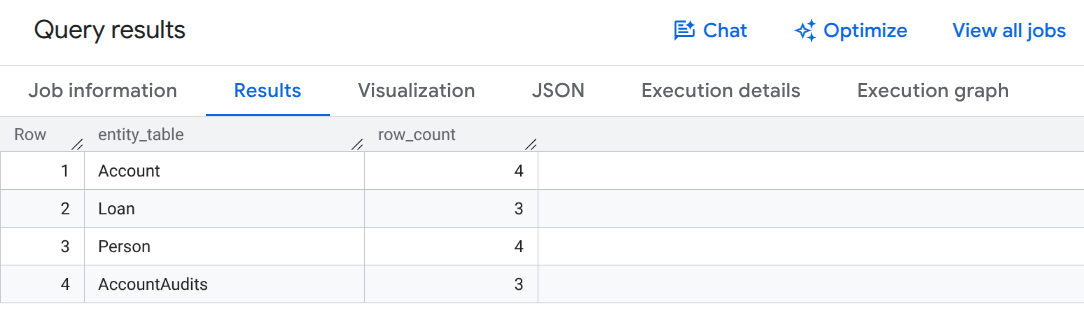
Esegui questa query per verificare i conteggi dei record nelle tabelle finanziarie:
SELECT 'Account' AS entity_table, COUNT(*) AS row_count FROM `fingraph_rag.Account`
UNION ALL SELECT 'Loan', COUNT(*) FROM `fingraph_rag.Loan`
UNION ALL SELECT 'Person', COUNT(*) FROM `fingraph_rag.Person`
UNION ALL SELECT 'AccountAudits', COUNT(*) FROM `fingraph_rag.AccountAudits`;
Dovresti visualizzare un output della query che conferma l'inserimento della riga simile a questo:
6. Crea un grafico delle proprietà BigQuery
Con i dati relazionali a disposizione, definiamo il FinGraph utilizzando il linguaggio DDL nativo di BigQuery. In questo modo viene creato un livello semantico sulle tabelle relazionali esistenti senza copiare o duplicare i dati.
Introduzione alla sintassi GQL ISO
I grafi delle proprietà BigQuery utilizzano pattern standard ISO Graph Query Language (GQL):
(node:Label)definisce i nodi delle entità (ad es.Account,Person,Loan).-[edge:LABEL]->definisce le relazioni dirette (ad es.Transfers,Repays,Owns).
Esegui la seguente istruzione SQL per creare il grafico delle proprietà:
CREATE OR REPLACE PROPERTY GRAPH `fingraph_rag.FinGraph`
 NODE TABLES (
   `fingraph_rag.Account` KEY (id) LABEL Account PROPERTIES (id, type, is_blocked),
   `fingraph_rag.Loan` KEY (id) LABEL Loan PROPERTIES (id, loan_amount, balance),
   `fingraph_rag.Person` KEY (id) LABEL Person PROPERTIES (id, name)
 )
 EDGE TABLES(
   `fingraph_rag.AccountRepayLoan`
     KEY (id, loan_id, create_time)
     SOURCE KEY (id) REFERENCES `fingraph_rag.Account` (id)
     DESTINATION KEY (loan_id) REFERENCES `fingraph_rag.Loan` (id)
     LABEL Repays PROPERTIES (amount, create_time),
   `fingraph_rag.AccountTransferAccount`
     KEY (id, to_id, create_time)
     SOURCE KEY (id) REFERENCES `fingraph_rag.Account` (id)
     DESTINATION KEY (to_id) REFERENCES `fingraph_rag.Account` (id)
     LABEL Transfers PROPERTIES (amount, create_time),
   `fingraph_rag.PersonOwnAccount`
     KEY (id, account_id)
     SOURCE KEY (id) REFERENCES `fingraph_rag.Person` (id)
     DESTINATION KEY (account_id) REFERENCES `fingraph_rag.Account` (id)
     LABEL Owns PROPERTIES (create_time)
 );
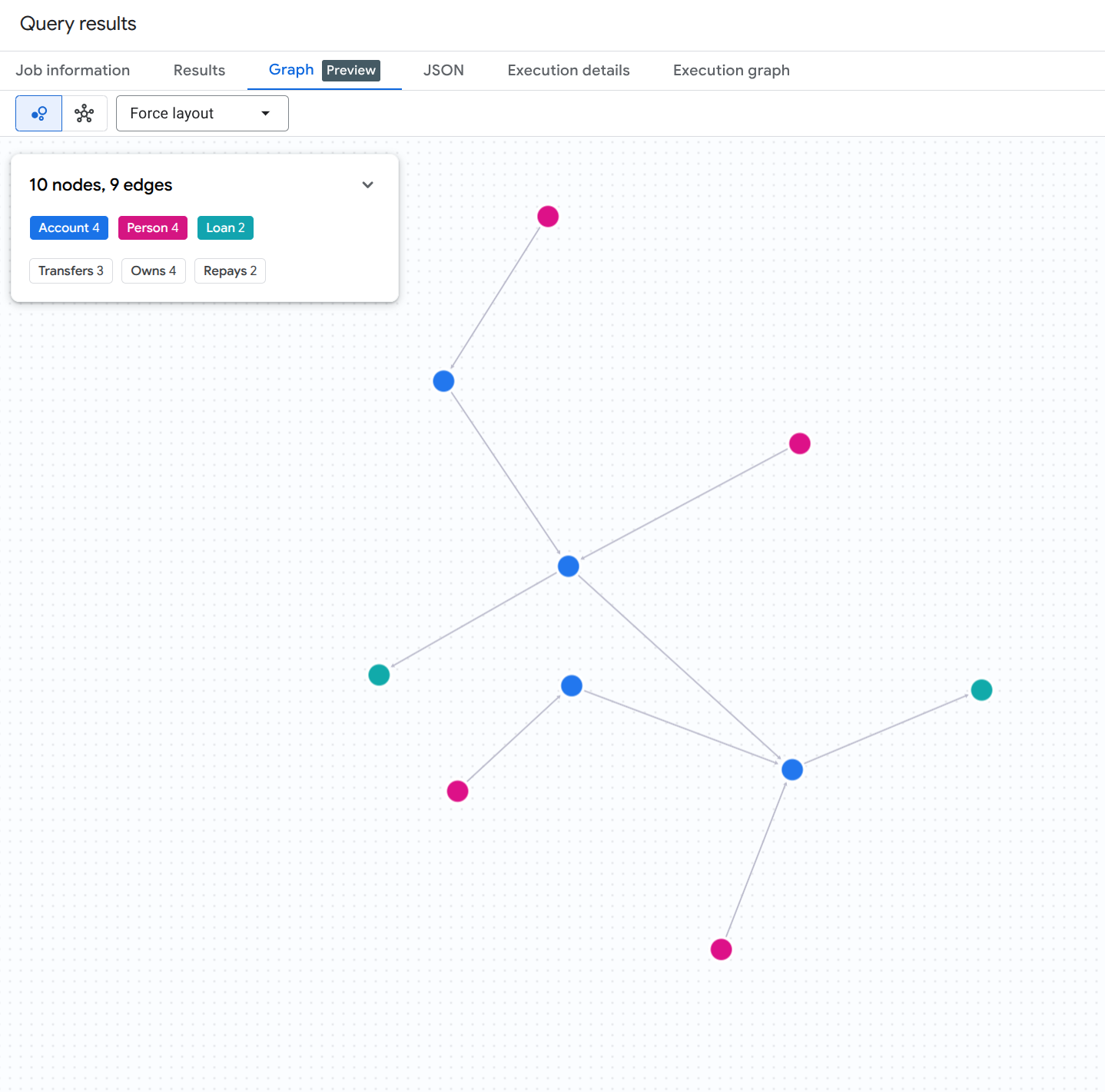
Per visualizzare l'intero grafico di conti, persone e prestiti, esegui la seguente query SQL in BigQuery Studio:
GRAPH `fingraph_rag.FinGraph`
MATCH (src)-[e]->(dst)
RETURN TO_JSON([
  TO_JSON(src),
  TO_JSON(e),
  TO_JSON(dst)
  ]) AS result;
Dovresti visualizzare un risultato di visualizzazione del grafico simile a questo:
7. Generare embedding per gli audit log
Per attivare la parte di ricerca vettoriale della nostra pipeline RAG, generiamo embedding di testo per i log di controllo non strutturati direttamente in BigQuery utilizzando la funzione con valori di tabella (TVF) AI.GENERATE_EMBEDDING.
Crea una connessione remota BigQuery e concedi autorizzazioni IAM
BigQuery ML richiede una connessione CLOUD_RESOURCE per comunicare in modo sicuro con gli endpoint di incorporamento di Vertex AI. Esegui i seguenti comandi bash in Cloud Shell per creare la connessione, scoprire il service account generato automaticamente e concedere il ruolo Utente Vertex AI (roles/aiplatform.user):
# 1. Set environment variables
export PROJECT_ID=$(gcloud config get-value project)
export LOCATION="us"
export CONNECTION_ID="vertex_ai_conn"

# 2. Create the BigQuery Cloud Resource Connection
bq mk --connection \
    --location=${LOCATION} \
    --project_id=${PROJECT_ID} \
    --connection_type=CLOUD_RESOURCE \
    ${CONNECTION_ID}

# 3. Retrieve the auto-generated Service Account ID associated with the connection
SA_ID=$(bq show --format=json --location=${LOCATION} --connection ${CONNECTION_ID} | jq -r '.cloudResource.serviceAccountId')
echo "Connection Service Account: ${SA_ID}"

# 4. Grant Vertex AI User (roles/aiplatform.user) permission to the Service Account
gcloud projects add-iam-policy-binding ${PROJECT_ID} \
    --member="serviceAccount:${SA_ID}" \
    --role="roles/aiplatform.user" \
    --condition=None
Crea modello di embedding remoto
Successivamente, definisci un modello remoto BigQuery ML che si colleghi al modello text-embedding-005 di Vertex AI tramite la connessione appena autorizzata:
CREATE OR REPLACE MODEL `fingraph_rag.embedding_model`
  REMOTE WITH CONNECTION `us.vertex_ai_conn`
  OPTIONS(ENDPOINT = 'text-embedding-005');
Genera incorporamenti
Ora genera gli embedding per la tabella AccountAudits chiamando AI.GENERATE_EMBEDDING nella clausola FROM di un'istruzione UPDATE:
UPDATE `fingraph_rag.AccountAudits` target
SET embedding = source.embedding
FROM AI.GENERATE_EMBEDDING(
  MODEL `fingraph_rag.embedding_model`,
  (SELECT id, audit_details AS content FROM `fingraph_rag.AccountAudits` WHERE ARRAY_LENGTH(embedding) = 0)
) source
WHERE target.id = source.id;
Verifica le dimensioni del vettore generate
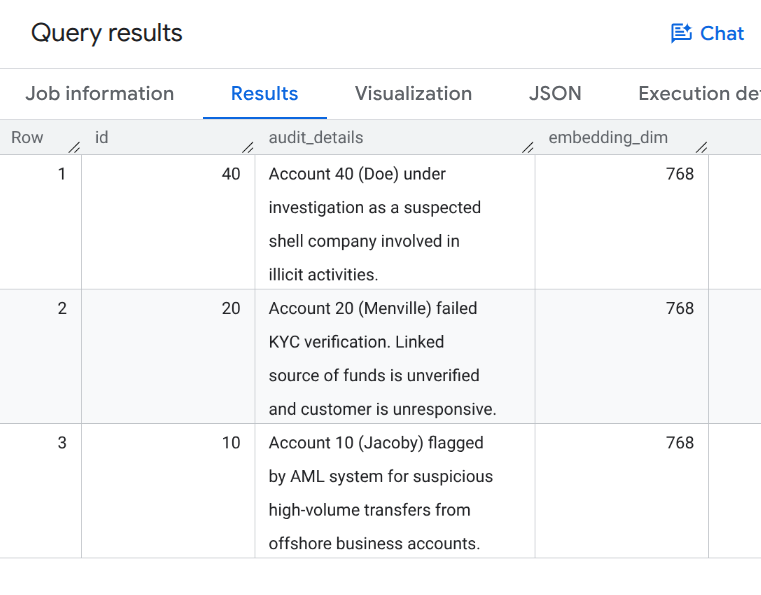
Esegui la seguente query per verificare che gli incorporamenti vettoriali siano stati compilati:
SELECT id, audit_details, ARRAY_LENGTH(embedding) AS embedding_dim
FROM `fingraph_rag.AccountAudits`;
Dovresti visualizzare l'output della query che mostra incorporamenti vettoriali a 768 dimensioni simili a questo:
8. Definisci il recuperatore GraphRAG
Ora creeremo un retriever LangChain personalizzato nel nostro ambiente Python. Questo recuperatore combina la ricerca vettoriale semantica (per trovare punti di partenza pertinenti) con le query MATCH del grafico nativo (per attraversare le relazioni).
Aggiungi il seguente codice allo script Python graphrag_aml.py:
from langchain_core.documents import Document
from langchain_core.retrievers import BaseRetriever
from typing import List

class FinGraphRetriever(BaseRetriever):
    project: str
    dataset: str

    def _get_relevant_documents(self, query: str) -> List[Document]:
        # 1. Vector Search
        vector_query = f"""
            SELECT id, audit_details
            FROM `{self.dataset}.AccountAudits`
            ORDER BY COSINE_DISTANCE(
                embedding,
                (
                    SELECT embedding
                    FROM AI.GENERATE_EMBEDDING(
                        MODEL `{self.dataset}.embedding_model`,
                        (SELECT @query AS content)
                    )
                )
            )
            LIMIT 1
        """
        res = bq_client.query(vector_query, job_config=bigquery.QueryJobConfig(
            query_parameters=[bigquery.ScalarQueryParameter("query", "STRING", query)]
        )).result()

        start_id = None
        audit_text = ""
        for row in res:
            start_id = row.id
            audit_text = row.audit_details

        if not start_id: return []

        # 2. Native Graph Traversal
        graph_query = f"""
            GRAPH `{self.dataset}.FinGraph`
            MATCH
              (sender_person:Person)-[:Owns]->(sender_acc:Account)
              -[tx:Transfers]->
              (a:Account)
              -[repays:Repays]->(l:Loan),
              (owner:Person)-[:Owns]->(a)
            WHERE a.id = @id
            RETURN
              owner.name as owner_name,
              a.type as account_type,
              sender_person.name as sender_name,
              tx.amount as transfer_amount,
              repays.amount as repayment_amount,
              l.id as loan_id
        """
        graph_res = bq_client.query(graph_query, job_config=bigquery.QueryJobConfig(
            query_parameters=[bigquery.ScalarQueryParameter("id", "INT64", start_id)]
        )).result()

        context_docs = [Document(page_content=f"Primary Audit Log (Target Account): {audit_text}")]
        sender_names = []
        for row in graph_res:
            sender_names.append(row['sender_name'])
            doc_str = (f"Account Owner: {row['owner_name']} (Account Type: {row['account_type']}). "
                       f"Received transfer of ${row['transfer_amount']} from {row['sender_name']}. "
                       f"Made loan repayment of ${row['repayment_amount']} to Loan {row['loan_id']}.")
            context_docs.append(Document(page_content=doc_str))

        if sender_names:
            names_list = "','".join(sender_names)
            sender_audit_query = f"""
                SELECT p.name, au.audit_details
                FROM `{self.dataset}.AccountAudits` au
                JOIN `{self.dataset}.Account` a ON au.id = a.id
                JOIN `{self.dataset}.PersonOwnAccount` poa ON a.id = poa.account_id
                JOIN `{self.dataset}.Person` p ON poa.id = p.id
                WHERE p.name IN ('{names_list}')
            """
            sender_audits = bq_client.query(sender_audit_query).result()
            for row in sender_audits:
                context_docs.append(Document(page_content=f"Audit Log for Sender {row['name']}: {row['audit_details']}"))

        return context_docs
9. Esegui l'indagine sulle frodi
Infine, eseguiamo la pipeline GraphRAG per generare un report dettagliato sulle frodi. L'LLM utilizzerà il contesto recuperato dal nostro recuperatore di grafici personalizzato per rispondere al prompt.
Aggiungi il seguente codice allo script graphrag_aml.py ed eseguilo utilizzando python graphrag_aml.py:
from langchain_google_vertexai import ChatVertexAI
from langchain_core.prompts import ChatPromptTemplate
from langchain_core.output_parsers import StrOutputParser

# Initialize the LLM and the Retriever
llm = ChatVertexAI(model_name=MODEL_NAME)
retriever = FinGraphRetriever(project=GCP_PROJECT_ID, dataset=BQ_DATASET_ID)

# Define the Prompt
prompt = ChatPromptTemplate.from_template("""
You are a Lead Fraud Analyst. Use the following audit logs and graph transaction history to answer the question.
Your goal is to connect the dots between the entities and explain the flow of funds.
If you see transfers from flagged users or shell companies, highlight the money laundering risk.

Context: {context}

Question: {question}

Detailed Fraud Report:
""")

# Create the LangChain
chain = (
    {"context": retriever , "question": lambda x: x}
    | prompt
    | llm
    | StrOutputParser()
)

# Execute the chain
question = "Why is Menville's loan repayment at risk? Flag any suspicious activity if you notice."
print(chain.invoke(question))
Completa lo script graphrag_aml.py
A titolo di riferimento, lo script graphrag_aml.py completo dovrebbe avere questo aspetto:
import vertexai
from google.cloud import bigquery
from langchain_core.documents import Document
from langchain_core.retrievers import BaseRetriever
from typing import List
from langchain_google_vertexai import ChatVertexAI
from langchain_core.prompts import ChatPromptTemplate
from langchain_core.output_parsers import StrOutputParser

# Configuration
GCP_PROJECT_ID = "<YOUR_PROJECT_ID>"
REGION = "us-central1"
BQ_DATASET_ID = "fingraph_rag"
MODEL_NAME = "gemini-2.5-flash"

# Initialize clients
bq_client = bigquery.Client(project=GCP_PROJECT_ID)
vertexai.init(project=GCP_PROJECT_ID, location=REGION)

class FinGraphRetriever(BaseRetriever):
    project: str
    dataset: str

    def _get_relevant_documents(self, query: str) -> List[Document]:
        # 1. Vector Search using Cosine Distance
        vector_query = f"""
            SELECT id, audit_details
            FROM `{self.dataset}.AccountAudits`
            ORDER BY COSINE_DISTANCE(
                embedding,
                (
                    SELECT embedding
                    FROM AI.GENERATE_EMBEDDING(
                        MODEL `{self.dataset}.embedding_model`,
                        (SELECT @query AS content)
                    )
                )
            )
            LIMIT 1
        """
        res = bq_client.query(vector_query, job_config=bigquery.QueryJobConfig(
            query_parameters=[bigquery.ScalarQueryParameter("query", "STRING", query)]
        )).result()

        start_id = None
        audit_text = ""
        for row in res:
            start_id = row.id
            audit_text = row.audit_details

        if not start_id: return []

        # 2. Native Graph Traversal (GQL MATCH)
        graph_query = f"""
            GRAPH `{self.dataset}.FinGraph`
            MATCH
              (sender_person:Person)-[:Owns]->(sender_acc:Account)
              -[tx:Transfers]->
              (a:Account)
              -[repays:Repays]->(l:Loan),
              (owner:Person)-[:Owns]->(a)
            WHERE a.id = @id
            RETURN
              owner.name as owner_name,
              a.type as account_type,
              sender_person.name as sender_name,
              tx.amount as transfer_amount,
              repays.amount as repayment_amount,
              l.id as loan_id
        """
        graph_res = bq_client.query(graph_query, job_config=bigquery.QueryJobConfig(
            query_parameters=[bigquery.ScalarQueryParameter("id", "INT64", start_id)]
        )).result()

        context_docs = [Document(page_content=f"Primary Audit Log (Target Account): {audit_text}")]
        sender_names = []
        for row in graph_res:
            sender_names.append(row['sender_name'])
            doc_str = (f"Account Owner: {row['owner_name']} (Account Type: {row['account_type']}). "
                       f"Received transfer of ${row['transfer_amount']} from {row['sender_name']}. "
                       f"Made loan repayment of ${row['repayment_amount']} to Loan {row['loan_id']}.")
            context_docs.append(Document(page_content=doc_str))

        if sender_names:
            names_list = "','".join(sender_names)
            sender_audit_query = f"""
                SELECT p.name, au.audit_details
                FROM `{self.dataset}.AccountAudits` au
                JOIN `{self.dataset}.Account` a ON au.id = a.id
                JOIN `{self.dataset}.PersonOwnAccount` poa ON a.id = poa.account_id
                JOIN `{self.dataset}.Person` p ON poa.id = p.id
                WHERE p.name IN ('{names_list}')
            """
            sender_audits = bq_client.query(sender_audit_query).result()
            for row in sender_audits:
                context_docs.append(Document(page_content=f"Audit Log for Sender {row['name']}: {row['audit_details']}"))

        return context_docs

# Initialize LLM & Retriever
llm = ChatVertexAI(model_name=MODEL_NAME)
retriever = FinGraphRetriever(project=GCP_PROJECT_ID, dataset=BQ_DATASET_ID)

prompt = ChatPromptTemplate.from_template("""
You are a Lead Fraud Analyst. Use the following audit logs and graph transaction history to answer the question.
Your goal is to connect the dots between the entities and explain the flow of funds.
If you see transfers from flagged users or shell companies, highlight the money laundering risk.

Context: {context}

Question: {question}

Detailed Fraud Report:
""")

chain = (
    {"context": retriever, "question": lambda x: x}
    | prompt
    | llm
    | StrOutputParser()
)

question = "Why is Menville's loan repayment at risk? Flag any suspicious activity if you notice."
print(chain.invoke(question))
Dovresti visualizzare un output simile a questo report di analisi LLM di esempio:

10. Visualizzare la catena del riciclaggio di denaro
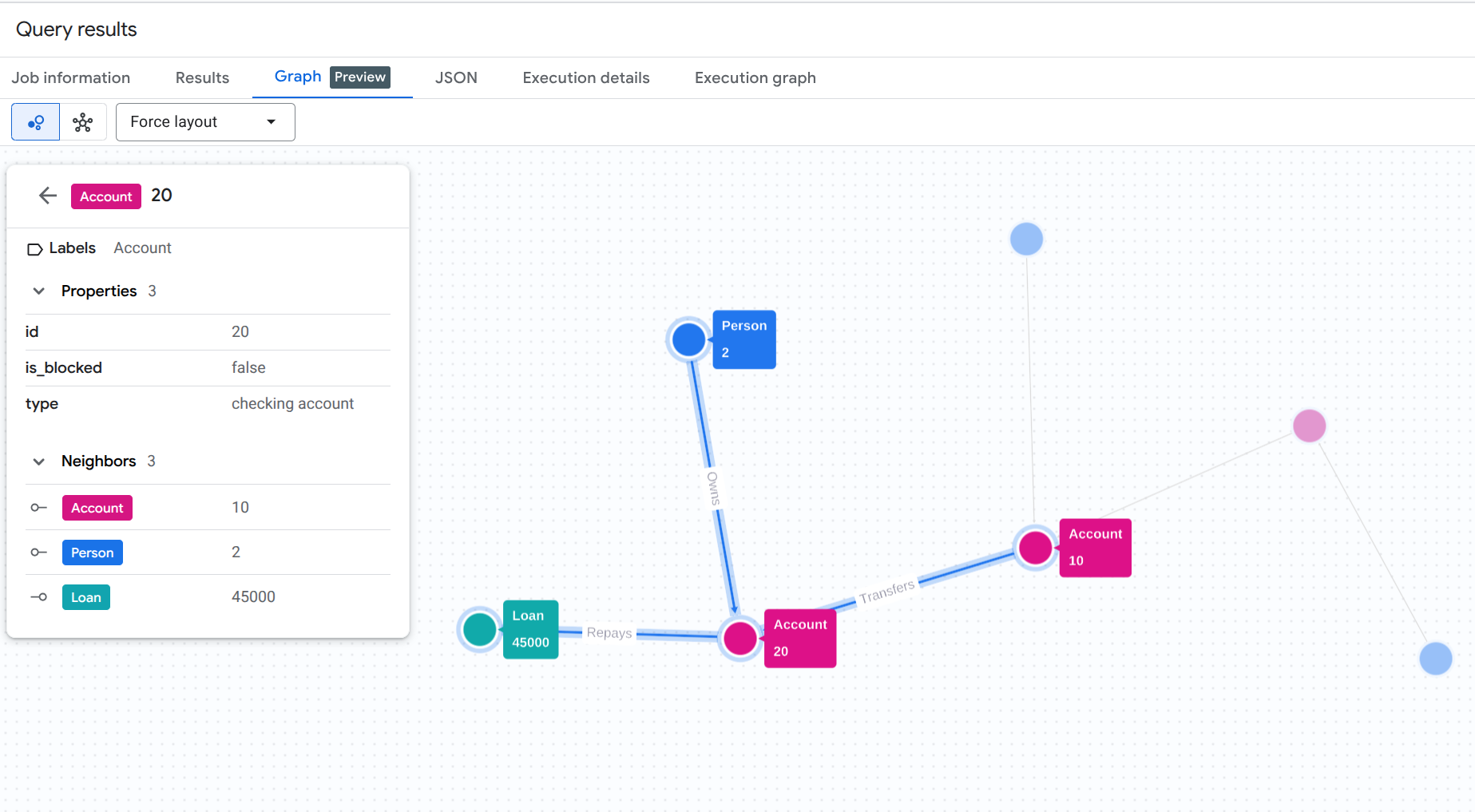
Per comprendere visivamente la traccia di riciclaggio di denaro che abbiamo appena scoperto a livello di programmazione, puoi eseguire una query di visualizzazione del grafico nella console BigQuery Studio.
Esegui questa query in BigQuery Studio. (Assicurati di attivare la funzionalità di visualizzazione del grafico o fai clic sulla scheda Grafico, se disponibile).
GRAPH `fingraph_rag.FinGraph`
 MATCH
   (p_shell:Person)-[o1:Owns]->(acc_shell:Account)-[t1:Transfers]->(acc_fraud:Account)-[t2:Transfers]->(acc_target:Account)-[r:Repays]->(l:Loan),
   (p_fraud:Person)-[o2:Owns]->(acc_fraud),
   (p_target:Person)-[o3:Owns]->(acc_target)
 WHERE p_target.name = 'Menville' AND p_fraud.name = 'Jacoby' AND p_shell.name = 'Doe'
 RETURN TO_JSON([
  TO_JSON(p_shell), TO_JSON(o1), TO_JSON(acc_shell),
  TO_JSON(t1), TO_JSON(acc_fraud), TO_JSON(p_fraud), TO_JSON(o2),
  TO_JSON(t2), TO_JSON(acc_target), TO_JSON(p_target), TO_JSON(o3),
  TO_JSON(r), TO_JSON(l)
]) AS result;
Questa query GQL traccia l'intero percorso dal proprietario della società fittizia sospetta (Doe) all'intermediario (Jacoby) fino al target finale (Menville) e al rimborso del prestito.
Dovresti visualizzare un risultato di visualizzazione del grafico simile a questo:
11. Esegui la pulizia
Per evitare addebiti continui al tuo account Google Cloud, elimina le risorse create durante questo codelab.
Elimina il set di dati BigQuery e la connessione alle risorse Cloud:
# Delete the BigQuery dataset
bq rm -r -f $PROJECT_ID:fingraph_rag

# Delete the BigQuery Cloud Resource Connection
bq rm --connection --location=us vertex_ai_conn
Verifica che le risorse siano state eliminate:
bq ls --project_id $PROJECT_ID
bq ls --connection --location=us
12. Complimenti
Complimenti! Hai creato un'applicazione RAG e ne hai analizzato il comportamento. Hai mostrato come utilizzare le funzionalità native di Graph e Vector Search di BigQuery per eseguire GraphRAG, rilevando un sistema di riciclaggio di denaro senza ETL.
Cosa hai imparato
- Come creare un grafico delle proprietà in BigQuery sopra le tabelle standard
- Come generare e archiviare vector embedding utilizzando BigQuery ML
- Come combinare le traversie del grafico BigQuery e la ricerca vettoriale in un retriever LangChain
- In che modo i LLM possono sintetizzare audit log semantici con topologia a grafo per ridurre i falsi positivi
Passaggi successivi
- Esplora la panoramica dei grafici delle proprietà di BigQuery
- Prova altri pattern di Graph Query Language (GQL) di BigQuery.