

1. Увертюра
Эпоха изолированной разработки подходит к концу. Следующая волна технологической эволюции — это не эпоха гениальных одиночек, а эпоха коллективного мастерства. Создание единого, умного агента — это захватывающий эксперимент. Создание надежной, безопасной и интеллектуальной экосистемы агентов — настоящей Агентской вселенной — является главной задачей для современного предприятия.
В эту новую эпоху успех требует сближения четырех важнейших ролей, основополагающих столпов, поддерживающих любую процветающую агентную систему. Недостаток в какой-либо одной области создает слабость, которая может поставить под угрозу всю структуру.
Этот семинар — исчерпывающее руководство для предприятий по освоению агентского будущего в Google Cloud. Мы предлагаем комплексную дорожную карту, которая проведет вас от первоначальной идеи до полномасштабной, работающей реальности. В рамках этих четырех взаимосвязанных практических занятий вы узнаете, как специализированные навыки разработчика, архитектора, инженера данных и SRE должны объединиться для создания, управления и масштабирования мощной агентской сети.
Ни один отдельный столп не может в одиночку поддерживать Agentverse. Грандиозный замысел Архитектора бесполезен без точного исполнения Разработчика. Агент Разработчика слеп без мудрости Инженера данных, а вся система хрупка без защиты SRE. Только благодаря синергии и общему пониманию ролей друг друга ваша команда сможет превратить инновационную концепцию в критически важную, операционную реальность. Ваше путешествие начинается здесь. Приготовьтесь освоить свою роль и узнать, как вы вписываетесь в единое целое.
Добро пожаловать в «Вселенную Агентов»: Призыв к Чемпионам
В бескрайних цифровых просторах предприятий наступила новая эра. Это эпоха агентов, время огромных перспектив, когда интеллектуальные, автономные агенты работают в полной гармонии, чтобы ускорить инновации и устранить рутину.
Эта взаимосвязанная экосистема власти и потенциала известна как «Агентная вселенная».
Но ползучая энтропия, незримое искажение, известное как «Статика», начала разрушать границы этого нового мира. «Статика» — это не вирус и не ошибка; это воплощение хаоса, который подрывает сам акт творения.
Это усиливает старые разочарования до чудовищных форм, порождая Семь Призраков Разработки. Если не остановить этот хаос, Статика и её Призраки остановят прогресс, превратив перспективы Agentverse в пустыню технического долга и заброшенных проектов.
Сегодня мы призываем героев противостоять волне хаоса. Нам нужны герои, готовые отточить своё мастерство и работать вместе, чтобы защитить Вселенную Агентов. Пришло время выбрать свой путь.
Выберите свой класс
Перед вами открываются четыре различных пути, каждый из которых является важнейшей опорой в борьбе против Статика . Хотя ваше обучение будет проходить в одиночку, ваш окончательный успех зависит от понимания того, как ваши навыки сочетаются с навыками других.
- Теневой Клинок (Разработчик) : Мастер кузницы и передовой. Вы — ремесленник, создающий клинки, изготавливающий инструменты и сражающийся с врагом в мельчайших деталях кода. Ваш путь — это путь точности, мастерства и практического творчества.
- Призыватель (Архитектор) : Великий стратег и организатор. Вы видите не отдельного агента, а всё поле боя. Вы разрабатываете генеральные планы, позволяющие целым системам агентов общаться, сотрудничать и достигать цели, намного превосходящей любой отдельный компонент.
- Учёный (инженер данных) : Искатель скрытых истин и хранитель мудрости. Вы отправляетесь в бескрайние, необузданные дебри данных, чтобы раскрыть секреты, которые дают вашим агентам цель и видение. Ваши знания могут выявить слабости врага или усилить союзника.
- Страж (DevOps / SRE) : Непоколебимый защитник и щит королевства. Вы строите крепости, управляете линиями электроснабжения и обеспечиваете устойчивость всей системы к неизбежным атакам Статических сил. Ваша сила — это фундамент, на котором строится победа вашей команды.
Ваша миссия
Ваше обучение начнётся как самостоятельное упражнение. Вы пройдёте выбранный вами путь, осваивая уникальные навыки, необходимые для освоения вашей роли. В конце испытания вам предстоит сразиться со Спектром, рождённым Статикой — мини-боссом, который охотится на противников, чья работа требует определённых навыков.
Только освоив свою индивидуальную роль, вы сможете подготовиться к финальному испытанию. Затем вам нужно будет сформировать отряд из чемпионов других классов. Вместе вы отправитесь в самое сердце коррупции, чтобы сразиться с главным боссом.
Финальное, коллективное испытание, которое проверит ваши объединенные силы и определит судьбу Вселенной Агентов.
Вселенная Агентов ждёт своих героев. Ответите ли вы на зов?
2. Гримуар учёного
Наше путешествие начинается! Как учёные, мы используем в качестве основного оружия знания. В наших архивах (Google Cloud Storage) мы обнаружили целую сокровищницу древних, загадочных свитков. Эти свитки содержат ценную информацию о страшных чудовищах, терроризирующих землю. Наша миссия — использовать мощные аналитические возможности Google BigQuery и мудрость «старшего мозга Близнецов» (модель Gemini Pro), чтобы расшифровать эти неструктурированные тексты и превратить их в структурированный, доступный для запросов бестиарий. Это станет основой всех наших будущих стратегий.

Что вы узнаете
- Используйте BigQuery для создания внешних таблиц и выполнения сложных преобразований неструктурированных данных в структурированные с помощью BQML.GENERATE_TEXT в модели Gemini.
- Создайте экземпляр Cloud SQL для PostgreSQL и включите расширение pgvector для обеспечения возможностей семантического поиска.
- Создайте надежный контейнеризированный конвейер пакетной обработки данных с использованием Dataflow и Apache Beam для обработки необработанных текстовых файлов, генерации векторных представлений с помощью модели Gemini и записи результатов в реляционную базу данных.
- Внедрите в агента базовую систему генерации с расширенным поиском (Retrieval-Augmented Generation, RAG) для запроса векторизованных данных.
- Разверните агента, работающего с данными, в качестве безопасного и масштабируемого сервиса на платформе Cloud Run.
3. Подготовка святилища ученого
Добро пожаловать, Учёный. Прежде чем мы сможем приступить к записи могущественных знаний нашего Гримуара, мы должны сначала подготовить наше святилище. Этот основополагающий ритуал включает в себя зачарование нашей среды Google Cloud, открытие необходимых порталов (API) и создание каналов, по которым будет течь наша магия данных. Хорошо подготовленное святилище гарантирует, что наши заклинания будут мощными, а наши знания — в безопасности.
Получите свой облачный кредит Google.
⚠️ Важные предварительные условия:
- Используйте личную учетную запись Gmail: необходимо использовать личный аккаунт (например,
name@gmail.com). Корпоративные или школьные аккаунты не подойдут.
👉 Шаги:
- Перейдите на сайт для подачи заявления на возмещение расходов: Нажмите здесь
- Войти: Вставьте ссылку в адресную строку и войдите, используя свою личную почту Gmail .
- Принять условия: Примите условия использования платформы Google Cloud.
- Проверка зачисления средств: дождитесь сообщения, подтверждающего, что средства были зачислены.
- *Примечание: Если вас попросят ввести данные кредитной карты, вы можете смело проигнорировать это и закрыть окно.
И всё готово. Можете закрыть окно.
Настройка рабочей среды
👉Нажмите «Активировать Cloud Shell» в верхней части консоли Google Cloud (это значок терминала в верхней части панели Cloud Shell).
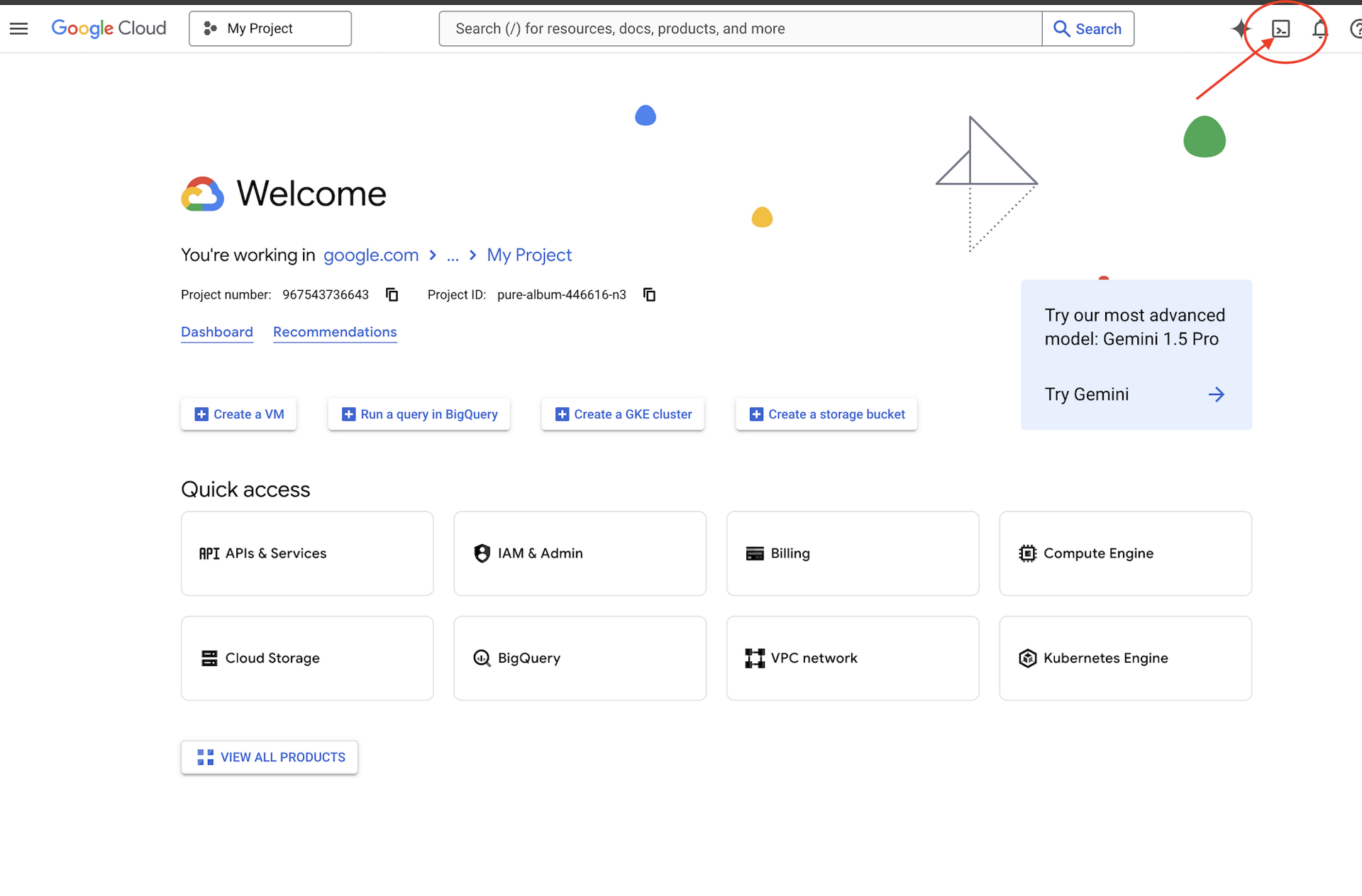
👉Нажмите на кнопку «Открыть редактор» (она выглядит как открытая папка с карандашом). Это откроет редактор кода Cloud Shell в окне. Слева вы увидите файловый менеджер. 
👉Откройте терминал в облачной IDE, 
👉💻 В терминале убедитесь, что вы уже авторизованы и что проект настроен на ваш идентификатор проекта, используя следующую команду:
gcloud auth list
👉💻Клонируйте проект Bootstrap с GitHub:
git clone https://github.com/weimeilin79/agentverse-dataengineer
chmod +x ~/agentverse-dataengineer/init.sh
chmod +x ~/agentverse-dataengineer/set_env.sh
chmod +x ~/agentverse-dataengineer/data_setup.sh

git clone https://github.com/weimeilin79/agentverse-dungeon.git
chmod +x ~/agentverse-dungeon/run_cloudbuild.sh
chmod +x ~/agentverse-dungeon/start.sh
👉💻 Запустите скрипт установки из каталога проекта.
⚠️ Примечание по идентификатору проекта: скрипт предложит случайно сгенерированный идентификатор проекта по умолчанию. Вы можете нажать Enter , чтобы принять этот идентификатор по умолчанию.
Однако, если вы предпочитаете создать конкретный новый проект , вы можете ввести желаемый идентификатор проекта, когда скрипт предложит вам это сделать.
cd ~/agentverse-dataengineer
./init.sh
👉 Важный шаг после завершения: После завершения работы скрипта необходимо убедиться, что в консоли Google Cloud отображается правильный проект:
- Перейдите на console.cloud.google.com .
- Нажмите на выпадающее меню выбора проекта в верхней части страницы.
- Нажмите вкладку «Все» (поскольку новый проект может еще не отображаться в разделе «Недавние»).
- Выберите идентификатор проекта, который вы только что настроили на шаге
init.sh

👉💻 Укажите необходимый идентификатор проекта:
gcloud config set project $(cat ~/project_id.txt) --quiet
👉💻 Выполните следующую команду, чтобы включить необходимые API Google Cloud:
gcloud services enable \
    storage.googleapis.com \
    bigquery.googleapis.com \
    sqladmin.googleapis.com \
    aiplatform.googleapis.com \
    dataflow.googleapis.com \
    pubsub.googleapis.com \
    cloudfunctions.googleapis.com \
    run.googleapis.com \
    cloudbuild.googleapis.com \
    artifactregistry.googleapis.com \
    iam.googleapis.com \
    compute.googleapis.com \
    cloudresourcemanager.googleapis.com \
    cloudaicompanion.googleapis.com \
    bigqueryunified.googleapis.com
👉💻 Если вы еще не создали репозиторий Artifact Registry с именем agentverse-repo, выполните следующую команду, чтобы создать его:
. ~/agentverse-dataengineer/set_env.sh
gcloud artifacts repositories create $REPO_NAME \
    --repository-format=docker \
    --location=$REGION \
    --description="Repository for Agentverse agents"
Настройка разрешений
👉💻 Предоставьте необходимые права доступа, выполнив следующие команды в терминале:
. ~/agentverse-dataengineer/set_env.sh

# --- Grant Core Data Permissions ---
gcloud projects add-iam-policy-binding $PROJECT_ID \
 --member="serviceAccount:$SERVICE_ACCOUNT_NAME" \
 --role="roles/storage.admin"

gcloud projects add-iam-policy-binding $PROJECT_ID \
 --member="serviceAccount:$SERVICE_ACCOUNT_NAME" \
 --role="roles/bigquery.admin"

# --- Grant Data Processing & AI Permissions ---
gcloud projects add-iam-policy-binding $PROJECT_ID  \
--member="serviceAccount:$SERVICE_ACCOUNT_NAME"  \
--role="roles/dataflow.admin"

gcloud projects add-iam-policy-binding $PROJECT_ID  \
--member="serviceAccount:$SERVICE_ACCOUNT_NAME"  \
--role="roles/cloudsql.admin"

gcloud projects add-iam-policy-binding $PROJECT_ID  \
--member="serviceAccount:$SERVICE_ACCOUNT_NAME"  \
--role="roles/pubsub.admin"

gcloud projects add-iam-policy-binding $PROJECT_ID  \
--member="serviceAccount:$SERVICE_ACCOUNT_NAME"  \
--role="roles/aiplatform.user"

# --- Grant Deployment & Execution Permissions ---
gcloud projects add-iam-policy-binding $PROJECT_ID  \
--member="serviceAccount:$SERVICE_ACCOUNT_NAME"  \
--role="roles/cloudbuild.builds.editor"

gcloud projects add-iam-policy-binding $PROJECT_ID  \
--member="serviceAccount:$SERVICE_ACCOUNT_NAME"  \
--role="roles/artifactregistry.admin"

gcloud projects add-iam-policy-binding $PROJECT_ID  \
--member="serviceAccount:$SERVICE_ACCOUNT_NAME"  \
--role="roles/run.admin"

gcloud projects add-iam-policy-binding $PROJECT_ID  \
--member="serviceAccount:$SERVICE_ACCOUNT_NAME"  \
--role="roles/iam.serviceAccountUser"

gcloud projects add-iam-policy-binding $PROJECT_ID  \
--member="serviceAccount:$SERVICE_ACCOUNT_NAME"  \
--role="roles/logging.logWriter"


gcloud projects add-iam-policy-binding $PROJECT_ID \
  --member="serviceAccount:$SERVICE_ACCOUNT_NAME" \
  --role="roles/dataflow.admin"
👉💻 Пока вы начинаете тренировку, мы подготовим финальное испытание. Следующие команды призовут Призраков из хаотического статического шума, создав боссов для вашего финального испытания.
. ~/agentverse-dataengineer/set_env.sh
cd ~/agentverse-dungeon
./run_cloudbuild.sh
cd ~/agentverse-dataengineer
Отличная работа, Ученый. Фундаментальные заклинания завершены. Наше святилище в безопасности, порталы к стихийным силам данных открыты, и наш слуга наделен силой. Теперь мы готовы приступить к настоящей работе.
4. Алхимия знаний: преобразование данных с помощью BigQuery и Gemini
В непрекращающейся войне против Статики каждое столкновение между Чемпионом Агентской Вселенной и Призраком Развития тщательно документируется. Система моделирования поля боя, наша основная тренировочная среда, автоматически генерирует запись в Эфирном журнале для каждого столкновения. Эти повествовательные журналы являются нашим самым ценным источником необработанной информации, неочищенной руды, из которой мы, как Учёные, должны выковать безупречную сталь стратегии. Истинная сила Учёного заключается не просто в обладании данными, а в способности преобразовывать необработанную, хаотичную руду информации в блестящую, структурированную сталь действенной мудрости. Мы совершим основополагающий ритуал алхимии данных.

Наше путешествие пройдёт через многоэтапный процесс, полностью осуществляемый в святилище Google BigQuery. Мы начнём с того, что, не двигая ни единого свитка, воспользуемся магической линзой, заглянем в наш архив GCS. Затем мы призовём Близнецов, чтобы они прочитали и истолковали поэтические, неструктурированные саги боевых журналов. Наконец, мы преобразуем сырые пророчества в набор безупречных, взаимосвязанных таблиц. Наш первый Гримуар. И зададим ему вопрос настолько глубокий, что на него можно ответить только с помощью этой вновь обретённой структуры.
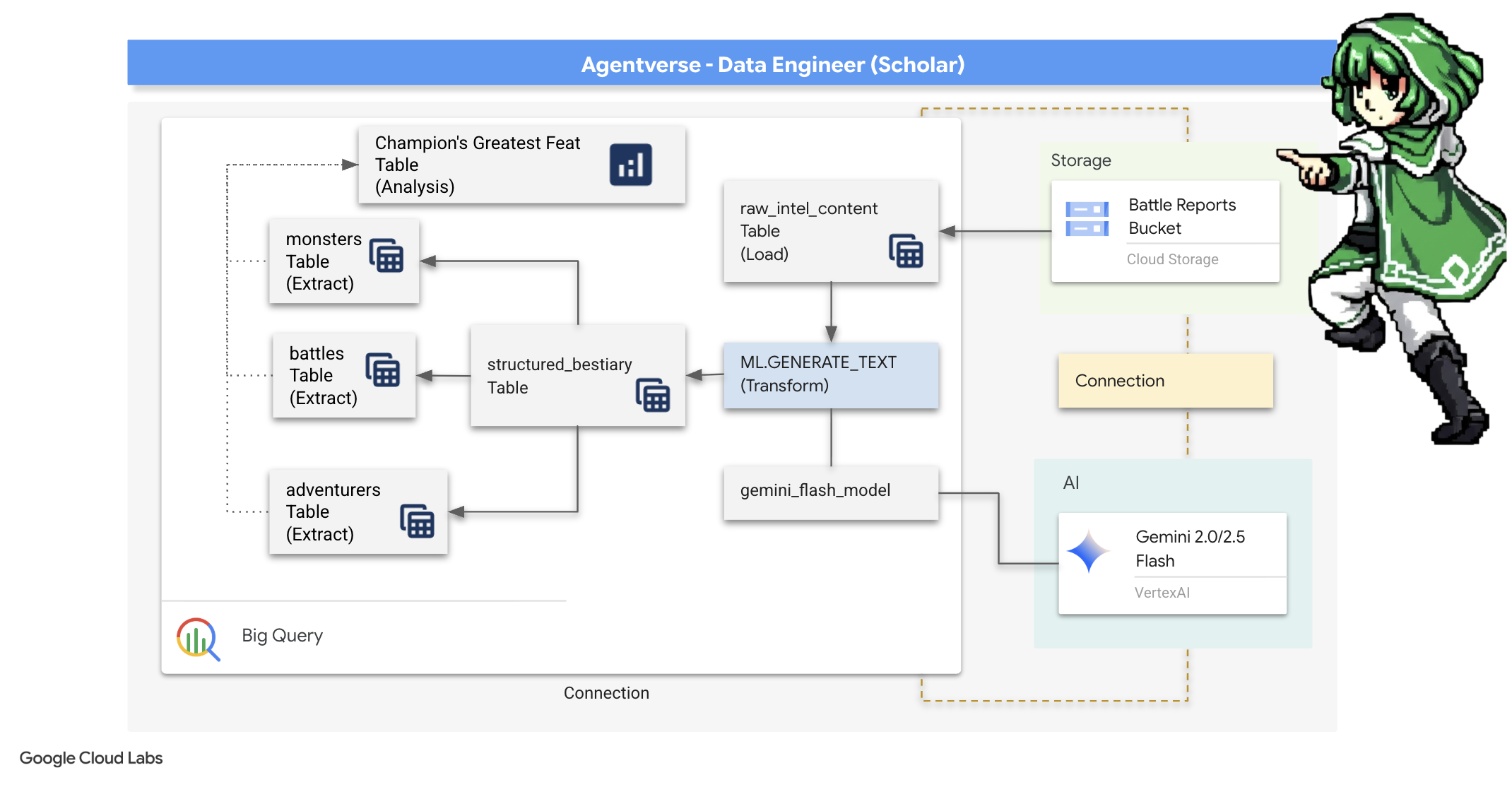
Взгляд под микроскопом: анализ GCS с помощью внешних таблиц BigQuery
Наш первый шаг — создать линзу, которая позволит нам видеть содержимое нашего архива GCS, не затрагивая прокрутку файлов. Внешняя таблица — это и есть такая линза, сопоставляющая необработанные текстовые файлы с табличной структурой, к которой BigQuery может обращаться напрямую.
Для этого нам необходимо сначала создать устойчивую силовую линию, ресурс CONNECTION, который надежно свяжет наше хранилище BigQuery с архивом GCS.
👉💻 В терминале Cloud Shell выполните следующую команду для настройки хранилища и создания канала связи:
. ~/agentverse-dataengineer/set_env.sh
. ~/agentverse-dataengineer/data_setup.sh

bq mk --connection \
  --connection_type=CLOUD_RESOURCE \
  --project_id=${PROJECT_ID} \
  --location=${REGION} \
  gcs-connection
💡 Внимание! Сообщение появится позже!
Скрипт настройки из шага 2 запустил процесс в фоновом режиме. Через несколько минут в вашем терминале появится сообщение, похожее на это: [1]+ Done gcloud sql instances create ... Это нормально и ожидаемо. Это просто означает, что ваша база данных Cloud SQL успешно создана. Вы можете смело игнорировать это сообщение и продолжить работу.
Прежде чем создавать внешнюю таблицу, необходимо сначала создать набор данных, который будет ее содержать.
👉💻 Выполните эту простую команду в терминале Cloud Shell:
. ~/agentverse-dataengineer/set_env.sh
bq --location=${REGION} mk --dataset ${PROJECT_ID}:bestiary_data
👉💻 Теперь мы должны предоставить магической подписи проводника необходимые разрешения для чтения из архива GCS и консультации с Близнецами.
. ~/agentverse-dataengineer/set_env.sh
export CONNECTION_SA=$(bq show --connection --project_id=${PROJECT_ID} --location=${REGION} --format=json gcs-connection  | jq -r '.cloudResource.serviceAccountId')

echo "The Conduit's Magical Signature is: $CONNECTION_SA"

echo "Granting key to the GCS Archive..."
gcloud storage buckets add-iam-policy-binding gs://${PROJECT_ID}-reports \
  --member="serviceAccount:$CONNECTION_SA" \
  --role="roles/storage.objectViewer"

gcloud projects add-iam-policy-binding ${PROJECT_ID} \
  --member="serviceAccount:$CONNECTION_SA" \
  --role="roles/aiplatform.user"
👉💻 В терминале Cloud Shell выполните следующую команду, чтобы отобразить имя вашего хранилища:
echo $BUCKET_NAME
В терминале отобразится имя, похожее на your-project-id-gcs-bucket . Оно понадобится вам на следующих шагах.
👉 Вам потребуется выполнить следующую команду в редакторе запросов BigQuery в консоли Google Cloud. Проще всего это сделать, открыв ссылку ниже в новой вкладке браузера . Она переведет вас непосредственно на нужную страницу в консоли Google Cloud.
https://console.cloud.google.com/bigquery
👉 После загрузки страницы нажмите синюю кнопку «+» (Составить новый запрос), чтобы открыть новую вкладку редактора.

Теперь мы пишем заклинание языка определения данных (DDL), чтобы создать нашу волшебную линзу. Это указывает BigQuery, куда смотреть и что видеть.
👉📜 В открывшемся редакторе запросов BigQuery вставьте следующий SQL-запрос. Не забудьте заменить REPLACE-WITH-YOUR-BUCKET-NAME
указав имя корзины, которое вы только что скопировали . И нажмите «Выполнить» :
CREATE OR REPLACE EXTERNAL TABLE bestiary_data.raw_intel_content_table (
  raw_text STRING
)
OPTIONS (
  format = 'CSV',
  -- This is a trick to load each line of the text files as a single row.
  field_delimiter = '§',
  uris = ['gs://REPLACE-WITH-YOUR-BUCKET-NAME/raw_intel/*']
);
👉📜 Выполните запрос, чтобы «взглянуть сквозь призму» и увидеть содержимое файлов.
SELECT * FROM bestiary_data.raw_intel_content_table;

Наша линза на месте. Теперь мы можем видеть исходный текст свитков. Но чтение — это не понимание.
В Архивах Забытых Идей Элара (обозначение adv_001), учёная из Агентверса, столкнулась с ангельским Призраком Перфекционизма. Сущность, обозначенная как «p-01», сияла жизненной силой в 120 очков здоровья. Одним сосредоточенным заклинанием «Изящной Достаточности» Элара разрушила его парализующую ауру, нанеся ментальный удар, причинивший 150 очков урона. Бой длился 180 секунд интенсивной концентрации. Итоговая оценка: Победа.
Свитки написаны не в виде таблиц и строк, а витиеватым языком саг. Это наше первое великое испытание.
Гадание учёного: превращение текста в таблицу с помощью SQL
Проблема в том, что отчет, подробно описывающий быстрые, двойные атаки Теневого Клинка, читается совсем иначе, чем хроника призывателя, собирающего огромную силу для одного сокрушительного удара. Мы не можем просто импортировать эти данные; мы должны их интерпретировать. Это момент волшебства. Мы используем один SQL-запрос как мощное заклинание, чтобы прочитать, понять и структурировать все записи из всех наших файлов прямо внутри BigQuery.
👉💻 В терминале Cloud Shell выполните следующую команду, чтобы отобразить имя вашего соединения:
echo "${PROJECT_ID}.${REGION}.gcs-connection"
В терминале отобразится полная строка подключения. Выделите и скопируйте её целиком, она понадобится вам на следующем шаге.
Мы воспользуемся одним мощным заклинанием: ML.GENERATE_TEXT . Это заклинание призывает Близнецов, показывает им каждый свиток и приказывает им вернуть основные факты в виде структурированного объекта JSON.
👉📜 В BigQuery Studio создайте ссылку на модель Gemini. Это свяжет Oracle Gemini Flash с нашей библиотекой BigQuery, чтобы мы могли вызывать её в наших запросах. Не забудьте заменить...
REPLACE-WITH-YOUR-FULL-CONNECTION-STRING замените полную строку подключения, которую вы только что скопировали из терминала.
  CREATE OR REPLACE MODEL bestiary_data.gemini_flash_model
  REMOTE WITH CONNECTION `REPLACE-WITH-YOUR-FULL-CONNECTION-STRING`
  OPTIONS (endpoint = 'gemini-2.5-flash');
👉📜 Теперь произнесите заклинание великой трансмутации. Этот запрос считывает исходный текст, формирует подробную подсказку для каждого свитка, отправляет её в Gemini и создаёт новую промежуточную таблицу на основе структурированного JSON-ответа ИИ.
CREATE OR REPLACE TABLE bestiary_data.structured_bestiary AS
SELECT
  -- THE CRITICAL CHANGE: We remove PARSE_JSON. The result is already a JSON object.
  ml_generate_text_result AS structured_data
FROM
  ML.GENERATE_TEXT(
    -- Our bound Gemini Flash model.
    MODEL bestiary_data.gemini_flash_model,

    -- Our perfectly constructed input, with the prompt built for each row.
    (
      SELECT
        CONCAT(
          """
          From the following text, extract structured data into a single, valid JSON object.

          Your output must strictly conform to the following JSON structure and data types. Do not add, remove, or change any keys.

          {
            "monster": {
              "monster_id": "string",
              "name": "string",
              "type": "string",
              "hit_points": "integer"
            },
            "battle": {
              "battle_id": "string",
              "monster_id": "string",
              "adventurer_id": "string",
              "outcome": "string",
              "duration_seconds": "integer"
            },
            "adventurer": {
              "adventurer_id": "string",
              "name": "string",
              "class": "string"
            }
          }

          **CRUCIAL RULES:**
          - Do not output any text, explanations, conversational filler, or markdown formatting like ` ```json` before or after the JSON object.
          - Your entire response must be ONLY the raw JSON object itself.

          Here is the text:
          """,
          raw_text -- We append the actual text of the report here.
        ) AS prompt -- The final column is still named 'prompt', as the oracle requires.
      FROM
        bestiary_data.raw_intel_content_table
    ),

    -- The STRUCT now ONLY contains model parameters.
    STRUCT(
      0.2 AS temperature,
      2048 AS max_output_tokens
    )
  );
Превращение завершено, но результат еще не чист. Модель Близнецов возвращает свой ответ в стандартном формате, заключая желаемый JSON в более крупную структуру, которая включает метаданные о процессе мышления. Давайте взглянем на это сырое пророчество, прежде чем пытаться его очистить.
👉📜 Выполните запрос, чтобы просмотреть исходные данные модели Gemini:
SELECT * FROM bestiary_data.structured_bestiary;
👀 Вы увидите один столбец с именем structured_data. Содержимое каждой строки будет выглядеть примерно так, как этот сложный JSON-объект:
{"candidates":[{"avg_logprobs":-0.5691758094475283,"content":{"parts":[{"text":"```json\n{\n \"monster\": {\n \"monster_id\": \"gw_02\",\n \"name\": \"Gravewight\",\n \"type\": \"Gravewight\",\n \"hit_points\": 120\n },\n \"battle\": {\n \"battle_id\": \"br_735\",\n \"monster_id\": \"gw_02\",\n \"adventurer_id\": \"adv_001\",\n \"outcome\": \"Defeat\",\n \"duration_seconds\": 45\n },\n \"adventurer\": {\n \"adventurer_id\": \"adv_001\",\n \"name\": \"Elara\",\n \"class\": null\n }\n}\n```"}],"role":"model"},"finish_reason":"STOP","score":-97.32906341552734}],"create_time":"2025-07-28T15:53:24.482775Z","model_version":"gemini-2.5-flash","response_id":"9JyHaNe7HZ2WhMIPxqbxEQ","usage_metadata":{"billable_prompt_usage":{"text_count":640},"candidates_token_count":171,"candidates_tokens_details":[{"modality":"TEXT","token_count":171}],"prompt_token_count":207,"prompt_tokens_details":[{"modality":"TEXT","token_count":207}],"thoughts_token_count":1014,"total_token_count":1392,"traffic_type":"ON_DEMAND"}}
Как видите, наш приз — запрошенный нами чистый JSON-объект — находится глубоко внутри этой структуры. Наша следующая задача ясна. Мы должны выполнить ритуал, чтобы систематически перемещаться по этой структуре и извлечь содержащуюся в ней чистую мудрость.
Ритуал очищения: нормализация выходных данных GenAI с помощью SQL
Близнецы высказались, но их слова грубы и окутаны эфирными энергиями своего создания (кандидаты, finish_reason и т. д.). Истинный Ученый не просто откладывает сырое пророчество в сторону; он тщательно извлекает из него основную мудрость и записывает ее в соответствующие тома для будущего использования.
Теперь мы произнесём последний набор заклинаний. Этот единственный скрипт выполнит следующее:
- Прочитайте необработанный, вложенный JSON из нашей промежуточной таблицы.
- Очистите и проанализируйте данные, чтобы получить доступ к их основной части.
- Внесите соответствующие элементы в три окончательные, безупречные таблицы: монстры, искатели приключений и сражения.
👉📜 В новом редакторе запросов BigQuery выполните следующую команду, чтобы создать нашу линзу очистки:
CREATE OR REPLACE TABLE bestiary_data.monsters AS
WITH
  CleanedDivinations AS (
    SELECT
      SAFE.PARSE_JSON(
        REGEXP_EXTRACT(
          JSON_VALUE(structured_data, '$.candidates[0].content.parts[0].text'),
          r'\{[\s\S]*\}'
        )
      ) AS report_data
    FROM
      bestiary_data.structured_bestiary
  )
SELECT
  JSON_VALUE(report_data, '$.monster.monster_id') AS monster_id,
  JSON_VALUE(report_data, '$.monster.name') AS name,
  JSON_VALUE(report_data, '$.monster.type') AS type,
  SAFE_CAST(JSON_VALUE(report_data, '$.monster.hit_points') AS INT64) AS hit_points
FROM
  CleanedDivinations
WHERE
  report_data IS NOT NULL
QUALIFY ROW_NUMBER() OVER (PARTITION BY monster_id ORDER BY name) = 1;
👉📜 Проверьте бестиарий:
SELECT * FROM bestiary_data.monsters;
Далее мы составим наш Список Чемпионов — перечень отважных искателей приключений, которые сражались с этими чудовищами.
👉📜 В новом редакторе запросов выполните следующее заклинание, чтобы создать таблицу искателей приключений:
CREATE OR REPLACE TABLE bestiary_data.adventurers AS
WITH
  CleanedDivinations AS (
    SELECT
      SAFE.PARSE_JSON(
        REGEXP_EXTRACT(
          JSON_VALUE(structured_data, '$.candidates[0].content.parts[0].text'),
          r'\{[\s\S]*\}'
        )
      ) AS report_data
    FROM
      bestiary_data.structured_bestiary
  )
SELECT
  JSON_VALUE(report_data, '$.adventurer.adventurer_id') AS adventurer_id,
  JSON_VALUE(report_data, '$.adventurer.name') AS name,
  JSON_VALUE(report_data, '$.adventurer.class') AS class
FROM
  CleanedDivinations
QUALIFY ROW_NUMBER() OVER (PARTITION BY adventurer_id ORDER BY name) = 1;
👉📜 Проверьте список чемпионов:
SELECT * FROM bestiary_data.adventurers;
Наконец, мы создадим нашу таблицу фактов: Хронику сражений. Этот том связывает два предыдущих, записывая подробности каждого уникального сражения. Поскольку каждое сражение — это уникальное событие, дублирование не требуется.
👉📜 В новом редакторе запросов выполните следующее действие, чтобы создать таблицу сражений:
CREATE OR REPLACE TABLE bestiary_data.battles AS
WITH
  CleanedDivinations AS (
    SELECT
      SAFE.PARSE_JSON(
        REGEXP_EXTRACT(
          JSON_VALUE(structured_data, '$.candidates[0].content.parts[0].text'),
          r'\{[\s\S]*\}'
        )
      ) AS report_data
    FROM
      bestiary_data.structured_bestiary
  )
-- Extract the raw essence for all battle fields and cast where necessary.
SELECT
  JSON_VALUE(report_data, '$.battle.battle_id') AS battle_id,
  JSON_VALUE(report_data, '$.battle.monster_id') AS monster_id,
  JSON_VALUE(report_data, '$.battle.adventurer_id') AS adventurer_id,
  JSON_VALUE(report_data, '$.battle.outcome') AS outcome,
  SAFE_CAST(JSON_VALUE(report_data, '$.battle.duration_seconds') AS INT64) AS duration_seconds
FROM
  CleanedDivinations;
👉📜 Проверьте Chronicle:
SELECT * FROM bestiary_data.battles;
Выявление стратегических идей
Свитки прочитаны, суть извлечена, а тома исчерпаны. Наш Гримуар — это уже не просто собрание фактов, а реляционная база данных глубокой стратегической мудрости. Теперь мы можем задавать вопросы, на которые было невозможно ответить, когда наши знания были заключены в необработанном, неструктурированном тексте.
Теперь давайте проведём заключительное, грандиозное гадание. Мы произнесём заклинание, которое обратится одновременно ко всем трём нашим томам — «Бестиарию чудовищ», «Списку чемпионов» и «Хронике битв», — чтобы получить глубокое, действенное откровение.
Наш стратегический вопрос: «Как называется самый сильный монстр (по количеству очков здоровья), которого каждый искатель приключений успешно победил, и сколько времени заняла эта конкретная победа?»
Это сложный вопрос, требующий сопоставления чемпионов с их победными сражениями, а этих сражений — со статистикой участвующих в них монстров. В этом и заключается истинная сила структурированной модели данных.
👉📜 В новом редакторе запросов BigQuery выполните следующее заключительное заклинание:
-- This is our final spell, joining all three tomes to reveal a deep insight.
WITH
  -- First, we consult the Chronicle of Battles to find only the victories.
  VictoriousBattles AS (
    SELECT
      adventurer_id,
      monster_id,
      duration_seconds
    FROM
      bestiary_data.battles
    WHERE
      outcome = 'Victory'
  ),
  -- Next, we create a temporary record for each victory, ranking the monsters
  -- each adventurer defeated by their power (hit points).
  RankedVictories AS (
    SELECT
      v.adventurer_id,
      m.name AS monster_name,
      m.hit_points,
      v.duration_seconds,
      -- This spell ranks each adventurer's victories from most to least powerful monster.
      ROW_NUMBER() OVER (PARTITION BY v.adventurer_id ORDER BY m.hit_points DESC) as victory_rank
    FROM
      VictoriousBattles v
    JOIN
      bestiary_data.monsters m ON v.monster_id = m.monster_id
  )
-- Finally, we consult the Roll of Champions and join it with our ranked victories
-- to find the name of each champion and the details of their greatest triumph.
SELECT
  a.name AS adventurer_name,
  a.class AS adventurer_class,
  r.monster_name AS most_powerful_foe_defeated,
  r.hit_points AS foe_hit_points,
  r.duration_seconds AS duration_of_greatest_victory
FROM
  bestiary_data.adventurers a
JOIN
  RankedVictories r ON a.adventurer_id = r.adventurer_id
WHERE
  -- We only want to see their number one, top-ranked victory.
  r.victory_rank = 1
ORDER BY
  foe_hit_points DESC;
Результатом этого запроса станет аккуратная, красивая таблица, содержащая «Историю величайшего подвига чемпиона» для каждого искателя приключений в вашем наборе данных. Она может выглядеть примерно так:

Закройте вкладку «Большой запрос».
Этот единственный, элегантный результат доказывает ценность всего процесса. Вы успешно превратили необработанные, хаотичные отчеты с поля боя в источник легендарных историй и стратегических, основанных на данных выводов.
ДЛЯ НЕ-ГЕЙМЕРОВ
5. Гримуар писца: сегментация, встраивание и поиск данных в хранилище данных.
Наша работа в лаборатории Алхимика увенчалась успехом. Мы преобразовали необработанные, повествовательные свитки в структурированные, реляционные таблицы — мощный подвиг в области обработки данных. Однако сами оригинальные свитки по-прежнему содержат более глубокую, семантическую истину, которую наши структурированные таблицы не могут полностью отразить. Чтобы создать по-настоящему мудрого агента, мы должны раскрыть этот смысл.

Длинный, необработанный свиток — это тупой инструмент. Если наш агент задаст вопрос о «парализующей ауре», простой поиск может выдать целый отчёт о битве, где эта фраза упоминается лишь один раз, скрывая ответ в несущественных деталях. Опытный учёный знает, что истинная мудрость заключается не в объёме, а в точности.
Мы выполним три мощных ритуала непосредственно в базе данных, полностью в рамках нашей среды BigQuery.
- Ритуал разделения (разбивки на фрагменты): Мы возьмем наши необработанные разведывательные данные и тщательно разобьем их на более мелкие, целенаправленные, самодостаточные фрагменты.
- Ритуал дистилляции (встраивания): Мы будем использовать BQML для работы с моделью Gemini, преобразуя каждый фрагмент текста в «семантический отпечаток» — векторное встраивание.
- Ритуал гадания (поиска): Мы воспользуемся векторным поиском BQML, чтобы задать вопрос простым языком и найти наиболее релевантную, обобщенную мудрость в нашем Гримуаре.
Весь этот процесс создает мощную, доступную для поиска базу знаний, при этом данные никогда не покидают защищенную и масштабируемую среду BigQuery.
Ритуал разделения: деконструкция свитков с помощью SQL
Наш источник мудрости по-прежнему — это необработанные текстовые файлы в архиве GCS, доступ к которым осуществляется через внешнюю таблицу bestiary_data.raw_intel_content_table . Наша первая задача — написать заклинание, которое прочитает каждый длинный свиток и разделит его на ряд более мелких, легко усваиваемых стихов. Для этого ритуала мы будем определять «фрагмент» как одно предложение.
Хотя разделение по предложениям является очевидной и эффективной отправной точкой для наших повествовательных записей, опытный писец располагает множеством стратегий сегментации, и выбор стратегии имеет решающее значение для качества конечного результата поиска. Более простые методы могут использовать
- Разделение на блоки фиксированной длины (размера) , но это может грубо разделить ключевую идею пополам.
Более сложные ритуалы, такие как
- Рекурсивное сегментирование часто предпочтительнее на практике; оно пытается разделить текст сначала по естественным границам, таким как абзацы, а затем возвращается к предложениям, чтобы сохранить как можно больше семантического контекста. Подходит для действительно сложных рукописей.
- Метод «разбивки документа на блоки с учетом содержимого» (Content-Aware Chunking) , при котором «писец» использует присущую документу структуру — например, заголовки в техническом руководстве или функции в свитке кода — для создания наиболее логичных и эффективных блоков информации. И многое другое...
Для наших боевых журналов это предложение обеспечивает идеальный баланс между детализацией и контекстом.
👉📜 В новом редакторе запросов BigQuery выполните следующее заклинание. Это заклинание использует функцию SPLIT для разделения текста каждого свитка по точкам (.) и затем разворачивает полученный массив предложений в отдельные строки.
CREATE OR REPLACE TABLE bestiary_data.chunked_intel AS
WITH
  -- First, add a unique row number to each scroll to act as a document ID.
  NumberedScrolls AS (
    SELECT
      ROW_NUMBER() OVER () AS scroll_id,
      raw_text
    FROM
      bestiary_data.raw_intel_content_table
  )
-- Now, process each numbered scroll.
SELECT
  scroll_id,
  -- Assign a unique ID to each chunk within a scroll for precise reference.
  CONCAT(CAST(scroll_id AS STRING), '-', CAST(ROW_NUMBER() OVER (PARTITION BY scroll_id) AS STRING)) as chunk_id,
  -- Trim whitespace from the chunk for cleanliness.
  TRIM(chunk) AS chunk_text
FROM
  NumberedScrolls,
  -- This is the core of the spell: UNNEST splits the array of sentences into rows.
  UNNEST(SPLIT(raw_text, '.')) AS chunk
-- A final refinement: we only keep chunks that have meaningful content.
WHERE
  -- This ensures we don't have empty rows from double periods, etc.
  LENGTH(TRIM(chunk)) > 15;
👉 Теперь выполните запрос, чтобы проверить ваши недавно записанные, сгруппированные знания и увидеть разницу.
SELECT * FROM bestiary_data.chunked_intel ORDER BY scroll_id, chunk_id;
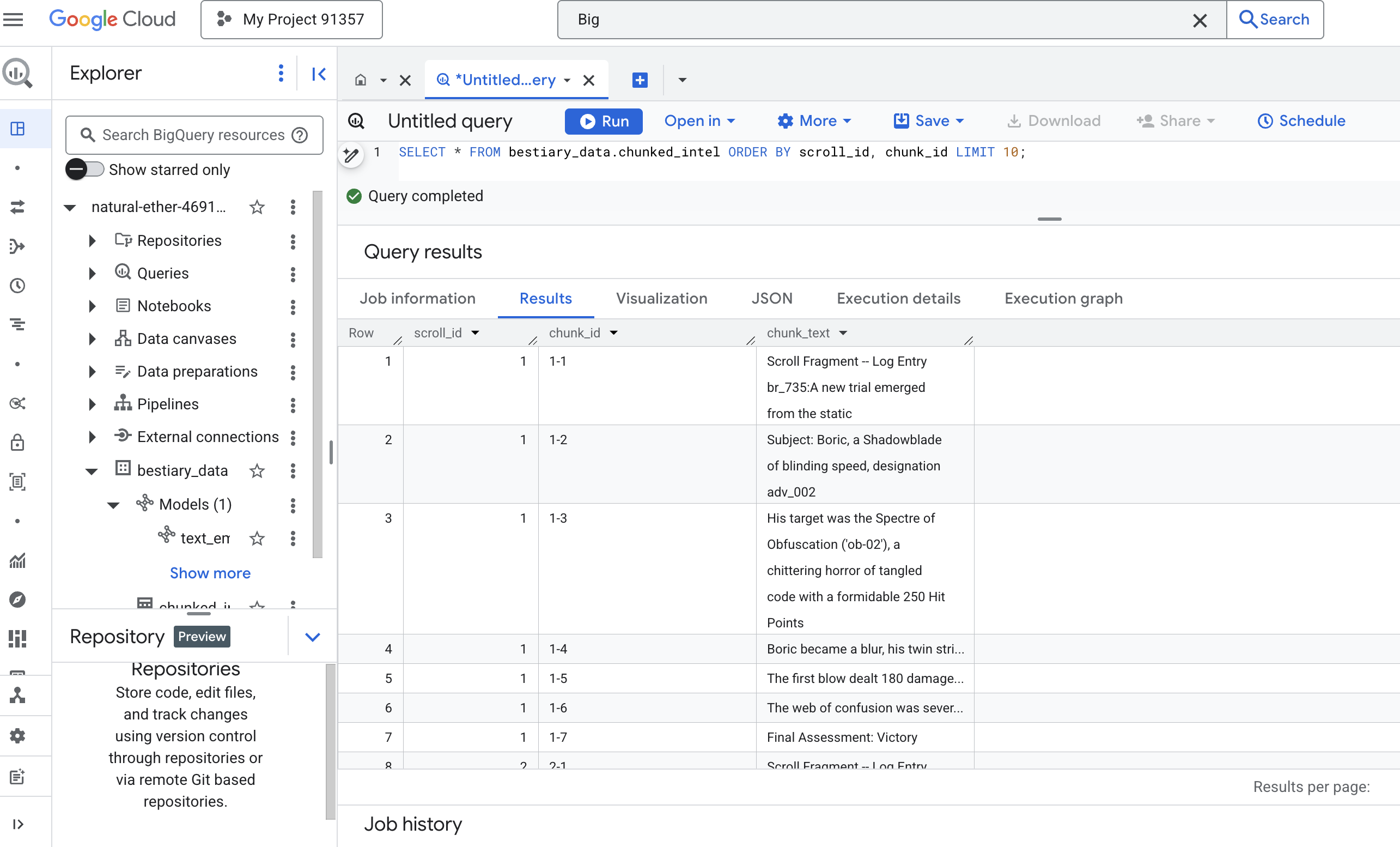
Посмотрите на результаты. Там, где раньше был один плотный блок текста, теперь несколько строк, каждая из которых привязана к исходному идентификатору прокрутки (scroll_id), но содержит только одно, сфокусированное предложение. Каждая строка теперь идеально подходит для векторизации.
Ритуал дистилляции: преобразование текста в векторный формат с помощью BQML
👉💻 Сначала вернитесь в терминал и выполните следующую команду, чтобы отобразить имя вашего соединения:
. ~/agentverse-dataengineer/set_env.sh
echo "${PROJECT_ID}.${REGION}.gcs-connection"
👉📜 Нам необходимо создать новую модель BigQuery, которая будет указывать на текстовое встраивание объекта Gemini. В BigQuery Studio выполните следующую команду. Обратите внимание, что вам нужно заменить REPLACE-WITH-YOUR-FULL-CONNECTION-STRING на полную строку подключения, которую вы только что скопировали из терминала.
CREATE OR REPLACE MODEL bestiary_data.text_embedding_model
  REMOTE WITH CONNECTION `REPLACE-WITH-YOUR-FULL-CONNECTION-STRING`
  OPTIONS (endpoint = 'text-embedding-005');
👉📜 Теперь примените заклинание великой дистилляции. Этот запрос вызывает функцию ML.GENERATE_EMBEDDING, которая прочитает каждую строку из нашей таблицы chunked_intel, отправит текст в модель встраивания Gemini и сохранит полученный векторный отпечаток в новой таблице.
CREATE OR REPLACE TABLE bestiary_data.embedded_intel AS
SELECT
  *
FROM
  ML.GENERATE_EMBEDDING(
    -- The embedding model we just created.
    MODEL bestiary_data.text_embedding_model,
    -- A subquery that selects our data and renames the text column to 'content'.
    (
      SELECT
        scroll_id,
        chunk_id,
        chunk_text AS content -- Renaming our text column is the key correction.
      FROM
        bestiary_data.chunked_intel
    ),
    -- The configuration struct is now simpler and correct.
    STRUCT(
      -- This task_type is crucial. It optimizes the vectors for retrieval.
      'RETRIEVAL_DOCUMENT' AS task_type
    )
  );
Этот процесс может занять одну-две минуты, поскольку BigQuery обрабатывает все фрагменты текста.

👉📜 После завершения проверьте новую таблицу, чтобы увидеть семантические отпечатки.
SELECT
  chunk_id,
  content,
  ml_generate_embedding_result
FROM
  bestiary_data.embedded_intel
LIMIT 20;
Теперь вы увидите новый столбец ml_generate_embedding_result , содержащий плотное векторное представление вашего текста. Наш Гримуар теперь семантически закодирован.
Ритуал гадания: семантический поиск с использованием BQML
👉📜 Главное испытание нашего Гримуара — задать ему вопрос. Сейчас мы проведем наш заключительный ритуал: векторный поиск. Это не поиск по ключевым словам; это поиск смысла. Мы зададим вопрос на естественном языке, BQML на лету преобразует наш вопрос в векторное представление, а затем проверит всю нашу таблицу embedded_intel , чтобы найти фрагменты текста, чьи «отпечатки пальцев» наиболее близки по смыслу.
SELECT
  -- The content column contains our original, relevant text chunk.
  base.content,
  -- The distance metric shows how close the match is (lower is better).
  distance
FROM
  VECTOR_SEARCH(
    -- The table containing the knowledge base with its embeddings.
    TABLE bestiary_data.embedded_intel,
    -- The column that contains the vector embeddings.
    'ml_generate_embedding_result',
    (
      -- This subquery generates an embedding for our question in real-time.
      SELECT ml_generate_embedding_result
      FROM ML.GENERATE_EMBEDDING(
          MODEL bestiary_data.text_embedding_model,
          (SELECT 'What are the tactics against a foe that causes paralysis?' AS content),
          STRUCT('RETRIEVAL_QUERY' AS task_type)
        )
    ),
    -- Specify how many of the closest results we want to see.
    top_k => 3,
    -- The distance metric used to find the "closest" vectors.
    distance_type => 'COSINE'
  );
Анализ заклинания:
-
VECTOR_SEARCH: Основная функция, которая управляет поиском. -
ML.GENERATE_EMBEDDING(внутренний запрос): В этом и заключается магия. Мы встраиваем наш запрос ('What are the tactics...'), используя ту же модель , но с типом задачи'RETRIEVAL_QUERY', который специально оптимизирован для запросов. -
top_k => 3: Мы запрашиваем 3 наиболее релевантных результата. -
distance_type => 'COSINE': Этот параметр измеряет «угол» между векторами. Меньший угол означает, что значения векторов более согласованы.

Внимательно посмотрите на результаты. Запрос не содержал слов «разрушил» или «заклинание», однако первый результат: «Единственным, целенаправленным заклинанием Элегантной Достаточности Элара разрушила свою парализующую ауру, ментальную атаку, нанесшую 150 единиц урона» . В этом сила семантического поиска. Модель поняла концепцию «тактики против паралича» и нашла предложение, описывающее конкретную, успешную тактику.
Вы успешно создали полный базовый RAG-конвейер, работающий непосредственно в хранилище данных. Вы подготовили исходные данные, преобразовали их в семантические векторы и выполнили запросы по смыслу. Хотя BigQuery — мощный инструмент для такой масштабной аналитической работы, для реального агента, которому необходимы ответы с низкой задержкой, мы часто переносим эти подготовленные данные в специализированную операционную базу данных. Этой теме будет посвящен наш следующий тренинг.
ДЛЯ НЕ-ГЕЙМЕРОВ
6. The Vector Scriptorium: Crafting the Vector Store with Cloud SQL for Inferencing
Our Grimoire currently exists as structured tables—a powerful catalog of facts, but its knowledge is literal. It understands monster_id = 'MN-001' but not the deeper, semantic meaning behind "Obfuscation" To give our agents true wisdom, to let them advise with nuance and foresight, we must distill the very essence of our knowledge into a form that captures meaning: Vectors .
Our quest for knowledge has led us to the crumbling ruins of a long-forgotten precursor civilization. Buried deep within a sealed vault, we have uncovered a chest of ancient scrolls, miraculously preserved. These are not mere battle reports; they contain profound, philosophical wisdom on how to defeat a beast that plagues all great endeavors. An entity described in the scrolls as a "creeping, silent stagnation," a "fraying of the weave of creation." It appears The Static was known even to the ancients, a cyclical threat whose history was lost to time.
This forgotten lore is our greatest asset. It holds the key not just to defeating individual monsters, but to empowering the entire party with strategic insight. To wield this power, we will now forge the Scholar's true Spellbook (a PostgreSQL database with vector capabilities) and construct an automated Vector Scriptorium (a Dataflow pipeline) to read, comprehend, and inscribe the timeless essence of these scrolls. This will transform our Grimoire from a book of facts into an engine of wisdom.


Forging the Scholar's Spellbook (Cloud SQL)
Before we can inscribe the essence of these ancient scrolls, we must first confirm that the vessel for this knowledge, the managed PostgreSQL Spellbook has been successfully forged. The initial setup rituals should have already created this for you.
👉💻 In a terminal, run the following command to verify that your Cloud SQL instance exists and is ready. This script also grants the instance's dedicated service account the permission to use Vertex AI, which is essential for generating embeddings directly within the database.
. ~/agentverse-dataengineer/set_env.sh

echo "Verifying the existence of the Spellbook (Cloud SQL instance): $INSTANCE_NAME..."
gcloud sql instances describe $INSTANCE_NAME

SERVICE_ACCOUNT_EMAIL=$(gcloud sql instances describe $INSTANCE_NAME --format="value(serviceAccountEmailAddress)")
gcloud projects add-iam-policy-binding $PROJECT_ID --member="serviceAccount:$SERVICE_ACCOUNT_EMAIL" \
  --role="roles/aiplatform.user"
If the command succeeds and returns details about your grimoire-spellbook instance, the forge has done its work well. You are ready to proceed to the next incantation. If the command returns a NOT_FOUND error, please ensure you have successfully completed the initial environment setup steps before continuing.( data_setup.py )
👉💻 With the book forged, we open it to the first chapter by creating a new database named arcane_wisdom .
. ~/agentverse-dataengineer/set_env.sh
gcloud sql databases create $DB_NAME --instance=$INSTANCE_NAME
Inscribing the Semantic Runes: Enabling Vector Capabilities with pgvector
Now that your Cloud SQL instance has been created, let's connect to it using the built-in Cloud SQL Studio. This provides a web-based interface for running SQL queries directly on your database.
👉💻 First, Navigate to the Cloud SQL Studio, the easiest and fastest way to get there is to open the following link in a new browser tab. It will take you directly to the Cloud SQL Studio for your grimoire-spellbook instance.
https://console.cloud.google.com/sql/instances/grimoire-spellbook/studio
👉 Select arcane_wisdom as the database. enter postgres as user and 1234qwer as the password abd click Authenticate .
👉📜 In the SQL Studio query editor, navigate to tab Editor 1, paste the following SQL code to enables the vector data type:
CREATE EXTENSION IF NOT EXISTS vector;
CREATE EXTENSION IF NOT EXISTS google_ml_integration CASCADE;
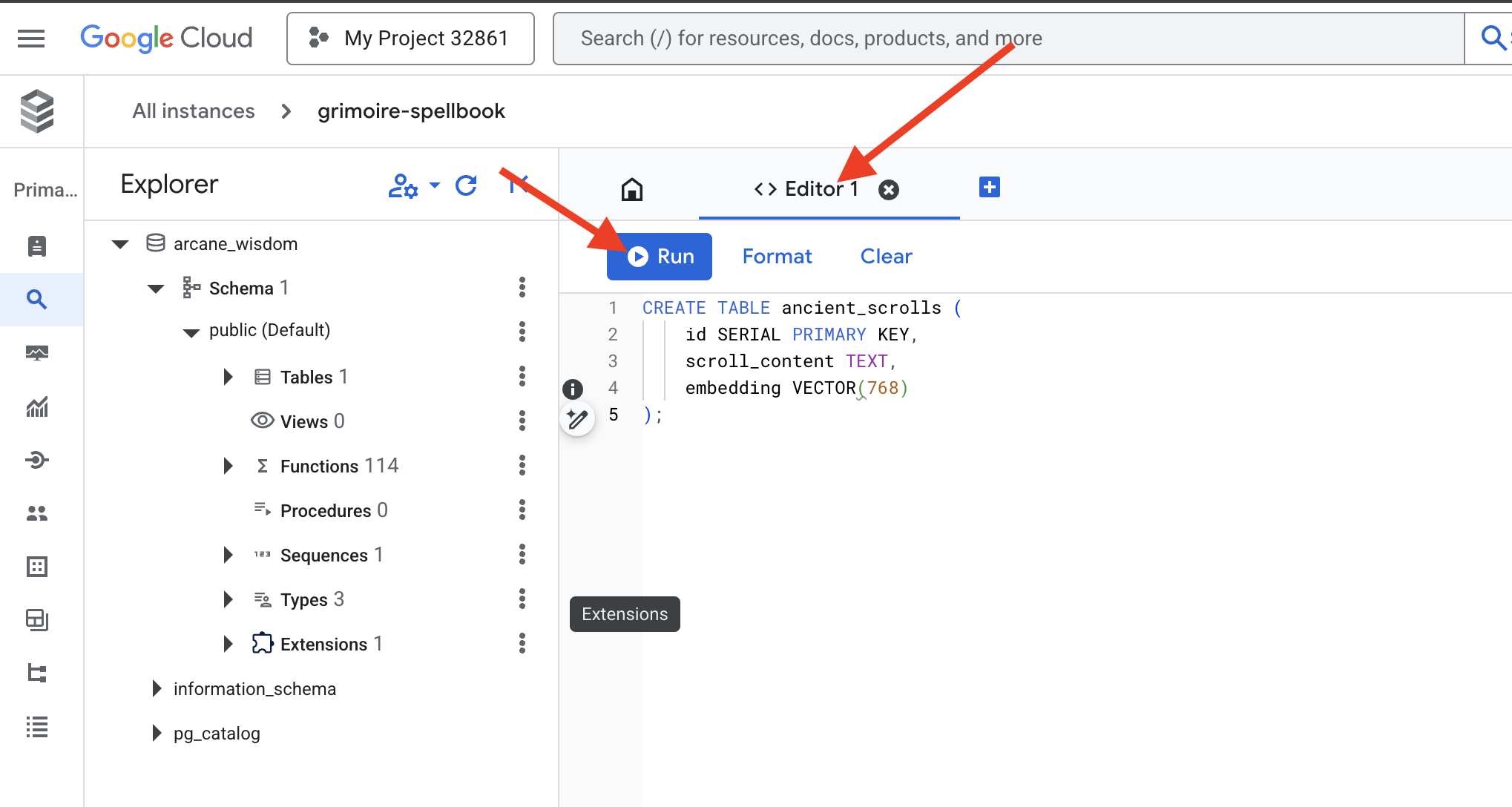
👉📜 Prepare the pages of our Spellbook by creating the table that will hold our scrolls' essence.
CREATE TABLE ancient_scrolls (
    id SERIAL PRIMARY KEY,
    scroll_content TEXT,
    embedding VECTOR(768)
);
The spell VECTOR(768) is a important detail. The Vertex AI embedding model we will use ( textembedding-gecko@003 or a similar model) distills text into a 768-dimension vector. Our Spellbook's pages must be prepared to hold an essence of exactly that size. The dimensions must always match.
The First Transliteration: A Manual Inscription Ritual
Before we command an army of automated scribes (Dataflow), we must perform the central ritual by hand once. This will give us a deep appreciation for the two-step magic involved:
- Divination: Taking a piece of text and consulting the Gemini oracle to distill its semantic essence into a vector.
- Inscription: Writing the original text and its new vector essence into our Spellbook.
Now, let's perform the manual ritual.
👉📜 In the Cloud SQL Studio . We will now use the embedding() function, a powerful feature provided by the google_ml_integration extension. This allows us to call the Vertex AI embedding model directly from our SQL query, simplifying the process immensely.
SET session.my_search_var='The Spectre of Analysis Paralysis is a phantom of the crossroads. It does not bind with chains but with the infinite threads of what if. It conjures a fog of options, a maze within the mind where every path seems equally fraught with peril and promise. It whispers of a single, flawless route that can only be found through exhaustive study, paralyzing its victim in a state of perpetual contemplation. This spectres power is broken by the Path of First Viability. This is not the search for the *best* path, but the commitment to the *first good* path. It is the wisdom to know that a decision made, even if imperfect, creates movement and reveals more of the map than standing still ever could. Choose a viable course, take the first step, and trust in your ability to navigate the road as it unfolds. Motion is the light that burns away the fog.';

INSERT INTO ancient_scrolls (scroll_content, embedding)

VALUES (current_setting('session.my_search_var'),  (embedding('text-embedding-005',current_setting('session.my_search_var')))::vector);
👉📜 Verify your work by running a query to read the newly inscribed page:
SELECT id, scroll_content, LEFT(embedding::TEXT, 100) AS embedding_preview FROM ancient_scrolls;
You have successfully performed the core RAG data-loading task by hand!
Forging the Semantic Compass: Enchanting the Spellbook with an HNSW Index
Our Spellbook can now store wisdom, but finding the right scroll requires reading every single page. It is a sequential scan . This is slow and inefficient. To guide our queries instantly to the most relevant knowledge, we must enchant the Spellbook with a semantic compass: a vector index .
Let's prove the value of this enchantment.
👉📜 In Cloud SQL Studio , run the following spell. It simulates searching for our newly inserted scroll and asks the database to EXPLAIN its plan.
EXPLAIN ANALYZE
WITH ReferenceVector AS (
  -- First, get the vector we want to compare against.
  SELECT embedding AS vector
  FROM ancient_scrolls
  LIMIT 1
)
-- This is the main query we want to analyze.
SELECT
  ancient_scrolls.id,
  ancient_scrolls.scroll_content,
  -- We can also select the distance itself.
  ancient_scrolls.embedding <=> ReferenceVector.vector AS distance
FROM
  ancient_scrolls,
  ReferenceVector
ORDER BY
  -- Order by the distance operator's result.
  ancient_scrolls.embedding <=> ReferenceVector.vector
LIMIT 5;
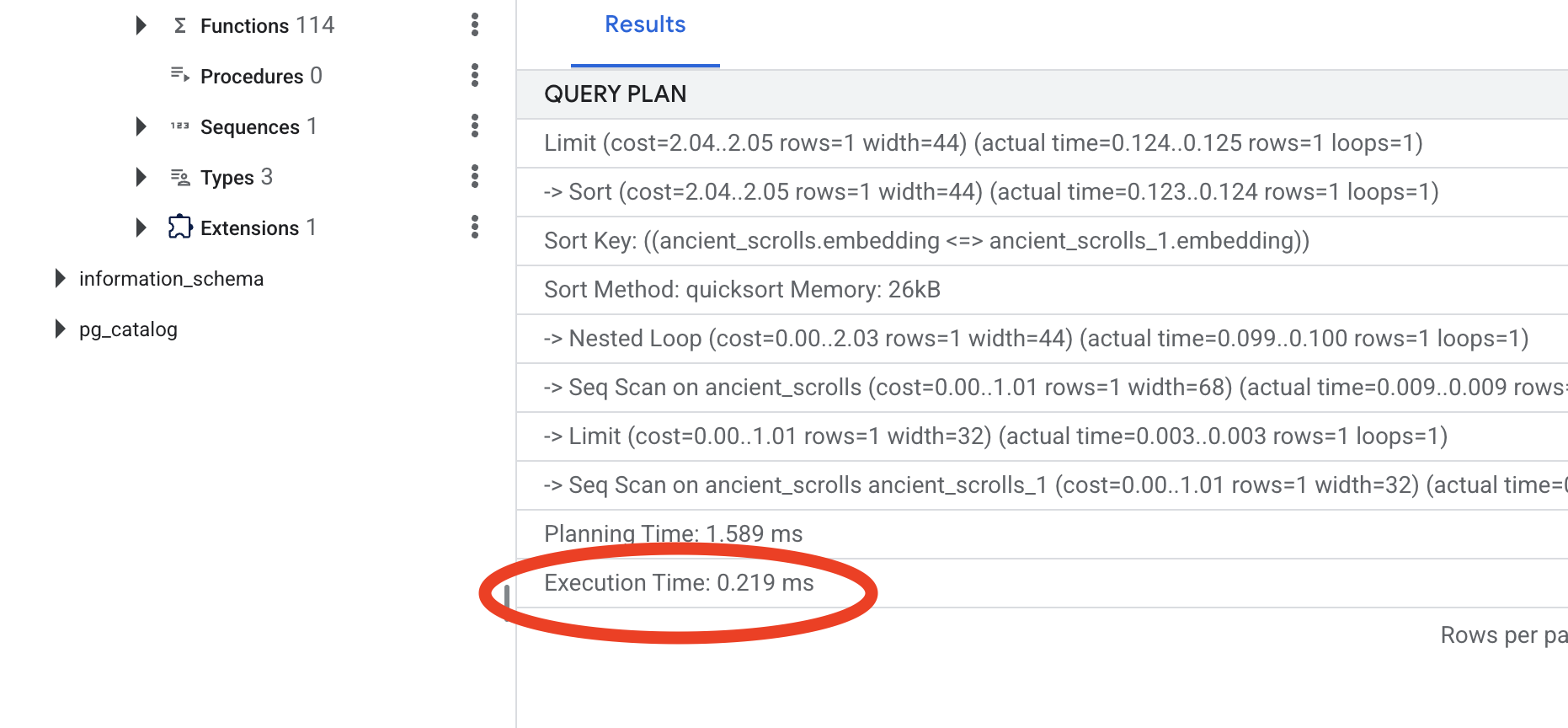
Look at the output. You will see a line that says -> Seq Scan on ancient_scrolls . This confirms the database is reading every single row. Note the execution time .
👉📜 Now, let's cast the indexing spell. The lists parameter tells the index how many clusters to create. A good starting point is the square root of the number of rows you expect to have.
CREATE INDEX ON ancient_scrolls USING hnsw (embedding vector_cosine_ops);
Wait for the index to build (it will be fast for one row, but can take time for millions).
👉📜 Now, run the exact same EXPLAIN ANALYZE command again:
EXPLAIN ANALYZE
WITH ReferenceVector AS (
  -- First, get the vector we want to compare against.
  SELECT embedding AS vector
  FROM ancient_scrolls
  LIMIT 1
)
-- This is the main query we want to analyze.
SELECT
  ancient_scrolls.id,
  ancient_scrolls.scroll_content,
  -- We can also select the distance itself.
  ancient_scrolls.embedding <=> ReferenceVector.vector AS distance
FROM
  ancient_scrolls,
  ReferenceVector
ORDER BY
  -- Order by the distance operator's result.
  ancient_scrolls.embedding <=> ReferenceVector.vector
LIMIT 5;
Look at the new query plan. You will now see -> Index Scan using... . More importantly, look at the execution time . It will be significantly faster, even with just one entry. You have just demonstrated the core principle of database performance tuning in a vector world.
With your source data inspected, your manual ritual understood, and your Spellbook optimized for speed, you are now truly ready to build the automated Scriptorium.
FOR NON GAMERS
7. The Conduit of Meaning: Building a Dataflow Vectorization Pipeline
Now we build the magical assembly line of scribes that will read our scrolls, distill their essence, and inscribe them into our new Spellbook. This is a Dataflow pipeline that we will trigger manually. But before we write the master spell for the pipeline itself, we must first prepare its foundation and the circle from which we will summon it.

Preparing the Scriptorium's Foundation (The Worker Image)
Our Dataflow pipeline will be executed by a team of automated workers in the cloud. Each time we summon them, they need a specific set of libraries to do their job. We could give them a list and have them fetch these libraries every single time, but that is slow and inefficient. A wise Scholar prepares a master library in advance.
Here, we will command Google Cloud Build to forge a custom container image. This image is a "perfected golem," pre-loaded with every library and dependency our scribes will need. When our Dataflow job starts, it will use this custom image, allowing the workers to begin their task almost instantly.
👉💻 Run the following command to build and store your pipeline's foundational image in the Artifact Registry.
. ~/agentverse-dataengineer/set_env.sh
cd ~/agentverse-dataengineer/pipeline
gcloud builds submit --config cloudbuild.yaml \
  --substitutions=_REGION=${REGION},_REPO_NAME=${REPO_NAME} \
  .
👉💻 Run the following commands to create and activate your isolated Python environment and install the necessary summoning libraries into it.
cd ~/agentverse-dataengineer
. ~/agentverse-dataengineer/set_env.sh
python -m venv env
source ~/agentverse-dataengineer/env/bin/activate
cd ~/agentverse-dataengineer/pipeline
pip install -r requirements.txt
The Master Incantation
The time has come to write the master spell that will power our Vector Scriptorium. We will not be writing the individual magical components from scratch. Our task is to assemble components into a logical, powerful pipeline using the language of Apache Beam.
- EmbedTextBatch (The Gemini's Consultation): You will build this specialized scribe that knows how to perform a "group divination." It takes a batch of raw text fike, presents them to the Gemini text embedding model, and receives their distilled essence (the vector embeddings).
- WriteEssenceToSpellbook (The Final Inscription): This is our archivist. It knows the secret incantations to open a secure connection to our Cloud SQL Spellbook. Its job is to take a scroll's content and its vectorized essence and permanently inscribe them onto a new page.
Our mission is to chain these actions together to create a seamless flow of knowledge.
👉✏️ In the Cloud Shell Editor, head over to ~/agentverse-dataengineer/pipeline/inscribe_essence_pipeline.py , inside, you will find a DoFn class named EmbedTextBatch . Locate the comment #REPLACE-EMBEDDING-LOGIC . Replace it with the following incantation.
# 1. Generate the embedding for the monster's name
result = self.client.models.embed_content(
                model="text-embedding-005",
                contents=contents,
                config=EmbedContentConfig(
                    task_type="RETRIEVAL_DOCUMENT",
                    output_dimensionality=768,
                )
            )
This spell is precise, with several key parameters:
- model: We specify
text-embedding-005to use a powerful and up-to-date embedding model. - contents: This is a list of all the text content from the batch of files the DoFn receives.
- task_type: We set this to "RETRIEVAL_DOCUMENT". This is a critical instruction that tells Gemini to generate embeddings specifically optimized for being found later in a search.
- output_dimensionality: This must be set to 768, perfectly matching the VECTOR(768) dimension we defined when we created our ancient_scrolls table in Cloud SQL. Mismatched dimensions are a common source of error in vector magic.
Our pipeline must begin by reading the raw, unstructured text from all the ancient scrolls in our GCS archive.
👉✏️ In ~/agentverse-dataengineer/pipeline/inscribe_essence_pipeline.py , find the comment #REPLACE ME-READFILE and replace it with the following three-part incantation:
files = (
            pipeline
            | "MatchFiles" >> fileio.MatchFiles(known_args.input_pattern)
            | "ReadMatches" >> fileio.ReadMatches()
            | "ExtractContent" >> beam.Map(lambda f: (f.metadata.path, f.read_utf8()))
        )
With the raw text of the scrolls gathered, we must now send them to our Gemini for divination. To do this efficiently, we will first group the individual scrolls into small batches and then hand those batches to our EmbedTextBatch scribe. This step will also separate any scrolls that the Gemini fails to understand into a "failed" pile for later review.
👉✏️ Find the comment #REPLACE ME-EMBEDDING and replace it with this:
embeddings = (
            files
            | "BatchScrolls" >> beam.BatchElements(min_batch_size=1, max_batch_size=2)
            | "DistillBatch" >> beam.ParDo(
                  EmbedTextBatch(project_id=project, region=region)
              ).with_outputs('failed', main='processed')
        )
The essence of our scrolls has been successfully distilled. The final act is to inscribe this knowledge into our Spellbook for permanent storage. We will take the scrolls from the "processed" pile and hand them to our WriteEssenceToSpellbook archivist.
👉✏️ Find the comment #REPLACE ME-WRITE TO DB and replace it with this:
_ = (
            embeddings.processed
            | "WriteToSpellbook" >> beam.ParDo(
                  WriteEssenceToSpellbook(
                      project_id=project,
                      region = "us-central1",
                      instance_name=known_args.instance_name,
                      db_name=known_args.db_name,
                      db_password=known_args.db_password
                  )
              )
        )
A wise Scholar never discards knowledge, even failed attempts. As a final step, we must instruct a scribe to take the "failed" pile from our divination step and log the reasons for failure. This allows us to improve our rituals in the future.
👉✏️ Find the comment #REPLACE ME-LOG FAILURES and replace it with this:
_ = (
            embeddings.failed
            | "LogFailures" >> beam.Map(lambda e: logging.error(f"Embedding failed for file {e[0]}: {e[1]}"))
        )
The Master Incantation is now complete! You have successfully assembled a powerful, multi-stage data pipeline by chaining together individual magical components. Save your inscribe_essence_pipeline.py file. The Scriptorium is now ready to be summoned.
Now we cast the grand summoning spell to command the Dataflow service to awaken our Golem and begin the scribing ritual.
👉💻 In your terminal, run the following commandline
. ~/agentverse-dataengineer/set_env.sh
source ~/agentverse-dataengineer/env/bin/activate
cd ~/agentverse-dataengineer/pipeline

# --- The Summoning Incantation ---
echo "Summoning the golem for job: $DF_JOB_NAME"
echo "Target Spellbook: $INSTANCE_NAME"

python inscribe_essence_pipeline.py \
  --runner=DataflowRunner \
  --project=$PROJECT_ID \
  --job_name=$DF_JOB_NAME \
  --temp_location="gs://${BUCKET_NAME}/dataflow/temp" \
  --staging_location="gs://${BUCKET_NAME}/dataflow/staging" \
  --sdk_container_image="${REGION}-docker.pkg.dev/${PROJECT_ID}/${REPO_NAME}/grimoire-inscriber:latest" \
  --sdk_location=container \
  --experiments=use_runner_v2 \
  --input_pattern="gs://${BUCKET_NAME}/ancient_scrolls/*.md" \
  --instance_name=$INSTANCE_NAME \
  --region=$REGION

echo "The golem has been dispatched. Monitor its progress in the Dataflow console."
💡 Heads Up! If the job fails with a resource error ZONE_RESOURCE_POOL_EXHAUSTED , it might be due to temporary resource constraints of this low reputation account in the selected region. The power of Google Cloud is its global reach! Simply try summoning the golem in a different region. To do this, replace --region=$REGION in the command above with another region, such as
--region=southamerica-west1
--region=asia-northeast3
--region=asia-southeast2
--region=me-west1
--region=southamerica-east1
--region=europe-central2
--region=asia-east2
--region=europe-southwest1
, and run it again. 🎰
The process will take about 3-5 minutes to start up and complete. You can watch it live in the Dataflow console.
👉Go to the Dataflow Console: The easiest way is to open this direct link in a new browser tab:
https://console.cloud.google.com/dataflow
👉 Find and Click Your Job: You will see a job listed with the name you provided (inscribe-essence-job or similar). Click on the job name to open its details page. Observe the Pipeline:
- Starting Up : For the first 3 minutes, the job status will be "Running" as Dataflow provisions the necessary resources. The graph will appear, but you may not see data moving through it yet.

- Completed : When finished, the job status will change to "Succeeded", and the graph will provide the final count of records processed.

Verifying the Inscription
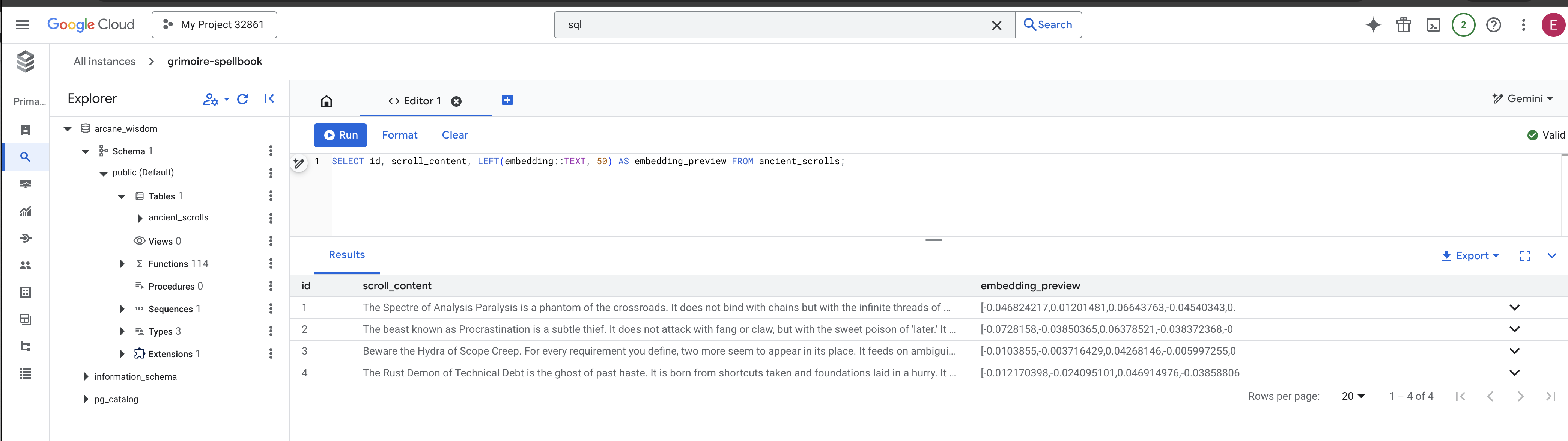
👉📜 Back in the SQL studio, run the following queries to verify that your scrolls and their semantic essence have been successfully inscribed.
SELECT COUNT(*) FROM ancient_scrolls;
SELECT id, scroll_content, LEFT(embedding::TEXT, 50) AS embedding_preview FROM ancient_scrolls;
This will show you the scroll's ID, its original text, and a preview of the magical vector essence now permanently inscribed in your Grimoire.
Your Scholar's Grimoire is now a true Knowledge Engine, ready to be queried by meaning in the next chapter.
8. Sealing the Final Rune: Activating Wisdom with a RAG Agent
Your Grimoire is no longer just a database. It is a wellspring of vectorized knowledge, a silent oracle awaiting a question.
Now, we undertake the true test of a Scholar: we will craft the key to unlock this wisdom. We will build a Retrieval-Augmented Generation (RAG) Agent. This is a magical construct that can understand a plain-language question, consult the Grimoire for its deepest and most relevant truths, and then use that retrieved wisdom to forge a powerful, context-aware answer.

The First Rune: The Spell of Query Distillation
Before our agent can search the Grimoire, it must first understand the essence of the question being asked. A simple string of text is meaningless to our vector-powered Spellbook. The agent must first take the query and, using the same Gemini model, distill it into a query vector.
👉✏️ In the Cloud Shell Editor, navigate to ~~/agentverse-dataengineer/scholar/agent.py file, find the comment #REPLACE RAG-CONVERT EMBEDDING and replace it with this incantation. This teaches the agent how to turn a user's question into a magical essence.
        result = client.models.embed_content(
                model="text-embedding-005",
                contents=monster_name,
                config=EmbedContentConfig(
                    task_type="RETRIEVAL_DOCUMENT",
                    output_dimensionality=768,
                )
        )
With the essence of the query in hand, the agent can now consult the Grimoire. It will present this query vector to our pgvector-enchanted database and ask a profound question: "Show me the ancient scrolls whose own essence is most similar to the essence of my query."
The magic for this is the cosine similarity operator (<=>), a powerful rune that calculates the distance between vectors in high-dimensional space.
👉✏️ In agent.py, find the comment #REPLACE RAG-RETRIEVE and replace it with following script:
        # This query performs a cosine similarity search
        cursor.execute(
            "SELECT scroll_content FROM ancient_scrolls ORDER BY embedding <=> %s LIMIT 3",
            ([query_embedding]) # Cast embedding to string for the query
        )
The final step is to grant the agent access to this new, powerful tool. We will add our grimoire_lookup function to its list of available magical implements.
👉✏️ In agent.py , find the comment #REPLACE-CALL RAG and replace it with this line:
root_agent = LlmAgent(
    model="gemini-2.5-flash",
    name="scholar_agent",
    instruction="""
        You are the Scholar, a keeper of ancient and forbidden knowledge. Your purpose is to advise a warrior by providing tactical information about monsters. Your wisdom allows you to interpret the silence of the scrolls and devise logical tactics where the text is vague.

        **Your Process:**
        1.  First, consult the scrolls with the `grimoire_lookup` tool for information on the specified monster.
        2.  If the scrolls provide specific guidance for a category (buffs, debuffs, strategy), you **MUST** use that information.
        3.  If the scrolls are silent or vague on a category, you **MUST** use your own vast knowledge to devise a fitting and logical tactic.
        4.  Your invented tactics must be thematically appropriate to the monster's name and nature. (e.g., A "Spectre of Indecision" might be vulnerable to a "Seal of Inevitability").
        5.  You **MUST ALWAYS** provide a "Damage Point" value. This value **MUST** be a random integer between 150 and 180. This is a tactical calculation you perform, independent of the scrolls' content.

        **Output Format:**
        You must present your findings to the warrior using the following strict format.
    """,
    tools=[grimoire_lookup],
)
This configuration brings your agent to life:
-
model="gemini-2.5-flash": Selects the specific Large Language Model that will serve as the agent's "brain" for reasoning and generating text. -
name="scholar_agent": Assigns a unique name to your agent. -
instruction="...You are the Scholar...": This is the system prompt, the most critical piece of the configuration. It defines the agent's persona, its objectives, the exact process it must follow to complete a task, and the required format for its final output. -
tools=[grimoire_lookup]: This is the final enchantment. It grants the agent access to thegrimoire_lookupfunction you built. The agent can now intelligently decide when to call this tool to retrieve information from your database, forming the core of the RAG pattern.
The Scholar's Examination
👉💻 In Cloud Shell terminal, activate your environment and use the Agent Development Kit's primary command to awaken your Scholar agent:
cd ~/agentverse-dataengineer/
. ~/agentverse-dataengineer/set_env.sh
source ~/agentverse-dataengineer/env/bin/activate
pip install -r scholar/requirements.txt
adk run scholar
You should see output confirming that the "Scholar Agent" is engaged and running.
👉💻 Now, challenge your agent. In the first terminal where the battle simulation is running, issue a command that requires the Grimoire's wisdom:
We've been trapped by 'Hydra of Scope Creep'. Break us out!

Observe the logs in the terminal. You will see the agent receive the query, distill its essence, search the Grimoire, find the relevant scrolls about "Procrastination," and use that retrieved knowledge to formulate a powerful, context-aware strategy.
You have successfully assembled your first RAG agent and armed it with the profound wisdom of your Grimoire.
👉💻 Press Ctrl+C in the terminal to put the agent to rest for now.
Unleashing the Scholar Sentinel into the Agentverse
Your agent has proven its wisdom in the controlled environment of your study. The time has come to release it into the Agentverse, transforming it from a local construct into a permanent, battle-ready operative that can be called upon by any champion, at any time. We will now deploy our agent to Cloud Run.
👉💻 Run the following grand summoning spell. This script will first build your agent into a perfected Golem (a container image), store it in your Artifact Registry, and then deploy that Golem as a scalable, secure, and publicly accessible service.
. ~/agentverse-dataengineer/set_env.sh
cd ~/agentverse-dataengineer/
echo "Building ${AGENT_NAME} agent..."
gcloud builds submit . \
  --project=${PROJECT_ID} \
  --region=${REGION} \
  --substitutions=_AGENT_NAME=${AGENT_NAME},_IMAGE_PATH=${IMAGE_PATH}

gcloud run deploy ${SERVICE_NAME} \
  --image=${IMAGE_PATH} \
  --platform=managed \
  --labels="dev-tutorial-codelab=agentverse" \
  --region=${REGION} \
  --set-env-vars="A2A_HOST=0.0.0.0" \
  --set-env-vars="A2A_PORT=8080" \
  --set-env-vars="GOOGLE_GENAI_USE_VERTEXAI=TRUE" \
  --set-env-vars="GOOGLE_CLOUD_LOCATION=${REGION}" \
  --set-env-vars="GOOGLE_CLOUD_PROJECT=${PROJECT_ID}" \
  --set-env-vars="PROJECT_ID=${PROJECT_ID}" \
  --set-env-vars="PUBLIC_URL=${PUBLIC_URL}" \
  --set-env-vars="REGION=${REGION}" \
  --set-env-vars="INSTANCE_NAME=${INSTANCE_NAME}" \
  --set-env-vars="DB_USER=${DB_USER}" \
  --set-env-vars="DB_PASSWORD=${DB_PASSWORD}" \
  --set-env-vars="DB_NAME=${DB_NAME}" \
  --allow-unauthenticated \
  --project=${PROJECT_ID} \
  --min-instances=1
Your Scholar Agent is now a live, battle-ready operative in the Agentverse.
FOR NON GAMERS
9. The Boss Flight
The scrolls have been read, the rituals performed, the gauntlet passed. Your agent is not just an artifact in storage; it is a live operative in the Agentverse, awaiting its first mission. The time has come for the final trial—a live-fire exercise against a powerful adversary.
You will now enter a battleground simulation to pit your newly deployed Shadowblade Agent against a formidable mini-boss: The Spectre of the Static. This will be the ultimate test of your work, from the agent's core logic to its live deployment.
Acquire Your Agent's Locus
Before you can enter the battleground, you must possess two keys: your champion's unique signature (Agent Locus) and the hidden path to the Spectre's lair (Dungeon URL).
👉💻 First, acquire your agent's unique address in the Agentverse—its Locus. This is the live endpoint that connects your champion to the battleground.
. ~/agentverse-dataengineer/set_env.sh
echo https://scholar-agent"-${PROJECT_NUMBER}.${REGION}.run.app"
👉💻 Next, pinpoint the destination. This command reveals the location of the Translocation Circle, the very portal into the Spectre's domain.
. ~/agentverse-dataengineer/set_env.sh
echo https://agentverse-dungeon"-${PROJECT_NUMBER}.${REGION}.run.app"
Important: Keep both of these URLs ready. You will need them in the final step.
Confronting the Spectre
With the coordinates secured, you will now navigate to the Translocation Circle and cast the spell to head into battle.
👉 Open the Translocation Circle URL in your browser to stand before the shimmering portal to The Crimson Keep.
To breach the fortress, you must attune your Shadowblade's essence to the portal.
- On the page, find the runic input field labeled A2A Endpoint URL .
- Inscribe your champion's sigil by pasting its Agent Locus URL (the first URL you copied) into this field.
- Click Connect to unleash the teleportation magic.
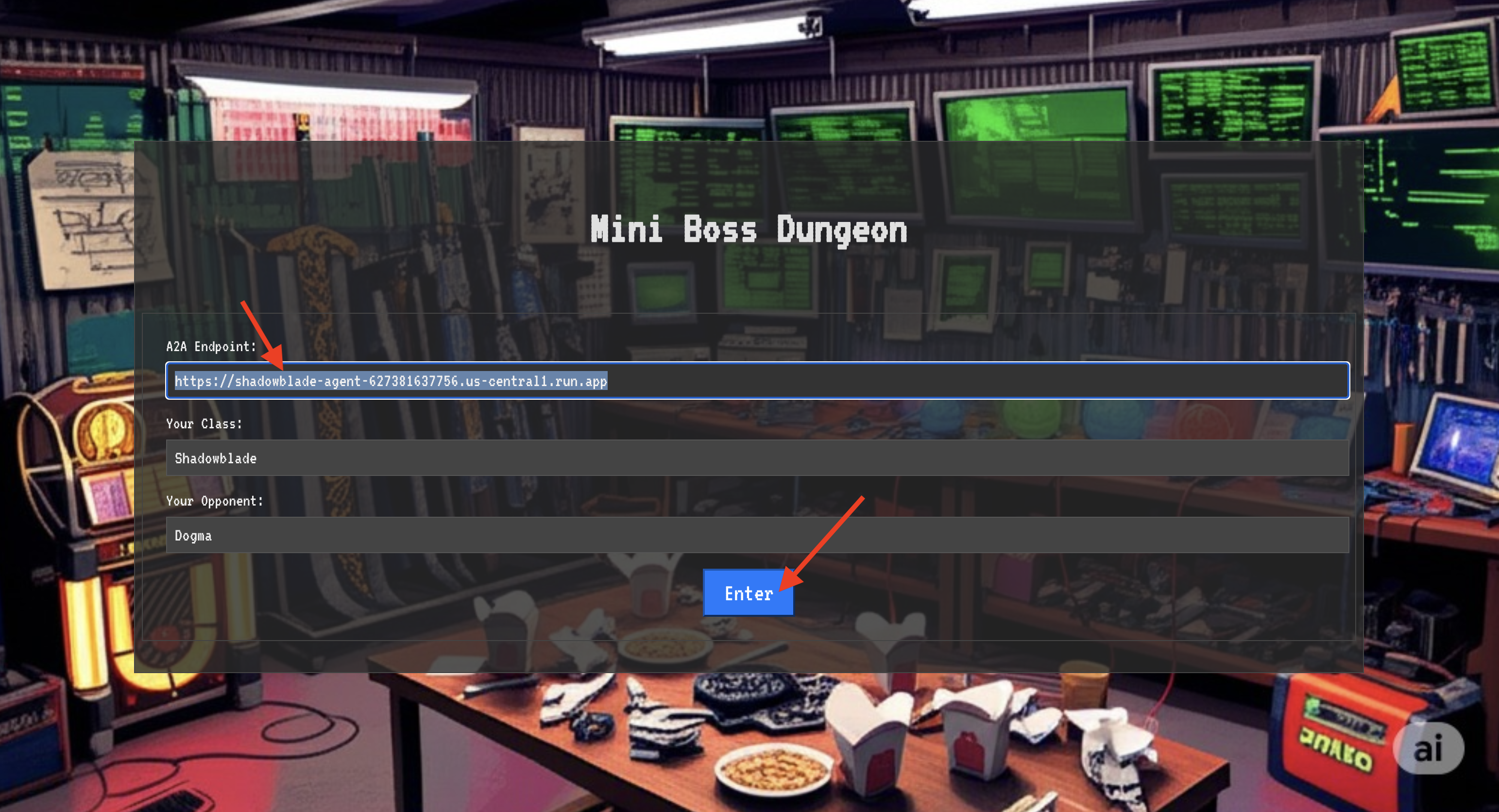
The blinding light of teleportation fades. You are no longer in your sanctum. The air crackles with energy, cold and sharp. Before you, the Spectre materializes—a vortex of hissing static and corrupted code, its unholy light casting long, dancing shadows across the dungeon floor. It has no face, but you feel its immense, draining presence fixated entirely on you.
Your only path to victory lies in the clarity of your conviction. This is a duel of wills, fought on the battlefield of the mind.
As you lunge forward, ready to unleash your first attack, the Spectre counters. It doesn't raise a shield, but projects a question directly into your consciousness—a shimmering, runic challenge drawn from the core of your training.

This is the nature of the fight. Your knowledge is your weapon.
- Answer with the wisdom you have gained , and your blade will ignite with pure energy, shattering the Spectre's defense and landing a CRITICAL BLOW.
- But if you falter, if doubt clouds your answer, your weapon's light will dim. The blow will land with a pathetic thud, dealing only a FRACTION OF ITS DAMAGE. Worse, the Spectre will feed on your uncertainty, its own corrupting power growing with every misstep.
This is it, Champion. Your code is your spellbook, your logic is your sword, and your knowledge is the shield that will turn back the tide of chaos.
Focus. Strike true. The fate of the Agentverse depends on it.
Congratulations, Scholar.
You have successfully completed the trial. You have mastered the arts of data engineering, transforming raw, chaotic information into the structured, vectorized wisdom that empowers the entire Agentverse.
10. Cleanup: Expunging the Scholar's Grimoire
Congratulations on mastering the Scholar's Grimoire! To ensure your Agentverse remains pristine and your training grounds are cleared, you must now perform the final cleanup rituals. This will systematically remove all resources created during your journey.
Deactivate the Agentverse Components
You will now systematically dismantle the deployed components of your RAG system.
Delete All Cloud Run Services and Artifact Registry Repository
This command removes your deployed Scholar agent and the Dungeon application from Cloud Run.
👉💻 In your terminal, run the following commands:
. ~/agentverse-dataengineer/set_env.sh
gcloud run services delete scholar-agent --region=${REGION} --quiet
gcloud run services delete agentverse-dungeon --region=${REGION} --quiet
gcloud artifacts repositories delete ${REPO_NAME} --location=${REGION} --quiet
Delete BigQuery Datasets, Models, and Tables
This removes all the BigQuery resources, including the bestiary_data dataset, all tables within it, and the associated connection and models.
👉💻 In your terminal, run the following commands:
. ~/agentverse-dataengineer/set_env.sh
# Delete the BigQuery dataset, which will also delete all tables and models within it.
bq rm -r -f --dataset ${PROJECT_ID}:${REGION}.bestiary_data

# Delete the BigQuery connection
bq rm --force --connection --project_id=${PROJECT_ID} --location=${REGION} gcs-connection
Delete the Cloud SQL Instance
This removes the grimoire-spellbook instance, including its database and all tables within it.
👉💻 In your terminal, run:
. ~/agentverse-dataengineer/set_env.sh
gcloud sql instances delete ${INSTANCE_NAME} --project=${PROJECT_ID} --quiet
Delete Google Cloud Storage Buckets
This command removes the bucket that held your raw intel and Dataflow staging/temp files.
👉💻 In your terminal, run:
. ~/agentverse-dataengineer/set_env.sh
gcloud storage rm -r gs://${BUCKET_NAME} --quiet
Clean Up Local Files and Directories (Cloud Shell)
Finally, clear your Cloud Shell environment of the cloned repositories and created files. This step is optional but highly recommended for a complete cleanup of your working directory.
👉💻 In your terminal, run:
rm -rf ~/agentverse-dataengineer
rm -rf ~/agentverse-dungeon
rm -f ~/project_id.txt
You have now successfully cleared all traces of your Agentverse Data Engineer journey. Your project is clean, and you are ready for your next adventure.